Instruments and indicators
30
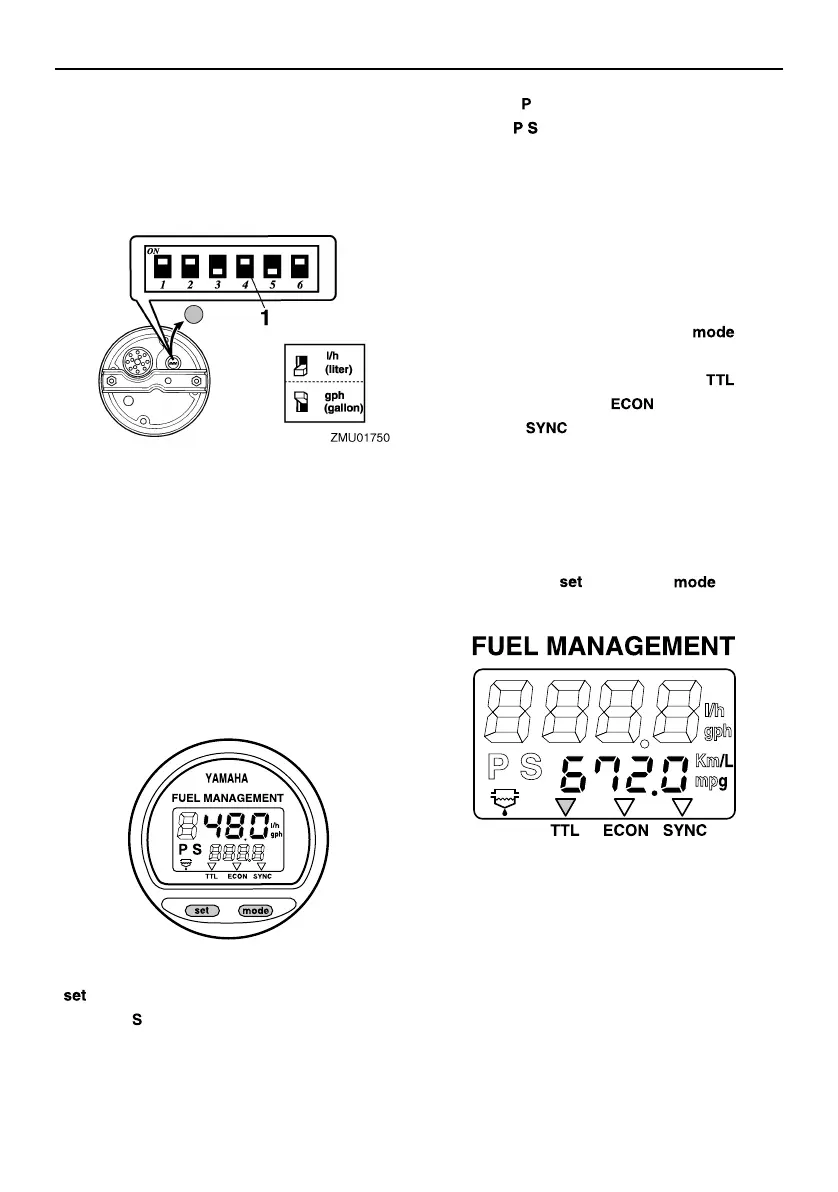
The fuel flow meter displays gallons/hour
or liters/hour according to operator prefer-
ence. Select the desired units of measure-
ment by setting the selector switch on the
back of the gauge during installation.
The fuel consumption meter and fuel econ-
omy meter will indicate the same unit of
measurement.
Fuel flow readings are not accurate when the
engine is operating under about 1300 r/min.
As the fuel pump cycles on and off, the dis-
play indicates either no fuel flow or higher
flow than the actual average use.
Dual engine users: the fuel flow meter can
display the fuel flow of either or both engines.
To change the fuel flow display, press the
“ ” (set) button repeatedly until the gauge
displays “ ” (for fuel flow to the starboard en-
gine only), “ ” (for fuel flow to the port engine
only), or “ ” (for total fuel flow both en-
gines).
EMU36091
Fuel consumption meter / Fuel econo-
my meter / Twin engine speed syn-
chronizer
The display shows either the fuel consump-
tion meter, the fuel economy meter, or the
twin engine synchronizer.
To change the display, press the “ ” (mo-
de) button repeatedly until the indicator on
the face of the gauge points to “ ” (fuel
consumption meter), “ ” (fuel economy
meter), or “ ” (twin engine speed syn-
chronizer).
EMU26762
Fuel consumption meter
This gauge displays the total amount of fuel
consumed since the gauge was last reset.
To reset the total fuel consumption meter to
zero, press the “ ” (set) and “ ” (mode)
buttons at the same time.
EMU26772
Fuel economy
This gauge displays the approximate dis-
tance per liter or gallon when cruising.
1. Selector switch
U63P7KE0.book Page 30 Wednesday, November 29, 2017 11:06 AM


 To Next Page