Protecting Scene Memories 65
ProMix 01 User’s Guide
1. Press [UTILITY].
The UTILITY menu appears.
2. Select MEMORY PROTECT
and press [ENTER].
The MEMORY PROTECT LCD
function appears.
3. Select Scene Memories
01–25 or 26–50, then press
[ENTER] or use the PARAM-
ETER wheel to turn protect
ON and OFF.
4. To exit this function and
return to the UTILITY menu,
select EXIT and press
[ENTER], or just press [UTIL-
ITY].
The UTILITY menu reappears.
Protecting Scene Memories
You can protect stored mix scenes against accidental overwriting
using this Memory Protect function. This is useful when you’ve set
up many mix scenes for repeated use, or when non-experienced users
operate ProMix 01.
With Memory Protect set to ON, mix scenes cannot be stored using
the [STORE] button. And mix scene data received as MIDI Bulk
Dump is ignored. Scene memories are divided into two groups, 01–25
and 26–50, and protection can be set separately for each group.
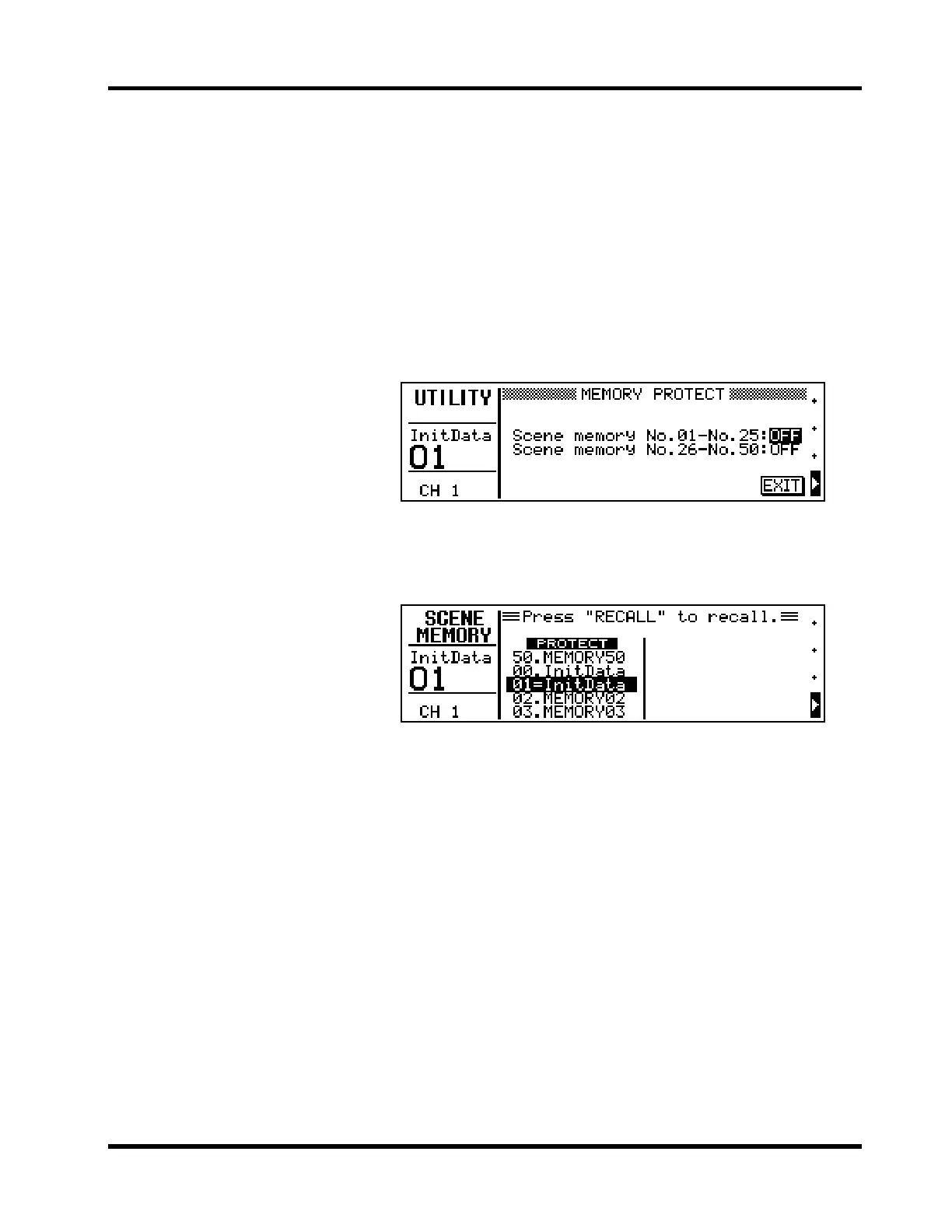
Shown below is the MEMORY PROTECT LCD function.
When MEMORY PROTECT is set to ON, the word PROTECT
appears on the MEMORY LCD function when a mix scene in the pro-
tected group is selected, as shown below.











 To Next Page