Checking the Battery 91
ProMix 01 User’s Guide
1. Press [UTILITY].
The UTILITY menu appears.
2. Select BATTERY CHECK and
press [ENTER].
The BATTERY CHECK LCD
function appears.
3. To exit this function and
return to the UTILITY menu,
select EXIT and press
[ENTER], or just press [UTIL-
ITY].
The UTILITY menu reappears.
Checking the Battery
ProMix 01 uses a long-life battery to backup its RAM memory. The
battery should last for up to five years, and you can check its condition
using the BATTERY CHECK function.
If the BATTERY CHECK function indicates that the battery needs
replacing, please contact your Yamaha dealer.
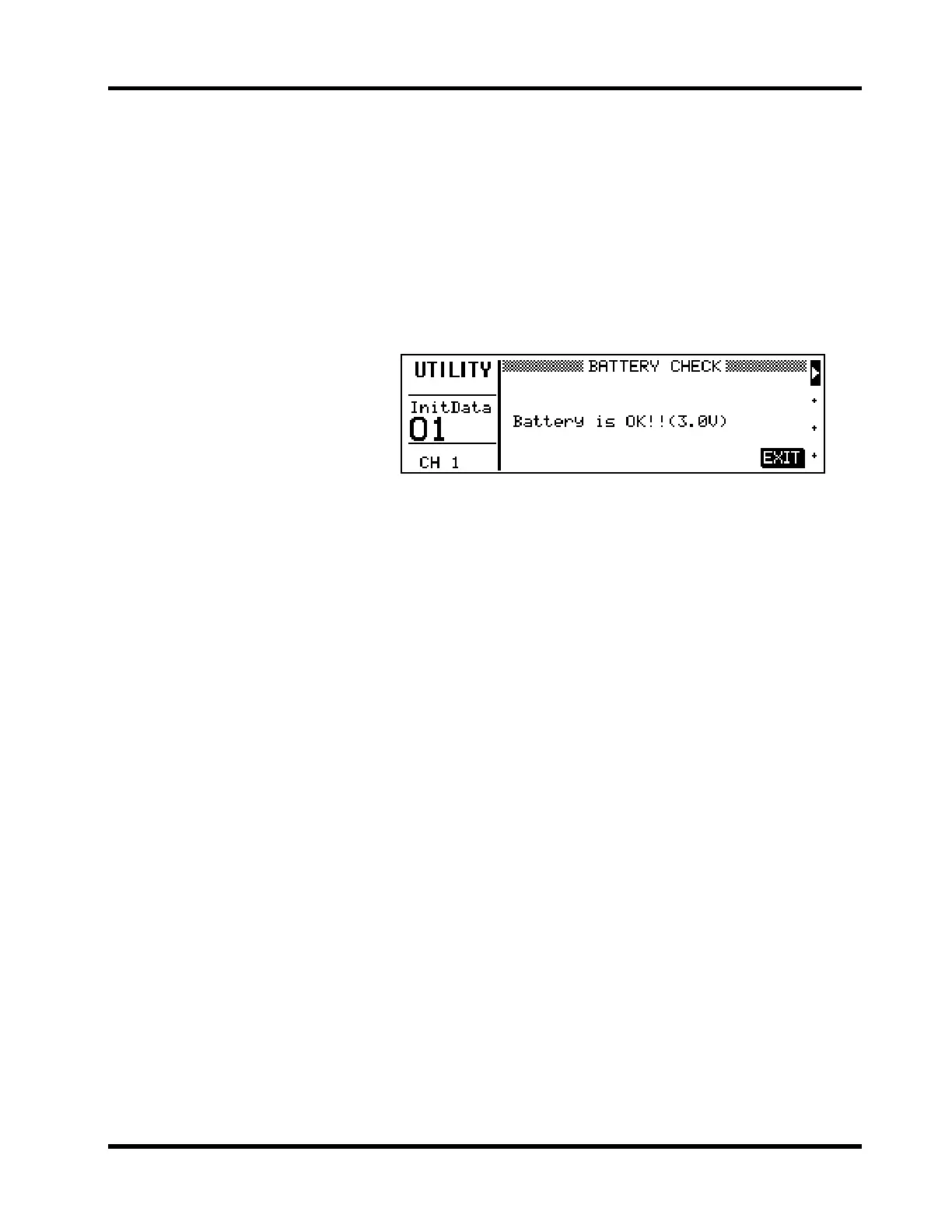
Shown below is the BATTERY CHECK LCD function.
Possible messages are:
Battery is OK!! — battery is OK.
Warning! Low battery — battery power is getting low. Ask your
Yamaha dealer to install a new battery.
Warning! No battery — no battery is installed. Ask your Yamaha
dealer to install a new battery.
Important: Do not try to replace the battery yourself.











 To Next Page