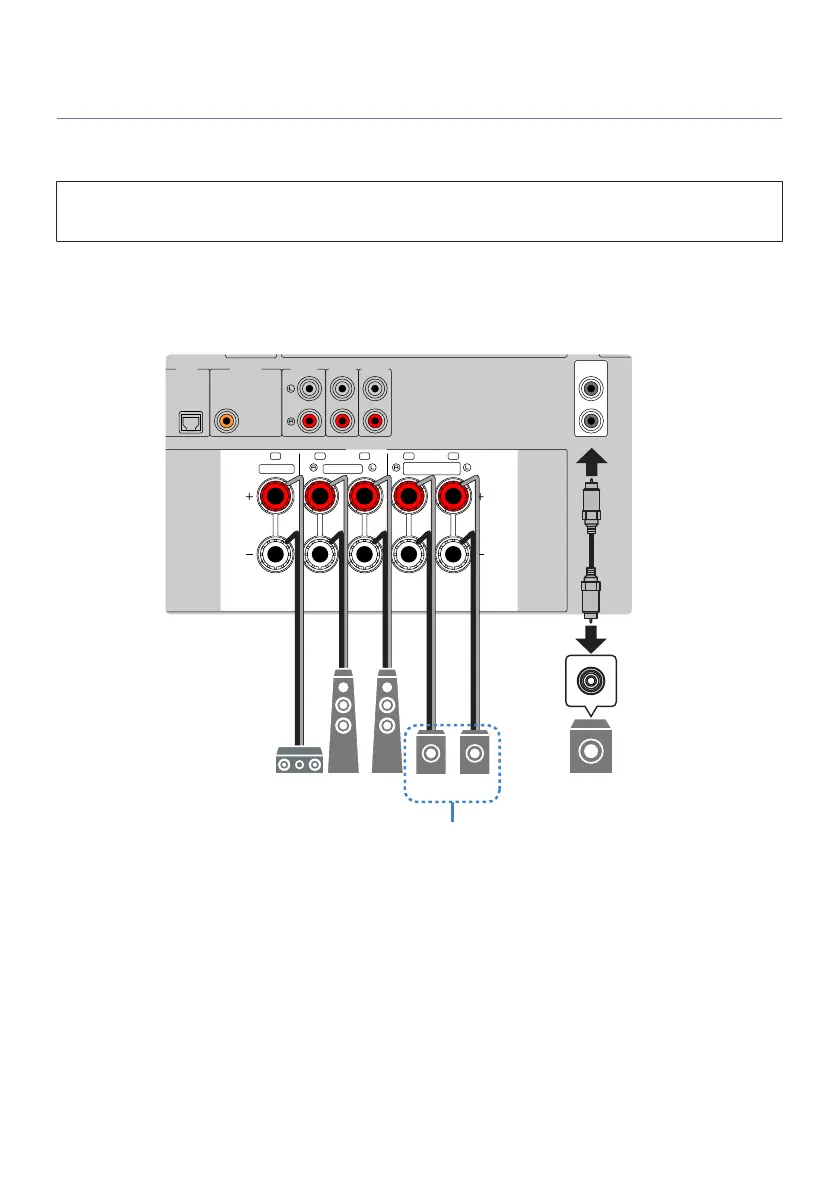
Connecting zone speakers
Connect zone speakers to the unit with speaker cables. And the speaker configuration settings must be
changed to “ZoneB”.
NOTICE
(
Unplug the unit’s power cable from an AC wall outlet before connecting the speakers.
1 Connect Zone B speakers to the SURROUND/ZONE B/BI-AMP terminals.
2 Set “Power Amp Assign” in the “Setup” menu to “ZoneB”.
AUDIO 5AUDIO 4
OPTICAL COAXIAL
CENTER FRONT
SURROUND
/ZONE B/BI-AMP
SPEAKERS
PRE OUT
SUBWOOFER
AUDIO 2
(3 MUSIC)
AUDIO 1
AUDIO 3
1
2
FRC FL SR SL
NOTE
The following speakers cannot be connected simultaneously.
(
Surround speakers
(
Zone B speakers
(
Bi-amp speakers
Related links
“Setting your speaker system”(p.161)
124
ENJOYING IN MULTIPLE ROOMS (ZONES) > Preparing zones



 To Next Page