Connection other than HDMI with a playback device
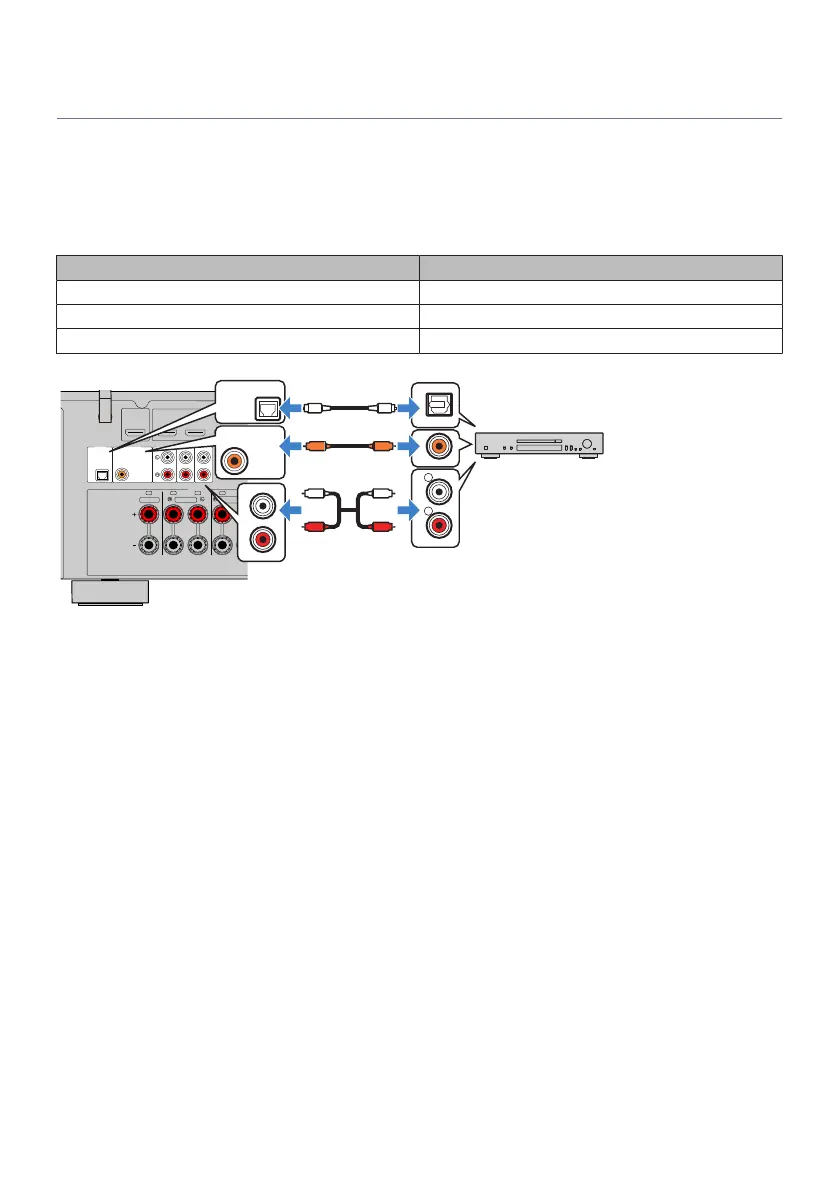
AUDIO connection with an audio device such as a CD player
Connect audio devices such as CD players to the unit.
Depending on the audio output jacks available on your audio device, choose one of the following
connections.
Audio output jacks on audio device Audio input jacks on the unit
Digital coaxial AUDIO2 (COAXIAL)
Digital optical AUDIO1 (OPTICAL)
Analog stereo (RCA) AUDIO 3-5 (AUDIO [RCA])
AUDIO 5AUDIO 4
OPTICAL COAXIAL
HDMI
CENTER FRONT
SURROUND
/ZONE B/BI-AMP
SPEAKERS
AUDIO 2
(3 MUSIC)
AUDIO 1
AUDIO 3
HDMI OUT
eARC/ARC
1 2 3
(1 MOVIE)
FRC FL SR SL
R
L
COAXIAL
OPTICAL
COAXIAL
AUDI02
OPTICAL
AUDIO1
(3MUSIC)
C C
L
R
L
R
O O
The unit (rear)
AUDIO 1–5 jacks
Audio output
(either digital optical, digital coaxial, or
analog stereo)
Audio device
Related links
(
“Part names and functions of the rear panel”(p.30)
(
“Connecting the FM antenna”(p.58)
(
“Connecting the DAB/FM antenna”(p.61)
57
PREPARATIONS > Connecting playback devices


 To Next Page