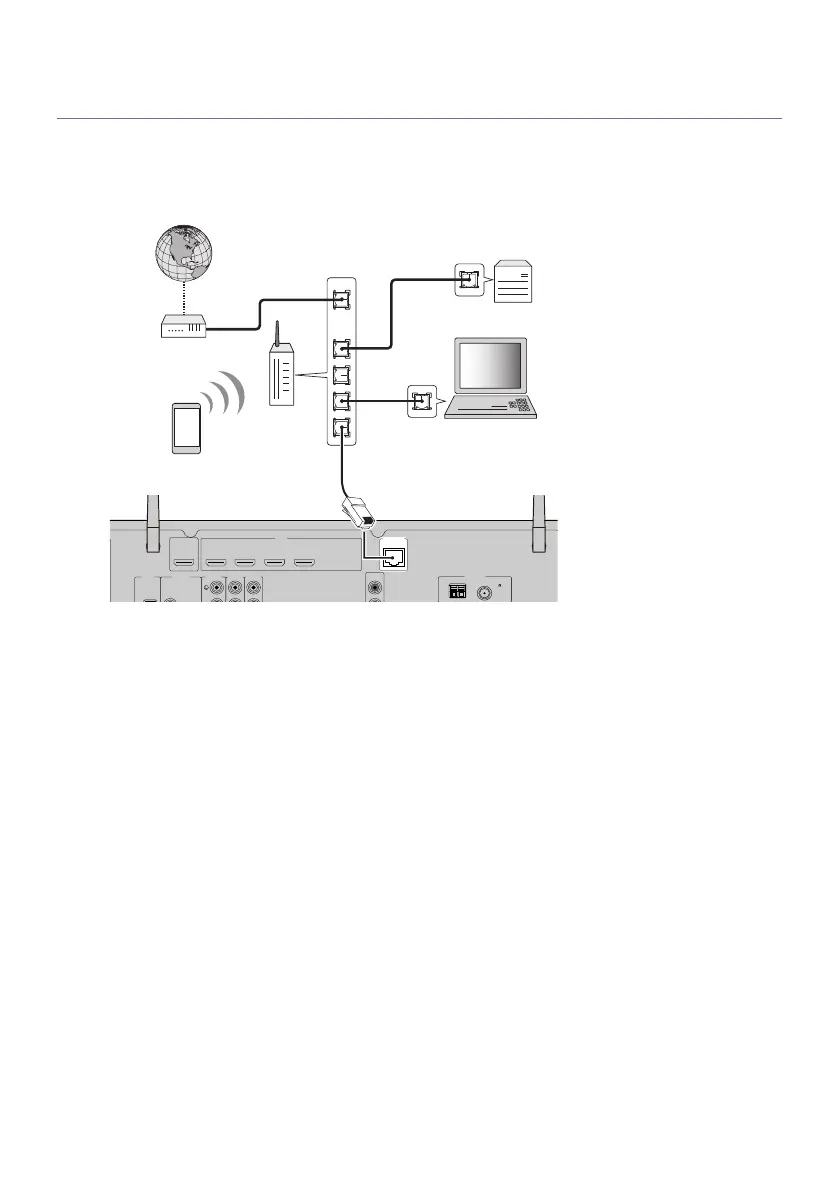
Connecting a network cable (wired connection)
Connect the unit to your router with a commercially-available STP network cable (CAT-5 or higher straight
cable).
When using a router that supports DHCP, you do not need to configure any network settings for the unit.
ANTENNA
FMAM
AUDIO 5AUDIO 4
OPTICAL COAXIAL
HDMI
PRE OUT
SUBWOOFER
AUDIO 2
(3 MUSIC)
AUDIO 1
AUDIO 3
NETWORK
HDMI OUT
eARC/ARC
( 2 RADIO )
(4 NET RADIO)
1 2 3 4
(1 MOVIE)
1
2
75
Network Attached Storage
(NAS)
Internet
Modem
Wireless router
PC
Network cable
The unit (rear)
NOTE
You need to configure the network settings if your router does not support DHCP or if you want to configure the network parameters
manually.
Related links
(
“Setting the network parameters manually”(p.216)
(
“Checking the network information of the unit”(p.213)
63
PREPARATIONS > Preparing for connecting to a network



 To Next Page