Setting the HDMI 4K signal format
Selects the format of signals input/output at the unit when HDMI 4K compatible TV and playback device are
connected to the unit. This setting is applied separately to each HDMI input jack.
Setup menu
“HDMI” > “HDMI Video Format” > (HDMI input)
Settings
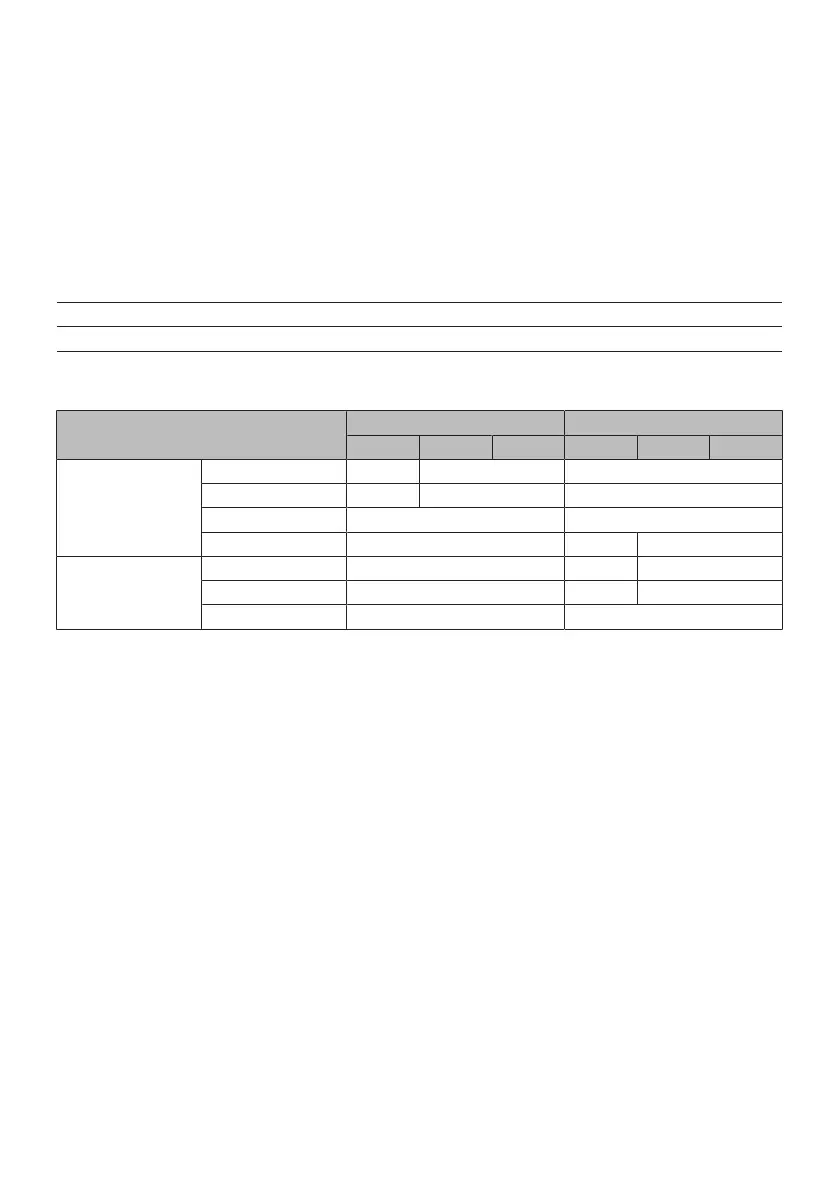
Mode 1 Inputs/outputs 4K signals shown in the following table.
Mode 2 Inputs/outputs 4K signals shown in the following table.
Format
Mode 1 Mode 2
8 bit 10 bit 12 bit 8 bit 10 bit 12 bit
4K/60, 50 Hz
RGB 4:4:4 ) – –
YCbCr 4:4:4 ) – –
YCbCr 4:2:2 ) –
YCbCr 4:2:0 ) ) –
4K/30, 25, 24 Hz
RGB 4:4:4 ) ) –
YCbCr 4:4:4 ) ) –
YCbCr 4:2:2 ) )
NOTE
(
Depending on the connected device or HDMI cables, video may not be displayed correctly when “Mode 1” is selected. In this case,
select “Mode 2”.
(
When “Mode 1” is selected, use a Premium High Speed HDMI Cable or Premium High Speed Cable with Ethernet.
Related links
“Basic operation of the Setup menu”(p.151)
180
CONFIGURATIONS > Configuring various functions (Setup menu)


 To Next Page