28
Basics Section Quick Guide Reference Appendix
Basic Operations
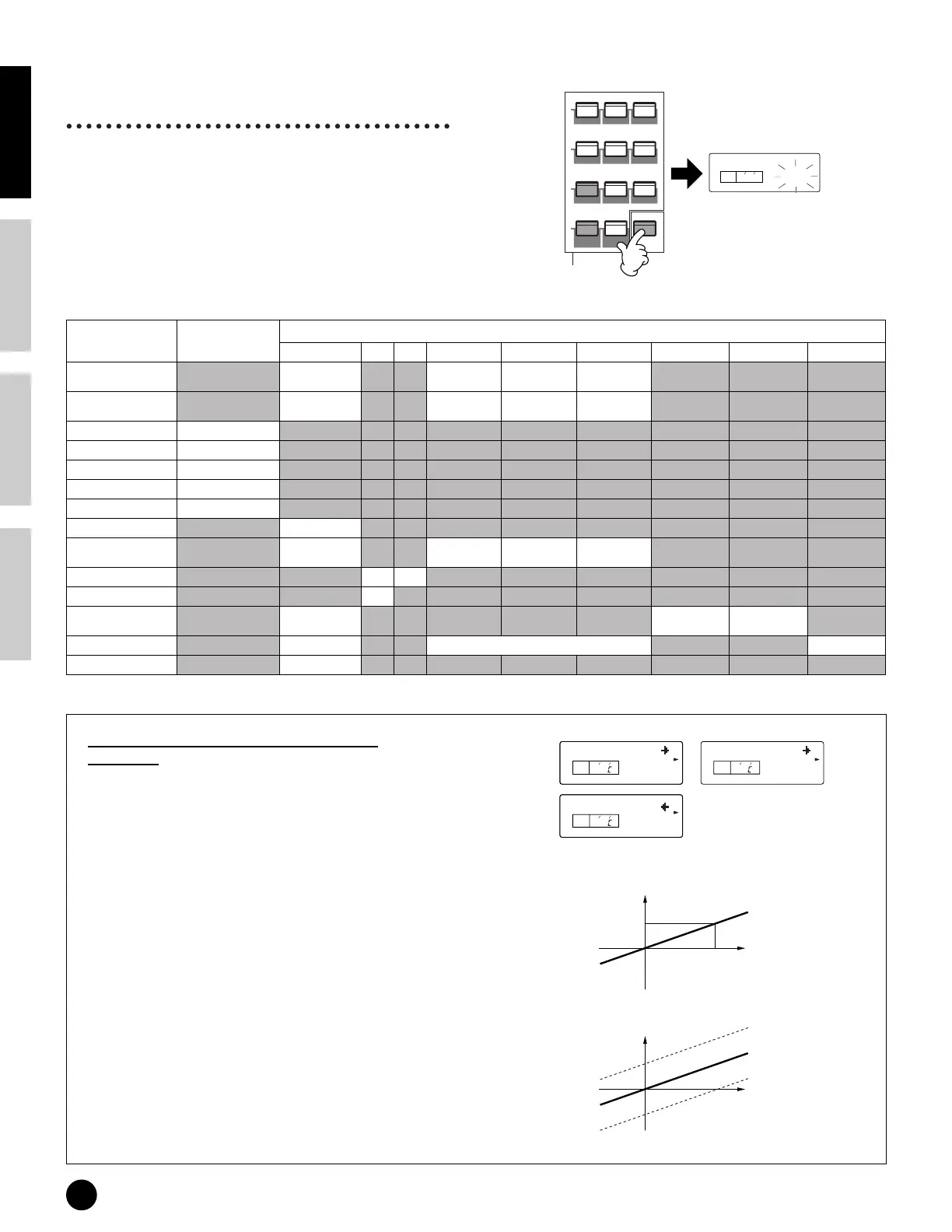
Numeric keypad, [ENTER]
button
You can specify the value for the selected parameter by
using the numeric keypad, then actually set that value
by pressing the [ENTER] button. For example, to set a
value of “100,” press (in order) the numeric keypad
buttons [1], [0], and [0]. (The parameter indicator
flashes.) Finally, press the [ENTER] button to set the
value.
Enter the value with the numeric keypad or the keyboard
Types of Parameters (Absolute and
Relative)
There are many ways to set parameters. Some
parameters require you to directly enter numerical
settings or alphabetic characters. With others, you
can choose from a number of available settings.
Furthermore, some types of parameters are
“absolute” whereas others are “relative.”
For example, the absolute parameter in the following
illustration can be set to either “mono” or “poly.”
For other absolute parameters such as Volume, the
setting can be any value between zero and 127. The
Volume setting has a linear, one-to-one relationship
with the actual volume, as shown in the graph on the
left. However, relative parameters do not follow the
same relationship. The graph on the bottom shows
the role of the Velocity Offset parameter. The value
you have set here, known as an “offset,” is added to,
or subtracted from, the actual value. With Velocity
Offset, the specified offset value is added to, or
subtracted from, the actual velocity of the notes you
play on the keyboard. Sometimes, these types of
relative parameters are set as a percentage.
ENTER
KEYBOARD
—
0
1
2
3
4
56
7
89
GUITARORGANPIANO
BASS STRINGS BRASS
REED/PIPE
SYN LEAD
SYN COMP
CHROMATIC
PERCUSSION
SYN PAD
Set the value.
The displayed value flashes.
Specify the value.
KEYELEMPAR T
PAG E
100
Parameter
ENTER + keyboard
(note number input)
Numeric Keypad
01718 1~63 64 65~128 96/97 98 129~130
Pan (Normal Voice)
Scale: the note posi-
tion
L63 (hard left)-L01 C (Cener) R01-R63 (hard
right)
Pan (Drum Voice/Multi) Rnd: Random L63 (hard left)-L01 C (Cener) R01-R63 (hard
right)
NtLmt-L/H Lowest/highest note
PchSclCN Basic pitch
PEGSclCN Basic pitch
Flt BP1-4 Break point
Lvl BP1-4 Break point
Alt.Group off
Reverb/Chorus /Var Pan L63 (hard left) L63 (hard left)-L01 C (Cener) R01-R63 (hard
right)
Device No all off
Rcv Ch omni
FSTxCtlNo off PCInc
PCDec
PLAY (START/
STOP)
Load (User voice) all Normal 1 to 128 User Drum 1/2
Sequence Play (tempo)
default tempo
KEYELEMPAR TPAG E
2 E
KEYELEMPAR TPAG E
4 E
Total Vol
127
VelSnsOfs
064
Mono/Poly
KEYELEMPAR TPAG E
poly
3 E
127
1. Total Volume (absolute)
0
Volume
Volume
Offset subtracted (-10)
Actual velocity
Offset added (+10)
2. Velocity Sensitivity offset (relative)
0
-64
Offset
+64


 To Next Page