32
Basics Section Quick Guide Reference Appendix
Using Multi Mode
Using Multi Mode
Playing in Multi Mode
In the Multi Play mode, you can select and play any of the Multis.
n For more details about Multis, see pages 20 and 21. For information on the Multi List, see the separate Data List.
n Up to 32 Multis can be stored in the USER (internal) memory. These Multi settings are available in Multi Edit mode (page 63).
Here, we’ll show you how to get started with Multi Play after selecting a Multi.
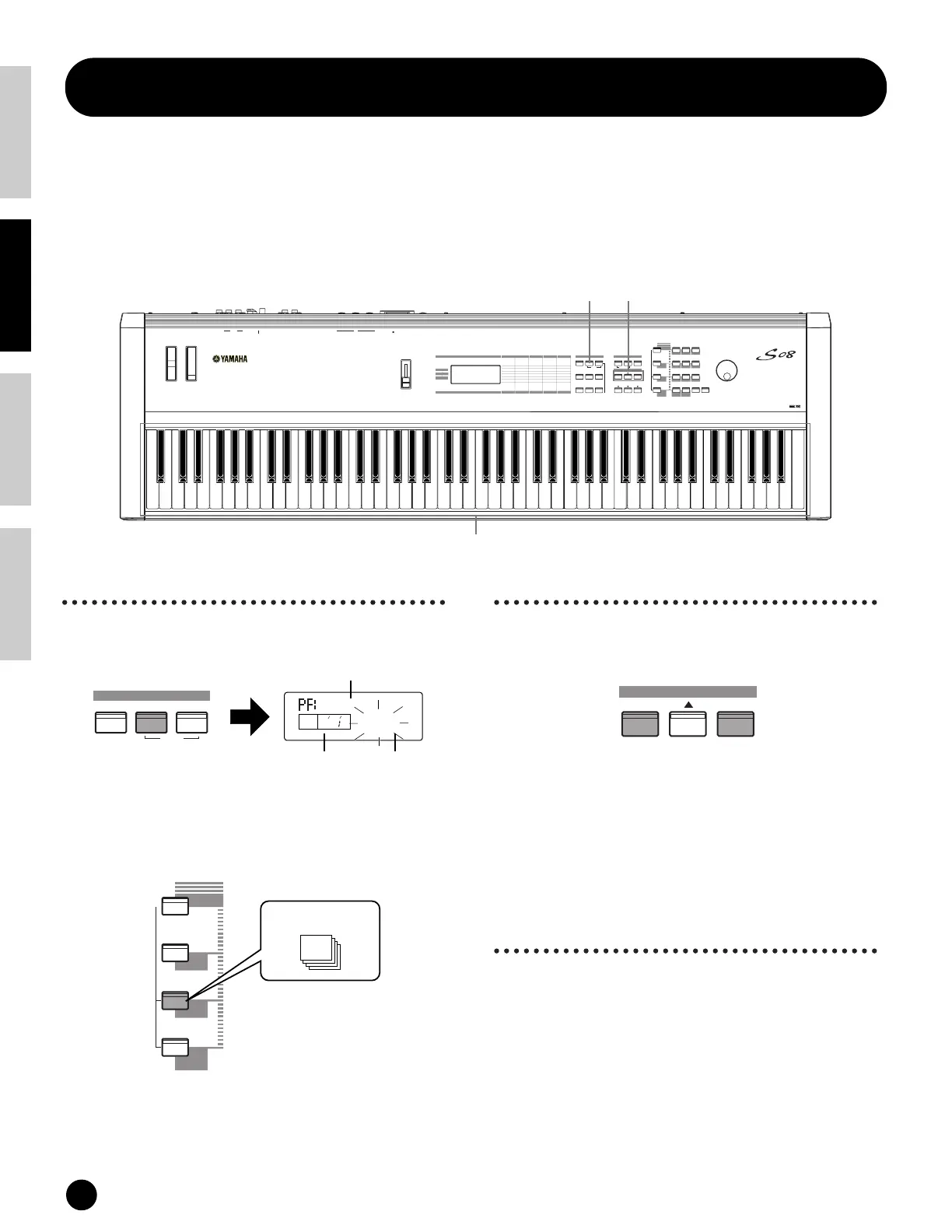
1 Press the [MULTI] button
The [MULTI] button LED will light, showing that you
are now in the Multi Play mode. The following
appears in the display.
At this point, you can play the Multi (named on the
screen) via keyboard.
Up to 32 Multis can be stored in the USER (internal)
memory.
n USER is stored in internal Random Access Memory
(RAM) and contains the factory default Multis. These
can be overwritten but can recalled at any time (page 23).
2 Select a Multi Number
Press the [INC/YES] button to increment the Multi
Number. Press the [DEC/NO] button to decrement the
Multi Number.
n This is selected in the same way as in selecting Voices,
using the numeric keypad and the [ENTER] button.
Refer to the instructions on selecting Voice numbers
(page 30).
3 You can now play Parts
in the Multi via the
keyboard.
If the MIDI receive channel parameter is the same for
any Parts, those Parts can be played in unison. Now
try selecting other Multis.
n To play a Voice from the keyboard, make sure that the
MIDI Receive Channel for that Voice’s Part and the MIDI
Transmit Channel for the keyboard are both set to the
same value.
MUSIC SYNTHESIZER
EXITENTER
KEYBOARD
—
0
1
2
3
4
56
7
89
PRESET
USER
GM2/XG
DRUM
MUTE
+—
COMMON
INC/YESDEC/NO
DEMO
UTILITY CONTROLLER CARD
EDIT
JOB
STORE
PLAY/STOP
COMPARE
VOICE
MULTI SEQ PLAY
PART/
COMMON
VOICE
MIX
GENERAL
TONE
CONTROLLER
EFFECT
ELEMENT
OSC/MIX
PITCH
FILTER
AMP
LFO
EFFECT
TG
MIDI CHANNEL
MIDI FILTER
SEQ SETUP
MIDI SETUP
EFFECT
CTRL ASSIGN
KEYBOARD
VELOCITY
CTRL SETUP
SAVE
LOAD
RENAME
DELETE
FORMAT
IMPORT
VOLU
M
E
PITC
H
M
ODULATION
PHONES
L/MONO
OUTPUT
RDC IN ON
STANDBY
FOOT
CONTROLLER
FOOT
SWITCH
IN OUT THRU
MIDI
CARD
3.3V
USB
GUITARORGANPIANO
CATEGORY
SEARCH
BASS STRINGS BRASS
REED/PIPE
SYN LEAD
SYN COMP
DRUM/PERC
SE
OTHER
CHROMATIC
PERCUSSION
SYN PAD
UTILITY
CARD
CONTROLLER
CARDUTILITYEDIT
CONTROLLER
PART/ ELEMENT/KEY
MODE
DATA
1 2
3
DEMO
VOICE
MULTI SEQ PLAY
MODE
MIDIGrnd
MLT01
KEYELEMPAR TPAG E
P
Target Part for Mute
PRESET
USER
GM2/XG
DRUM
CATEGORY
SEARCH
DRUM/PERC
SE
OTHER
USER
1
~
32
INC/YESDEC/NO
DATA
Category/Multi name
Multi Number


 To Next Page