48
Basics Section Quick Guide Reference Appendix
Using the Jobs
Using the Jobs
You can perform various operations (Jobs) in the Job mode. For example, you can initialize Voices/Multis to their
original settings (including those currently being edited) or copy Elements/Parts.
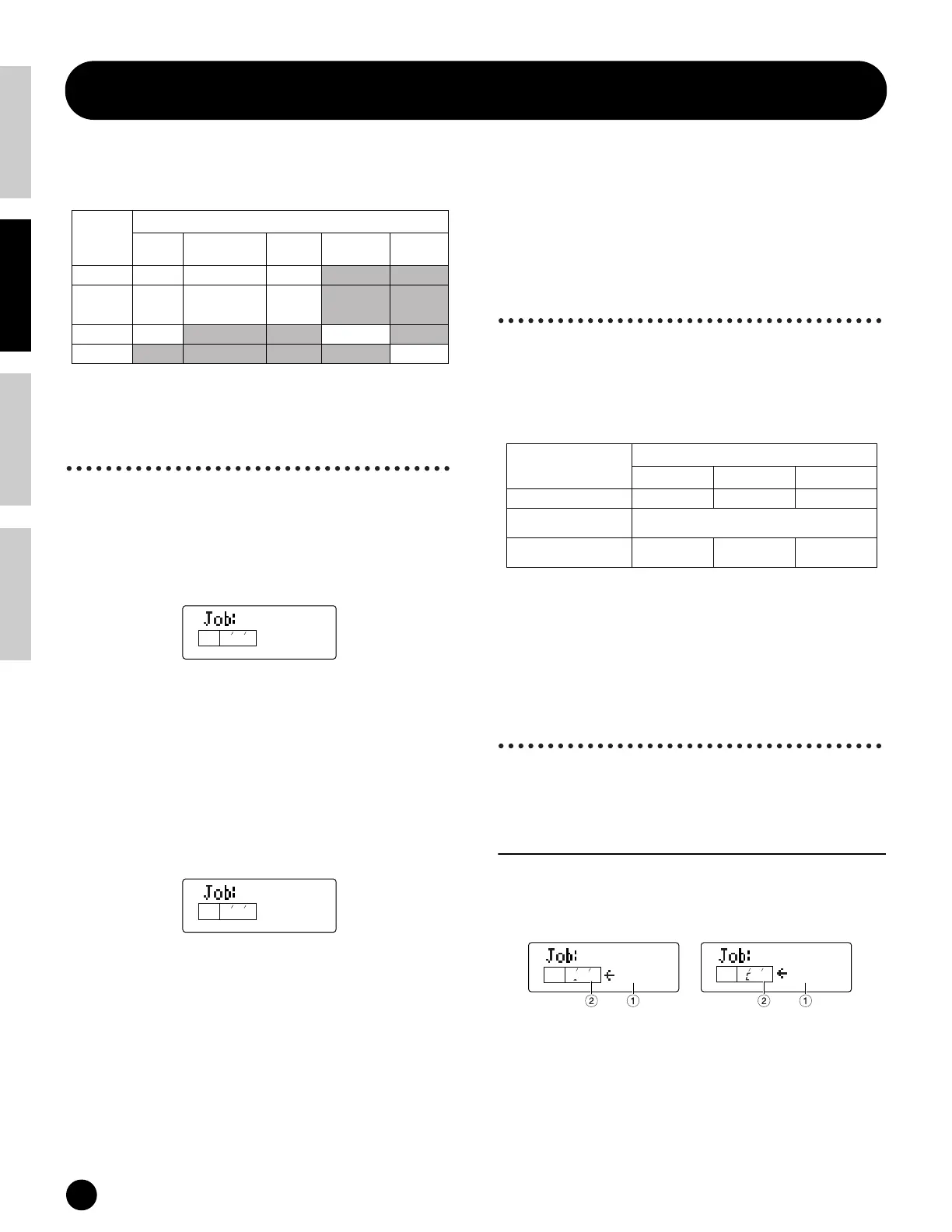
Job (PAGE)
The numbers in each column indicate the display
PAGE corresponding to the Job parameters.
Performing a Job
1 In the Voice/Multi Play mode, select the Voice/Multi
Number you wish to perform the Job on.
2 Press the [JOB] button to enter the Job mode.
3 Use the [
▲][▼] buttons and switch to the screen
showing the Job you wish to perform.
4
Use the [DEC/NO] and [INC/YES] buttons to select
the parameter you wish to perform the Job on.
n Use the [+]/[–] buttons to set the destination
Element/Key when using Copy CpyElm/
CpyKey(Voice).
n Use the [+]/[–] buttons to set the Part or destination
Part when using Init Part/CpyVar/CpyCtl or Copy Part
(Multi).
5 When you press the [ENTER] button, you will be
prompted for confirmation.
6 Press the [INC/YES] button to confirm.
A “Completed” message appears when the Job has
been completed, and operation returns to the
original screen.
Press the [DEC/NO] button to cancel the Job.
n
For Jobs that take longer to process, you will see the
message “Executing” during processing. If you switch
off the power to the S08 while this message is
displayed, you risk corrupting your data.
7 Press the [VOICE]/[MULTI] button to exit the Job
mode and return to the Play mode.
Resetting (initializing) parameters
of a Voice/Multi to their default
settings
This is useful for setting up a “blank slate” when you
want to build a completely new Voice/Multi from
scratch. Keep in mind that this does not return the
Multi to its original state prior to editing.
Select parameter Type to be Initialized
Use the [DEC/NO] and [INC/YES] buttons to select
the parameter to be initialized. When this is set to
“Part1,” use the [+]/[–] buttons to select the desired
Part (1 to 16)/Element (1 to 4)/Drum Key C#-1 to G5).
Select the desired Drum Key by pressing the
appropriate key on the keyboard.
Using the Copy function
Voice
CpyElm (Copy Element)/CpyKey
(Copy Drum Key)
This lets you copy Element/Drum Key parameter
settings of the Voice being edited to another Element/
Drum Key in the same Voice.
1 Source Element/Drum Key
Select the source Element/Drum Key (the data to be
copied) of the Voice.
❏ Settings:
Normal Voice:
elm1 ~ elm4 (Element 1 ~4)
Drum Voice:
C#-1 ~ G5 (Drum Key C#-1 ~ G5)
MODE JOB
Initialize Copy Bulk Dump
Sequencer All
chain Factory Set
VOICE 1 2 (Element/Key) 3
MULTI 1 2 (Variation Effect)
3 (Controller)
4 (Part)
5
SEQ PLAY 1 (page 52) 2 (page 52)
UTILITY 1 (page 23)
Init
multi
KEYELEMPA RT
PAG E
1
Init
Sure?
KEYELEMPA RT
PAG E
1
Target
Settings in the LCD
Multi Normal Voice Drum Voice
Whole currently selected data multi voice kit
Common data for currently
selected Voice/Multi
cmmn
Part/Element/Key data for cur-
rently selected Voice/Multi
part elemnt key
CpyElm
KEYELEMPA RT
PAG E
elm1
2 E
1
CpyKey
KEYELEMPA RT
PAG E
D-1
2
4
Normal Voice Drum Voice


 To Next Page