65
Basics SectionQuick GuideReferenceAppendix
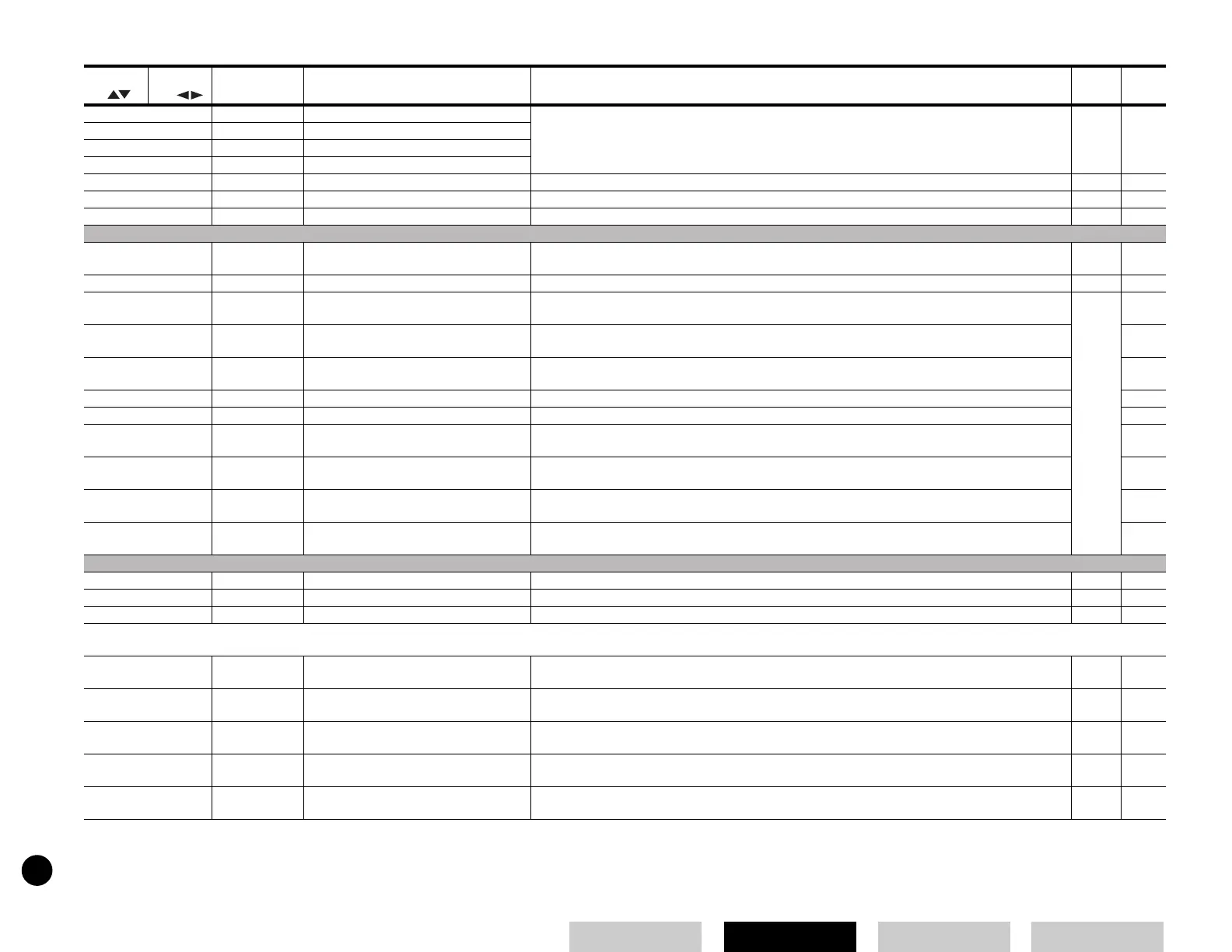
13 -1 PEGIntL Pitch EG Initial Level Controls how the pitch changes from the moment a note is pressed on the keyboard to the moment it is
released or the point at which the level has faded to zero.
.
*26
13 -2 PEGAtkTm Pitch EG Attack Time
13 -3 PEGRelL Pitch EG Release Level
13 -4 PEGRelTm Pitch EG Release Time
14 -1 Vib Rate Vibrato Rate Determines the speed of pitch modulation. *27
14 -2 Vib Depth Vibrato Depth Determines the depth or degree of pitch modulation. *27
14 -3 Vib Delay Vibrato Delay Time Determines the delay time before the Vibrato comes into effect. *27
CONTROLLER
15 -1 Porta Sw Portamento Switch Determines whether Portamento (a smooth transition in pitch from one note to the next) is on or off. 22
15 -2 PortaTime Portamento Time Determines the pitch transition time for Portamento. Higher values result in longer transition times. 22
16 PB Range Pitch Bend Range Determines the amount (in semitones; 12: one octave) by which the pitch is varied when you move the
Pitch Bend wheel up/down.
37
17 MW FltCtl MW Filter Control Determines the depth of the MW (Modulation Wheel) over the filter cutoff frequency.
18 -1 MW PMod MW LFO Pitch Modulation Depth Determines the depth of control the Modulation Wheel has over pitch modulation (vibrato effect).
18 -2 MW FMod MW LFO Filter Modulation Depth Determines the depth of control the Modulation Wheel has over filter cutoff modulation (wah effect).
18 -3 MW AMod MW LFO Amplitude Modulation Depth Determines the depth of control the Modulation Wheel has over amplitude modulation (tremolo effect).
19 AC1 CC No Multi Mode AC1 Control Number Determines the Control number for the AC1 of each Part.
20 AC1FltCtl AC1 Low Pass Filter Control Determines the depth of the AC1 (Assignable Controller 1) over the filter cutoff frequency.
21 -1 AC1 FMod AC1 LFO Filter Modulation Depth Determines the depth of control the AC1 has over filter cutoff modulation (wah effect).
21 -2 AC1 AMod AC1 LFO Amplitude Modulation Depth Determines the depth of control the AC1 has over amplitude modulation (tremolo effect).
EFFECT
22 ReverbSend Reverb Send Determines the send level of the Reverb Effect. 47 *3
23 ChorusSend Chorus Send Determines the send level of the Chorus Effect. 47
24 Var Send Variation Send Determines the send level of the Variation Effect. 47 *29
■ Multi Job [MULTI] →→
→→
Multi Selection →→
→→
[JOB]
1 Init Initialize Resets (initializes) all parameters of a Multi to their default settings. Use the [DEC/NO] and [INC/YES]
buttons to select the parameter type to be initialized.
48
2CpyVar Copy Variation Effect Copies Effect settings of the Voice to Multi. 48
3CpyCtl Copy Controller Copies the Controller settings for the Voice assigned to the Part. 48
4CpyPart Copy Part Copies Part parameter settings of the Multi being edited to another Part in the same Multi. 48
5 BlkDmp Bulk Dump Sends your edited Multi data to a computer or another MIDI device for data archivung. 36, 49
Selected
by
Selected
by
Display Parameter Name Explanation
Related
Page
Multi Edit Part / Multi Job


 To Next Page