44
Basics Section Quick Guide Reference Appendix
Voice Edit
● AMP (Amplitude)
In PAGES 23 to 31, you can set the volume of each
Element after the OSC (Oscillator), PITCH and
FILTER parameters have been applied, as well as
the final overall volume of the signal sent to the
outputs.
The signal of each Element is sent at the specified
volume to the next Effect section.
Also, by setting the AEG (Amplitude Envelope
Generator), you can control how the volume
changes over time.
n
The final volume for all Elements is set in the Total
Vol (Total Volume) parameter, Common Edit PAGE 2.
Level (Volume) related Parameters
AEG (Amplitude Envelope Generator)
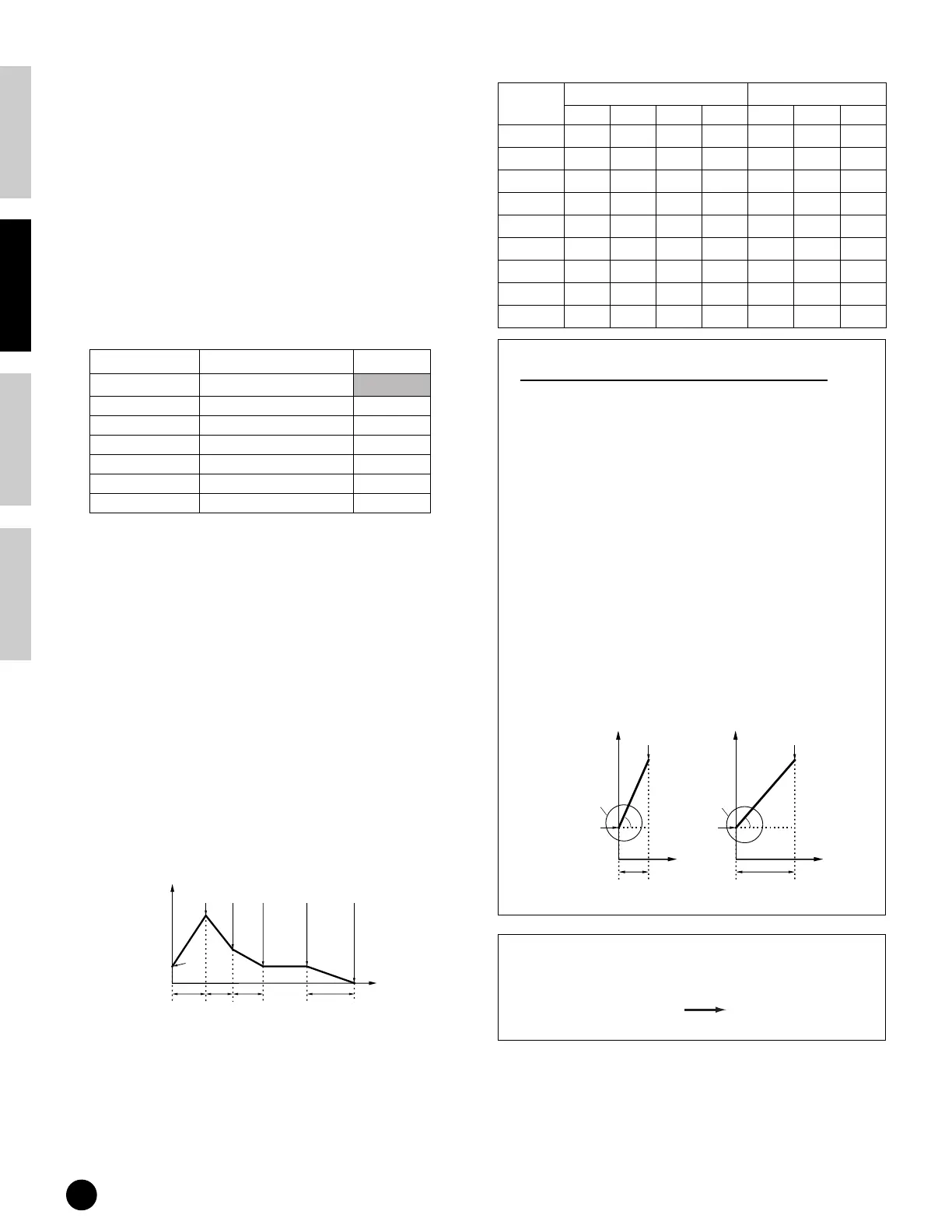
There are four Rate settings (which control how fast
the volume changes from one Level to the next) and
three Level settings (which control the actual
volume). When you play a key, the volume goes to
the Initial Level, at the speed set in Attack Rate.
From there it goes to the Decay and Sustain Levels,
at speeds set in Decay 1 and 2 Rates, respectively.
When the note is released, the volume goes down to
zero, at the speed set in Release Rate.
In the illustration below, the letters a - d indicate the
respective Rate (R) settings for Attack - Release.
The greater the value for each Rate, the faster the
filter goes to the next set Level — in other words, the
time it takes for the volume to change (between
Level settings) becomes shorter. Velocity Sensitivity
and other parameters can also be set if required.
Example of AEG Settings
About EG Rate and Time (Voice Mode)
The EG (Envelope Generator) processes and shapes
the output level of the tone generator from the
moment you press a key until the sound decays to
silence. The level (Y-axis in the illustrations below)
is a different aspect of the sound, depending on
which EG is being used. For the PEG, level
corresponds to Pitch. For the FEG, it corresponds to
the cutoff frequency. For the AEG, it corresponds to
the volume.
The behavior of the EG over time is controlled by
the Rate (R) parameters. Rate refers to the time it
takes to go from one level to the next (for example,
from the initial level to the attack level).
The illustrations below show how different Rate
settings affect the sound. To extend the time
between level changes and make it long, set the Rate
(R) to a small value.
Parameter
Type PAGE
Volume Slider Top panel
Total Vol Multi Common Edit 2
Volume Multi Part Edit 2
Total Lvl Voice Common Edit 2
Total Vol Voice Common Edit 2
Level Voice Element Edit 3
Level Voice Key Edit 1
0
Release
Level
Attack
Level
Init
Level
Attack
Time
Decay1
Time
Decay2
Time
Release
Time
Decay1
Level
Sustain
Level
Key off
Time
Volume
Category AEG Rate AEG Level
AtkR Dcy1R Dcy2R RelR InitL Dcy1L SusL
Piano
127 34 12 65 0 124 0
Organ
127 10 0 100 255 255 255
Guitar
127 33 16 93 255 200 107
Bass
127 33 0 95 0 0 0
Strings
63 18 0 43 0 250 200
Brass
127 39 0 73 0 234 0
Reed/Pipe
127 39 0 83 0 234 0
Synth Lead
106 18 0 77 0 255 255
Synth Pad
64 26 0 42 0 250 200
0
Attack
Level
Initial
Level
Attack
Time
is short.
Rate (R) is
set to a
large value.
a
Time
Initial
Level
Level
Rate (R) is
set to a
small value.
0
Attack
Level
Attack
Time
is long.
a
Time
Level
+
EG
Cutoff
Pitch
Amplitude (Volume)
FEG
PEG
AEG
EG Types


 To Next Page