MULTI-FUNCTION DISPLAY
1-23
EAM20150
MULTI-FUNCTION DISPLAY
EWA19000
Be sure to stop the machine before making
any setting changes to the multi-function
display.
The multi-function display is equipped with the
following:
• Speedometer
• Clock
• Two tripmeters (which show the distance that
has been traveled since it was last set to zero)
• Accumulated fuel consumption meter
• Timer (which shows the time that has been ac-
cumulated since the start of timer measure-
ment)
EAM30326
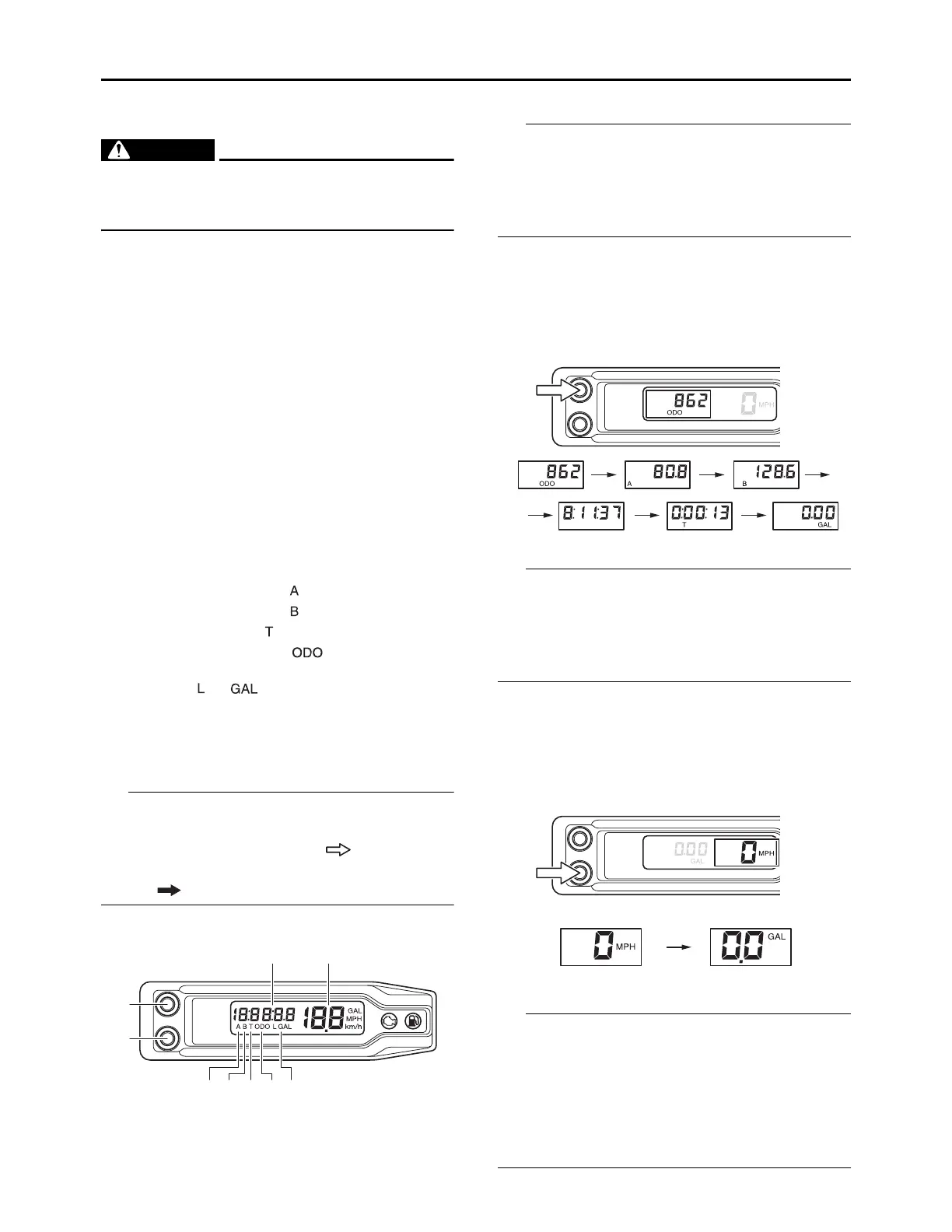
DESCRIPTION
Operation buttons:
Screen display:
The operation buttons can be pushed in the fol-
lowing two manners:
Short push: Push the button. ( )
Long push: Push the button for 1 second or
more. ( )
Changing the display item
• The odometer will lock at 199999.
• The tripmeter will reset and continue counting
after 9999.9 is reached.
• The accumulated fuel consumption meter will
lock at 19.9.
1. Push the A button to change the meter dis-
play.
The display will change in the following order:
ODO TRIP A TRIP B Clock Timer
Accumulated fuel consumption ODO
• To reset the digits, select the meter involved
and push the A button for 1 second or more.
• When the fuel consumption meter is reset, the
fuel consumption meter that is displayed on the
speedometer side will be also reset.
2. Push the B button to change the meter dis-
play.
The display will change in the order:
Speed Accumulated fuel consumption
Speed
• To reset the digits of the accumulated fuel con-
sumption meter, select the accumulated fuel
consumption meter and push the B button for 1
second or more.
• When the fuel consumption meter is reset, the
fuel consumption meter that is displayed on the
odometer side will be also reset.
1. A button
2. B button
3.
Tripmeter indicator “ ”
4.
Tripmeter indicator “ ”
5.
Timer indicator “ ”
6.
Odometer indicator “ ”
7. Accumulated fuel consumption meter indi-
cator “ ”, “ ”
8. Odometer/Tripmeter/Clock/Timer/Accumu-
lated fuel consumption meter
9. Speedometer/Accumulated fuel consump-
tion meter
1
2
3 4567
8 9





 To Next Page