MULTI-FUNCTION DISPLAY
1-30
EAM30330
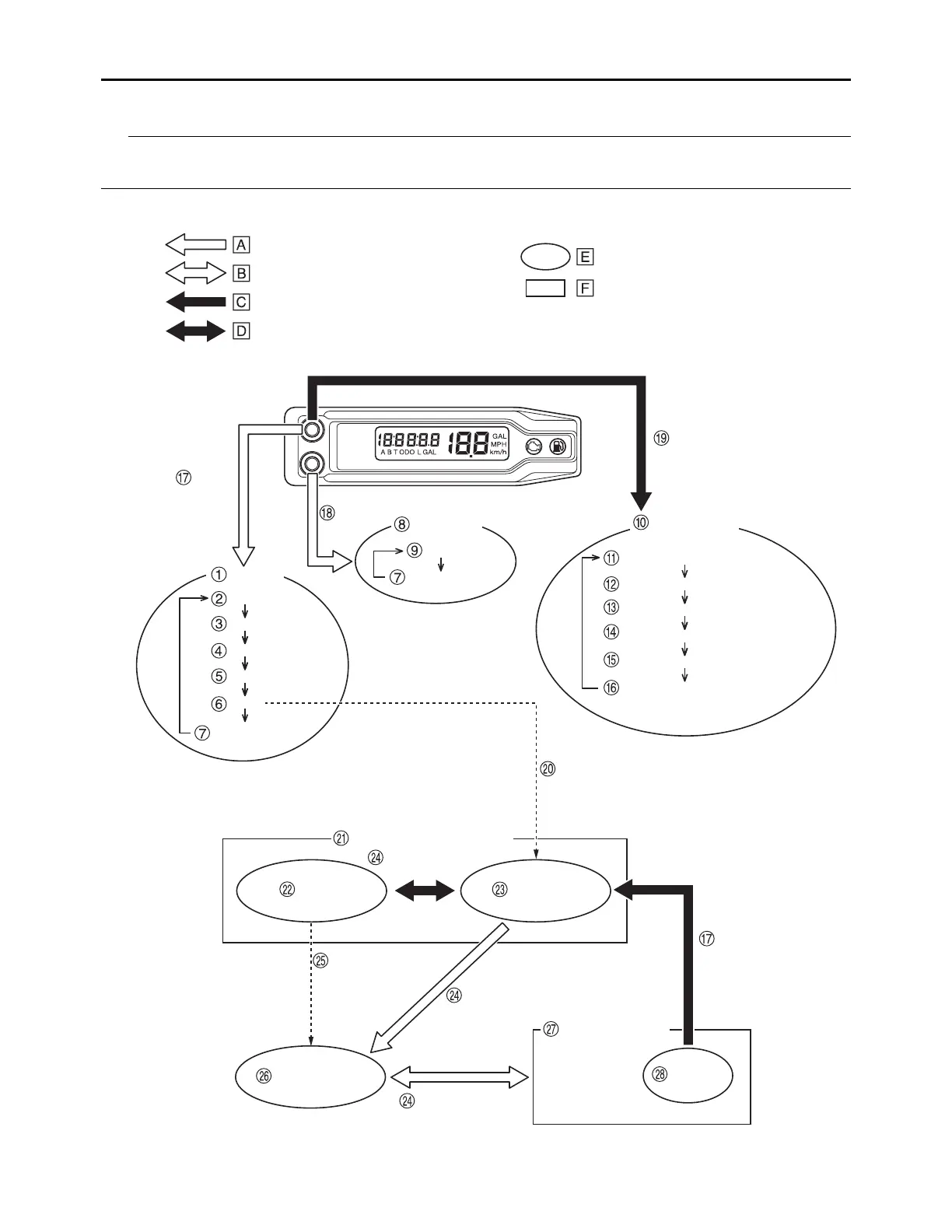
FUNCTION DIAGRAM
The following diagram illustrates the multi-function display regarding the direction and operation condi-
tion involved in each of its functions.
SETTING MODE
Turn on the display with the
A button pushed. After the display
is turned on, release the A button
when shifted to the setting mode.
A button
Odometer
ODO
TRIP A
TRIP B
Clock
Timer
Accumulated fuel
consumption
Setting the timer
Putting measurement on standby
A button +B button
Auto start Manual start
A button
Measurement starts as
the machine mo
ves
A button +B button
Timer in operation
Timer not in operation
Reset timer
A button +B button
A short push on the button changes
the operation in the arrowed direction.
A short push on the button changes
the operation in both arrowed directions.
A long push on the button changes the
operation in the arrowed direction.
Meter function
Extent to which the meter can operate
A long push on the button changes the
operation in both arrowed directions.
B button
Speedometer
Speed
Setting the backlight brightness
Setting the clock time (hour)
Setting the clock time (minute)
Setting the unit
Setting the fuel consumption correction
Setting the tire diameter correction
Accumulated fuel
consumption














 To Next Page