8
datalog files. If the device reaches max storage and has not
been cleared, it will cease to log data until all files have been
cleared from the device. Be sure to select the proper logging
rate based on the intended length of the datalog session. As
the P51-870 has limited internal memory, exceeding
maximum memory capacity will result in loss of data and
may cause corruption of the current datalog session file. To
avoid this, ensure to select the appropriate logging rate for
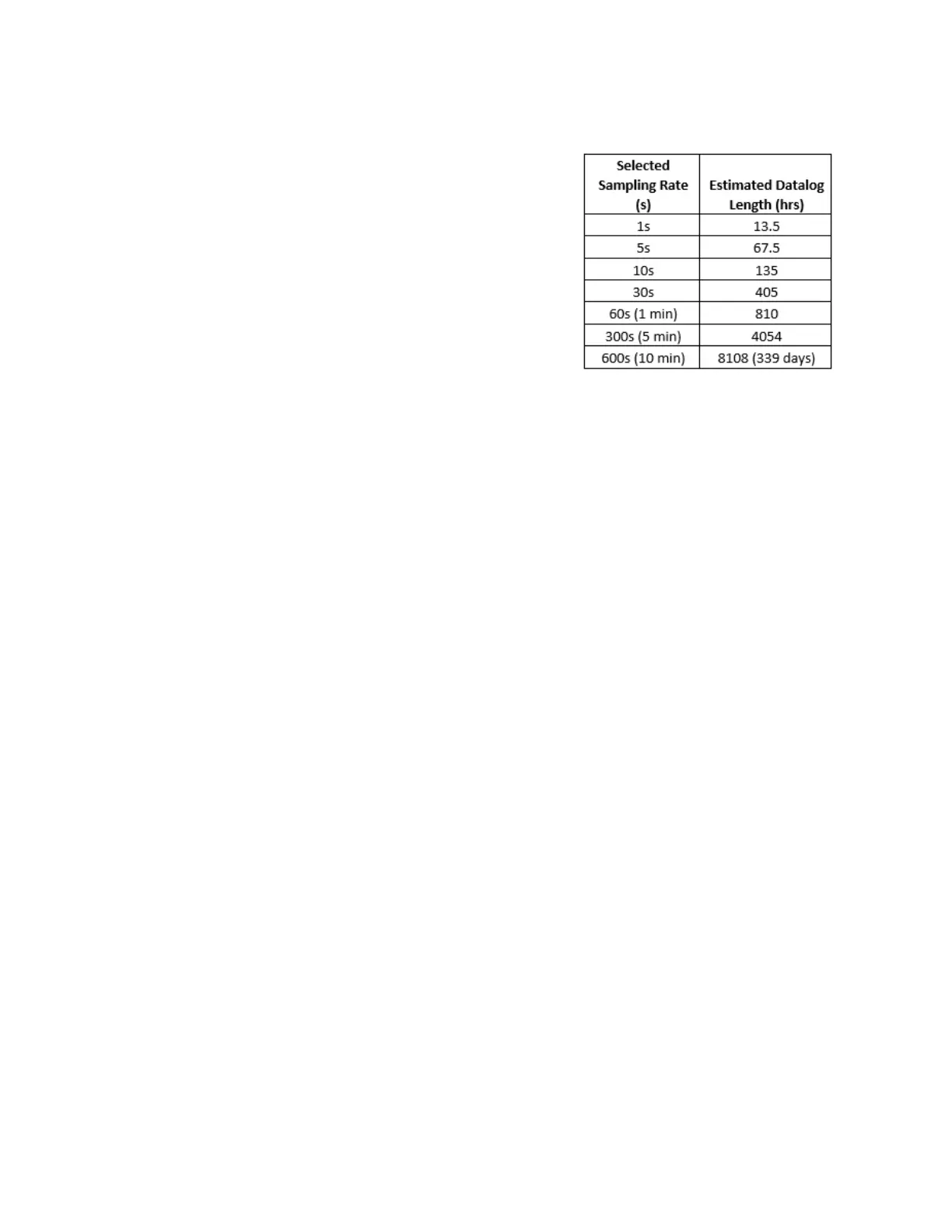
your current datalog session. Table 2-1, details the
maximum logging duration for several logging rates
assuming the internal memory has just been cleared, or is
0% capacity.
Interpreting the RGB LED:
The LED on the front face of the device can display a variety of colors during normal operation.
Below is a list of various colors and flashing schemes encountered during normal use.
• Flashing Blue: The P51-870 TITAN® flashes blue every time it stores a datalog sample. If
the logging rate is set to a larger time increment, the LED will not flash blue as often.
• Flashing Red: When the device reaches low charge, or falls below 10% battery charge, the
LED will flash red every time a datalog sample is taken (at the same rate as flashing blue).
• Flashing Violet: The instrument will flash a violet color every 1 second when connected
and transmitting data via Bluetooth® to a device.
• Solid Red/Blue: The LED will turn a solid red or blue when the power button is pressed
and held (usually when powering on/off). Powering on the device will display a solid blue
LED, powering off will display a solid red LED.
• Solid Green: The LED will remain a solid green color when connected to a power source
and charging. When the device reaches full charge, the solid green light will shut off
regardless if it remains connected to a power source.
• Solid Violet: If the instrument is placed into updater mode, the LED will turn a solid violet
color and the display will shut off (if the device is powered on). This mode is not intended
for normal use; to exit updater mode, hold the power button for 3 seconds or until the
LED powers off.
Table 2-1: Sampling Rates and Time to
Maximum Memory Capacity


 To Next Page