10
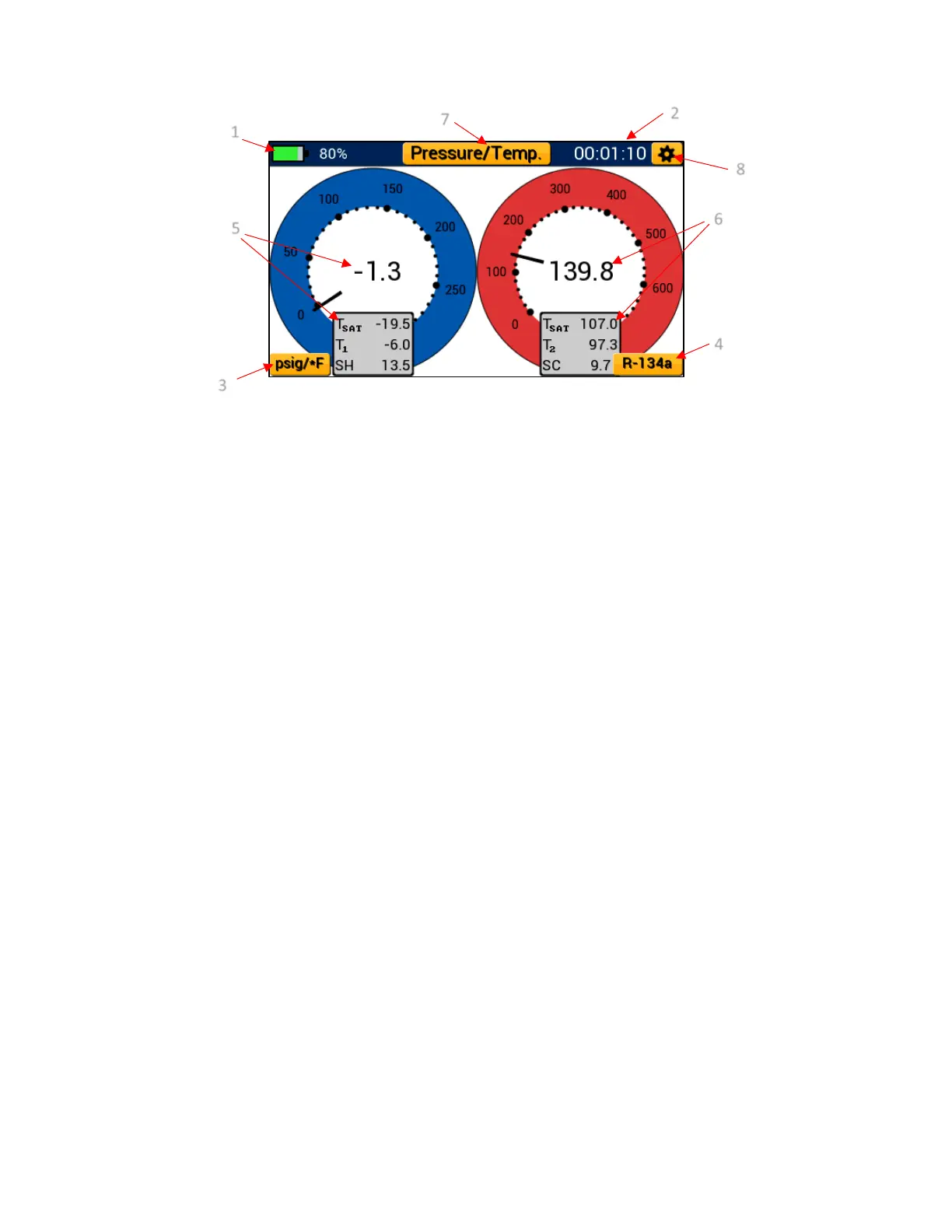
1. Battery Level Indicator
2. Session Timer
3. Currently Selected Pressure & Temperature Units – Unit Settings Menu Shortcut
4. Currently Selected System Refrigerant – Refrigerant Settings Shortcut
5. Low Side Pressure & Temperature Measurement
6. High Side Pressure & Temperature Measurement
7. Current Mode Selection – Modes Menu Button
8. General Settings Button
Interpreting the Pressure Analog Gauges:
Pressure/Temperature mode features a set of fully functional digital analog pressure gauges.
Each gauge operates on a linear scale with minor divisions indicated by small dots and major
divisions by larger dots respectively. When adjusting the selected pressure unit, the gauge face
will update accordingly to reflect that unit of measure. High and low side pressure is displayed in
a digital format at the center of each blue and red analog gauge respectively. Each gauge needle
adjusts in real time and can be used to observe fluctuations in pressure as if utilizing a real analog
gauge. All temperature readings are conveniently displayed below each gauge as Tsat (saturation
Temperature), T1/T2 (system temperature), and SH/SC (superheat & subcool).
Interpreting the Pressure and Temperature Line Graphs:
Each digital analog gauge can be transformed into a line graph (shown in Figure 18) by tapping
anywhere within the center of the gauge. While in graph mode, both system pressure and
temperature are plotted on a linear scale and are denoted as P1/P2 and T1/T2. The pressure and
temperature graphs utilize an orange leader line to plot new data from left to right. Old data is
conveniently displayed to the right of the leader line such that it can be compared to newer data
Figure 17: Pressure/Temperature Mode Diagram


 To Next Page