18
Operation
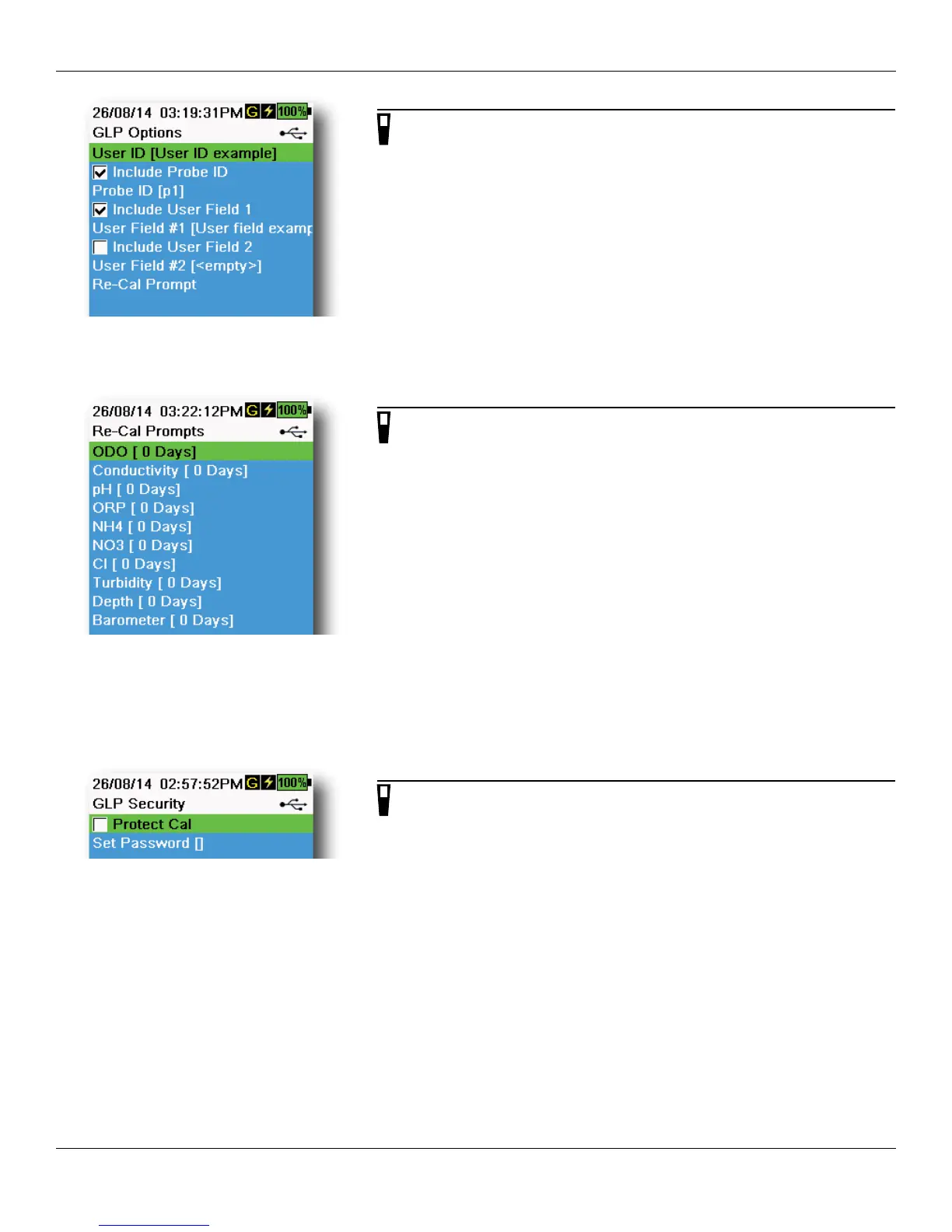
Figure 13 GLP Options
GLP Options
→ GLP → Options
User ID, Probe ID, or User Field #1 or 2 can be user-defined for positive
GLP file identification of:
• The person calibrating the instrument.
• The sensor/cable serial number used during calibration (or other,
user-defined Probe ID).
• Other user-specific identification (User Field #1 and #2) (Figure 13).
NOTE: User Field can be used to describe the condition of the
probe. For example, new sensor or new ODO cap.
Figure 14 Re-Cal Prompts
Re-Cal Prompts
→ GLP → Options → Re-Cal Prompts
Re-Cal Prompts provide a reminder to recalibrate a probe in the
user-defined number of days (Figure 14).
The Re-Cal prompt will be displayed in the message area of the main
display when the set time has elapsed (Figure 9 on page 15).
Select the desired sensor Re-Cal prompt, then enter the desired number
of days before the Re-Cal prompt occurs.
Set the sensor value to zero (0) days (default) to turn off Re-Cal prompts.
NOTE: When enabled and the set amount of time since the last
calibration has passed, the Re-Cal prompt will be shown
when the instrument is turned on.
Figure 15 GLP Security
GLP Security
→ GLP → Security
The Calibration menu can be password protected to prevent accidental
or unauthorized sensor calibration (Figure 15).
1. From the GLP menu, select Security, then enter the default
password “ysi123”.
2. Select Set Password [] and change the default password.
3. Select the Protect Cal check box to password protect the
Calibration menu.
NOTE: Write down and keep the password in a safe place. Contact
YSI Technical Support if you lose the password (Technical
support on page 81).




 To Next Page