19
Operation
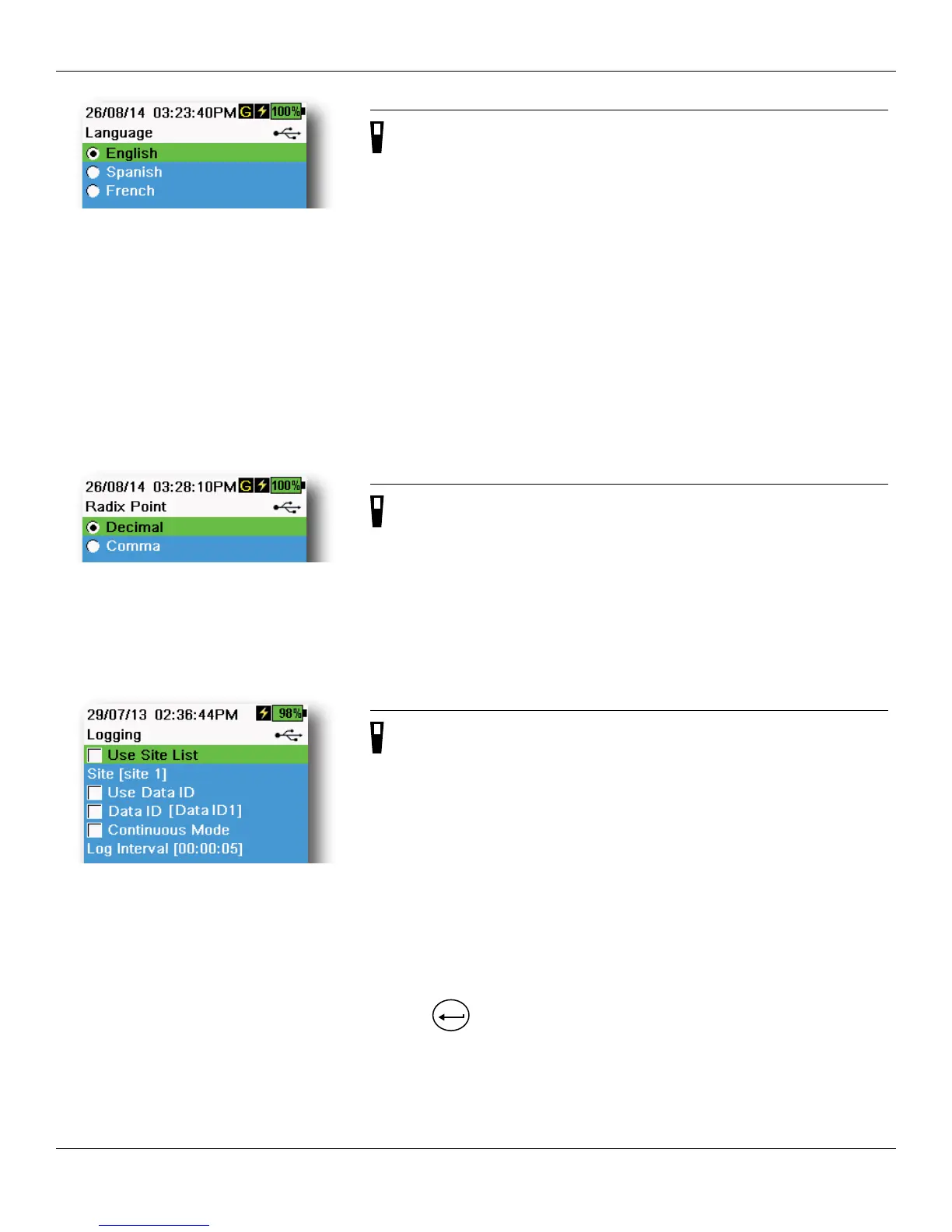
Figure 16 Language
Language
→ Language
The ProDSS is shipped with English enabled. If a different language
is desired and selected, the ProDSS will take approximately 10 to 20
seconds to enable the new language (during the first installation only).
Optional languages:
• French
• German
• Italian
• Japanese
• Norwegian
• Portuguese
• Simplified Chinese
• Spanish
• Traditional Chinese
Figure 17 Radix Point
Radix Point
→ Radix Point
The radix point can be changed to display a comma or a decimal in
numeric displays (e.g. 1.00 becomes 1,00 when Comma is selected)
(Figure 17).
Figure 18 Logging
Logging
→ Logging
The Logging menu allows user-defined site and Data ID lists to be added
to the logged data. Add a Site or Data ID, then select the applicable
check box to log data to that site and/or Data ID (Figure 18).
Continuous Mode ( Interval logging): Select the Continuous Mode check
box and enter the user-defined Log Interval (in HH:MM:SS -
hours:minutes:seconds) to log samples continuously at the specified
time interval. The Run screen will display Start Logging... when in
Continuous Mode.
One sample logging: Clear the Continuous Mode check box. The
Run screen will display Log One Sample. A sample will be logged each
time the
ENTER
key is pushed when in the Run screen.




 To Next Page