ZEISS Start-Up and Operation Primovert
18 415510-7244-001 12/2014
3.1.7 Mounting the Specimen Guide and
Inserting the Mounting Frame
• If attached, remove the stage enlargement plate
from the right side of the stage.
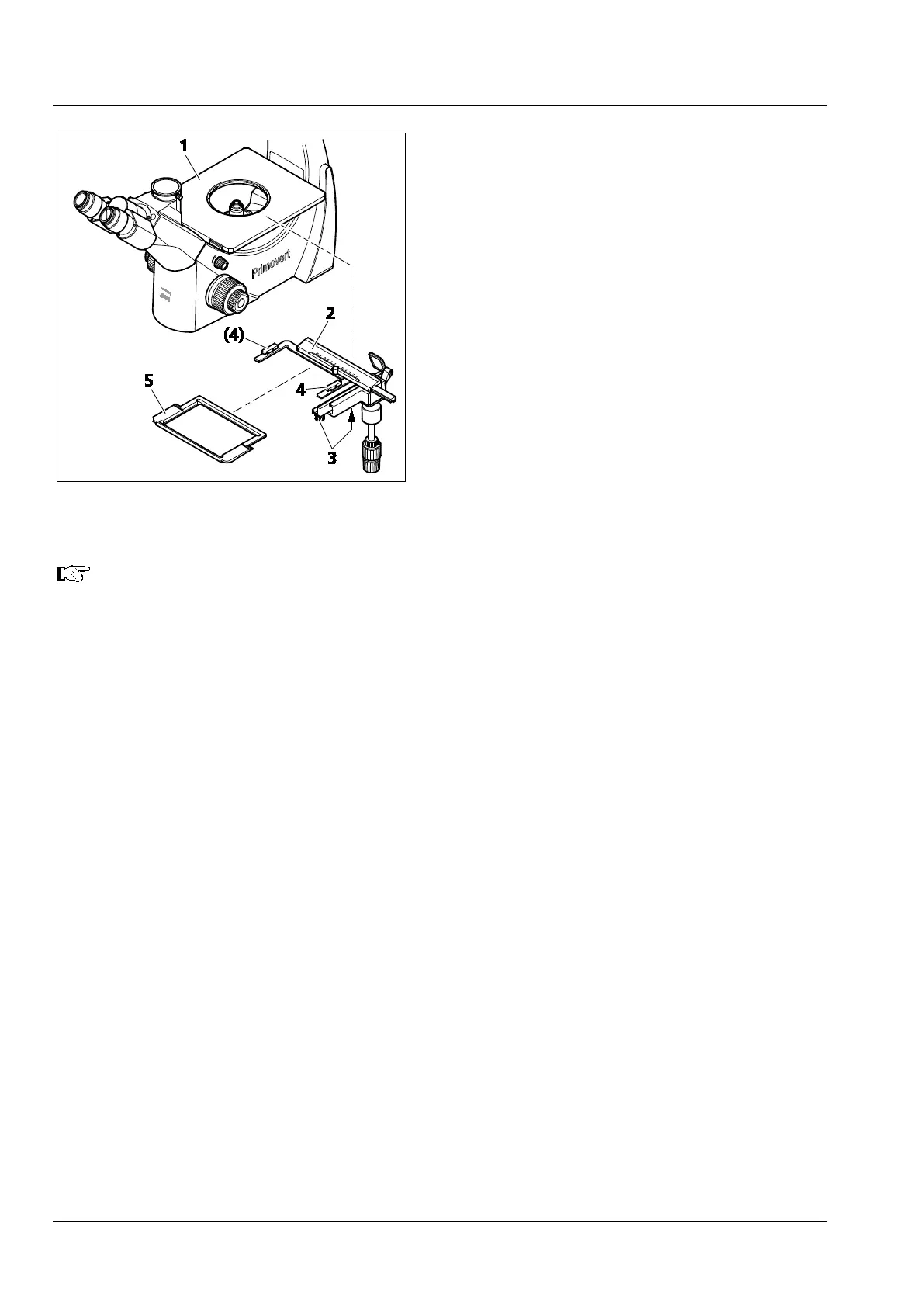
• Attach the specimen guide (Fig. 8/2) from
below to the right side of the stage (Fig. 8/1)
and fasten it with the two knurled screws
(Fig. 8/3) of the specimen guide.
• Insert the universal mounting frame M or the
mounting frame for 96-position microtiter
plates (Fig. 8/5) into the specimen guide,
depending on the sample vessel used. Make
sure that the mounting frame stops properly in
the two fixing clips (Fig. 8/4).
• For Petri dishes with 65 mm or 54 mm
diameter, insert the corresponding mounting
frame into the mounting frame for microtiter
plates.
If required, the mounting frame for Petri dishes d=35
mm can be inserted additionally into
the mounting frame for Petri dishes d=65 mm.
Fig. 8 Mounting the specimen guide and
inserting the mounting frame











 To Next Page