Primovert Start-Up and Operation ZEISS
12/2014 415510-7244-001 29
The various states of the integrated camera are displayed by LED.
System status LED display / operating mode
Start sequence LED lights up green
Start sequence completed LED flashes green
Ready for operation LED lights up green
Storage process LED flashes green
Error LED flashed red for approx. 5 seconds
Table 3 LED status displays
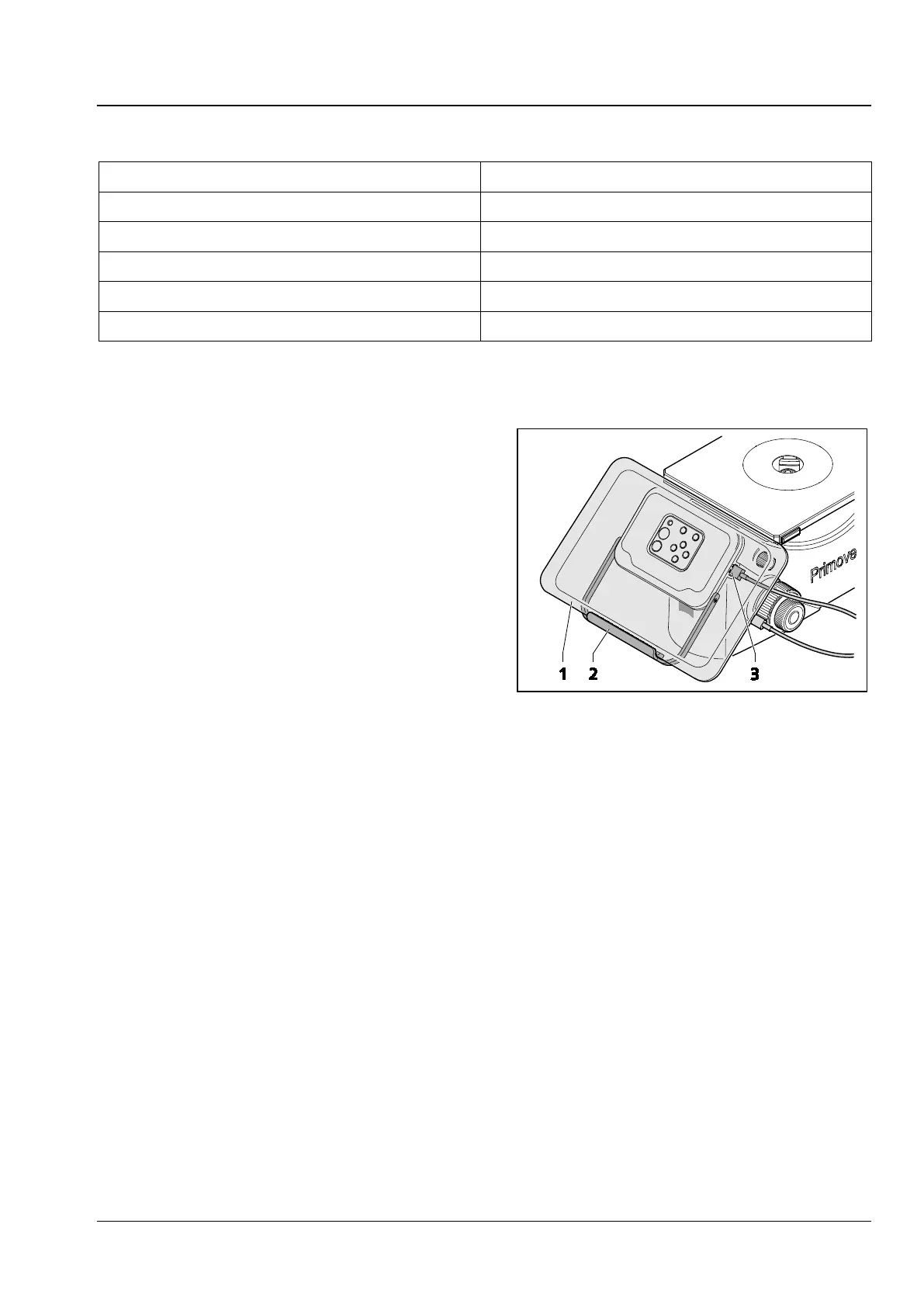
3.3.2 Connect iPad to USB charge port
• If you want to load the iPad use the USB charge
port (Fig. 17/3) for iPad.
• Connect the iPad via USB cable with the USB
charge port in front of the iPad holder.
• For this purpose swivel down the holder
(Fig. 17/2) and insert the iPad (Fig. 17/1).
• Insert the mini USB plug into the USB 2.0 port
on the iPad.
• Insert the USB plug into the USB charge port
(Fig. 17/3) in front of iPad holder.
1 iPad
2 Holder
3 USB charge port for iPad
Fig. 17 Connect iPad to USB charge port











 To Next Page