ZEISS Start-Up and Operation Primovert
28 415510-7244-001 12/2014
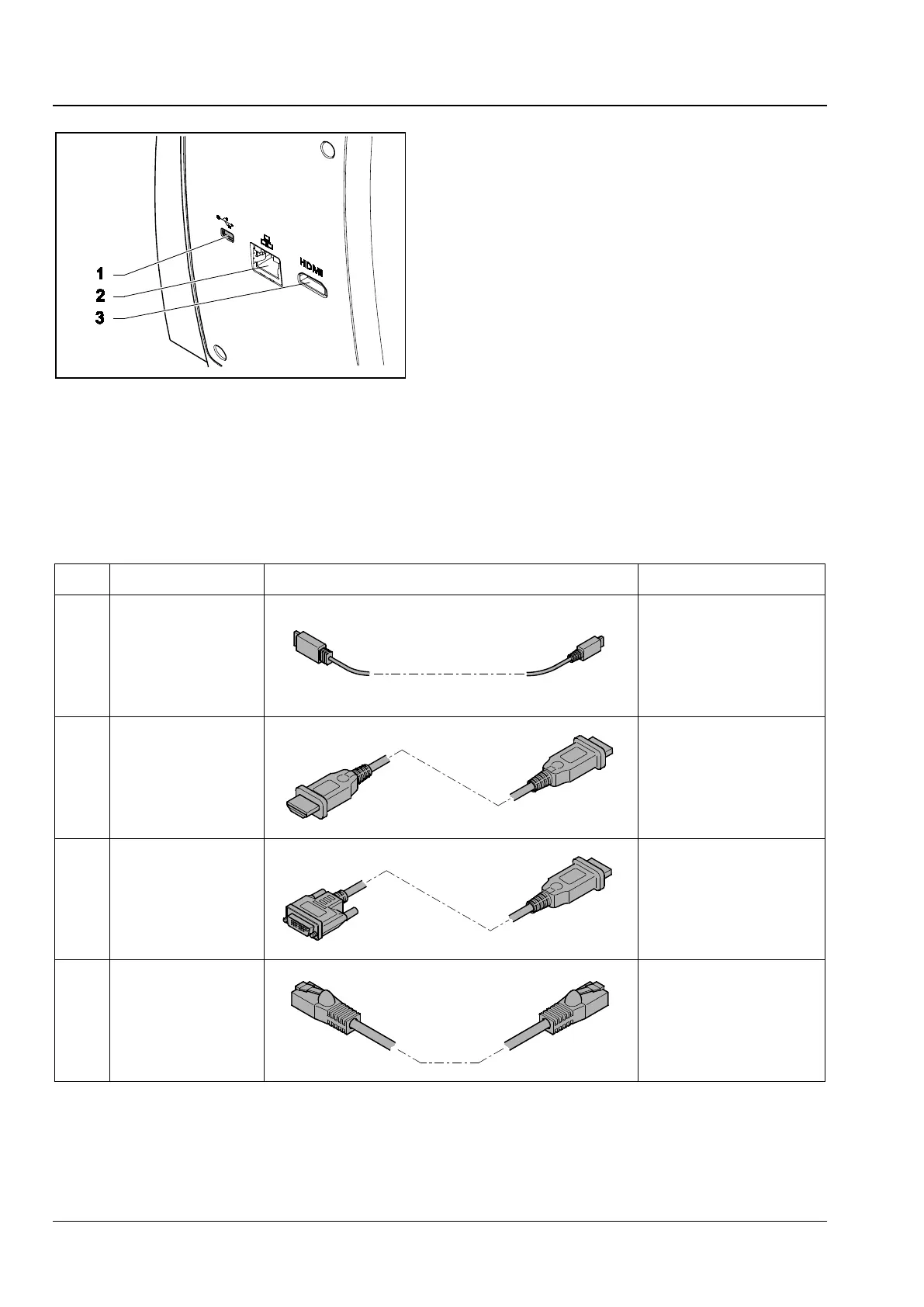
The camera has a number of ports:
− USB 2.0 port (Fig. 16/1) for data communication
when connected to PC, as well as power supply,
see section 3.3.3.2
− HDMI port (Fig. 16/3) for image data transfer to
a monitor, TV or projector, see section 3.3.3.3
− Fast Ethernet port (Fig. 16/2) for communication
and image data transfer, Ethernet port can
connect to external router, see section 3.3.3.4
The microscope stand has a SD / SDHC card port
(Fig. 18/2) at the left side for storing image data,
see section 3.3.3.1.
The following connecting cables are required for use of the ports:
Item Name Figure Remarks
1 USB 2.0 cable
Connection between
integrated camera and PC
2 HDMI cable
(not supplied)
Connection between
integrated camera and
monitor, TV or projector
3 HDMI / DVI adapter
cable
(not supplied)
Connection between
integrated camera and
monitor or projector
4 Ethernet cable
Connection between
integrated camera and
network or WLAN router
Table 2 Connections
1 USB 2.0
2 Netport in Primovert HDcam
3 HDMI
Fig. 16 Interfaces on reverse side











 To Next Page