SD CARD READER OPERATION
ACCESSING SD CARD MODE
■ Insert the SD card in the slot and press the SRC button on the remote control to switch
to the SD card mode.
USING THE TOUCHSCREEN CONTROLS
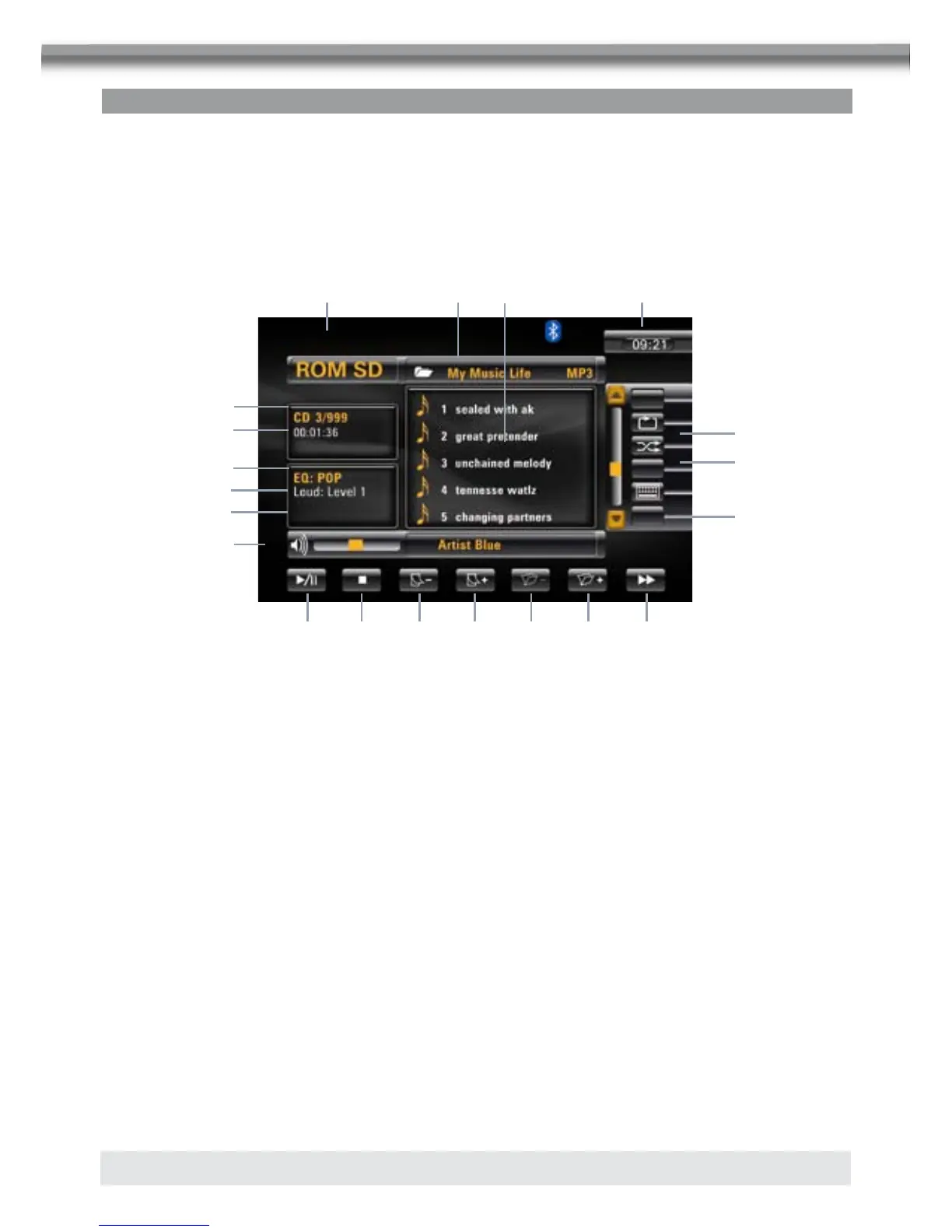
■ The touch keys for SD card playback are described below. The interface is similar to the
MP3 mode.
1. Current source indicator, touch this area to access MAIN menu.
2. Disc title.
3. Track title.
4. Current time.
5.
E Touch to play/pause.
6. F Touch to stop disc playback.
7. G Touch to turn to the previous page.
8. H Touch to turn to the next page.
9. I Touch to display previous folder.
10. J Touch to display next folder.
11. f Touch to select the next track.
12. Q Touch to activate/deactivate repeat single mode.
13. R Touch to activate/deactivate random mode.
14. S Touch to display the numeric keypad on the screen to access a track directly.
15. SD card indicator, display the current track and total number of tracks on SD card.
16. Elapsed playing time.
17. System EQ setting.
18. Loud setting indicator.
19. Rear setting.
20. Volume indicator.
2 3 4
bn
bo
bp
bq
br
bs
cl
6
1
5
7 8
9 bl bm
bu
bt



 To Next Page