OPERATION J PAGE 21
PLaybackShuttle Operation (For Special Video Effects)
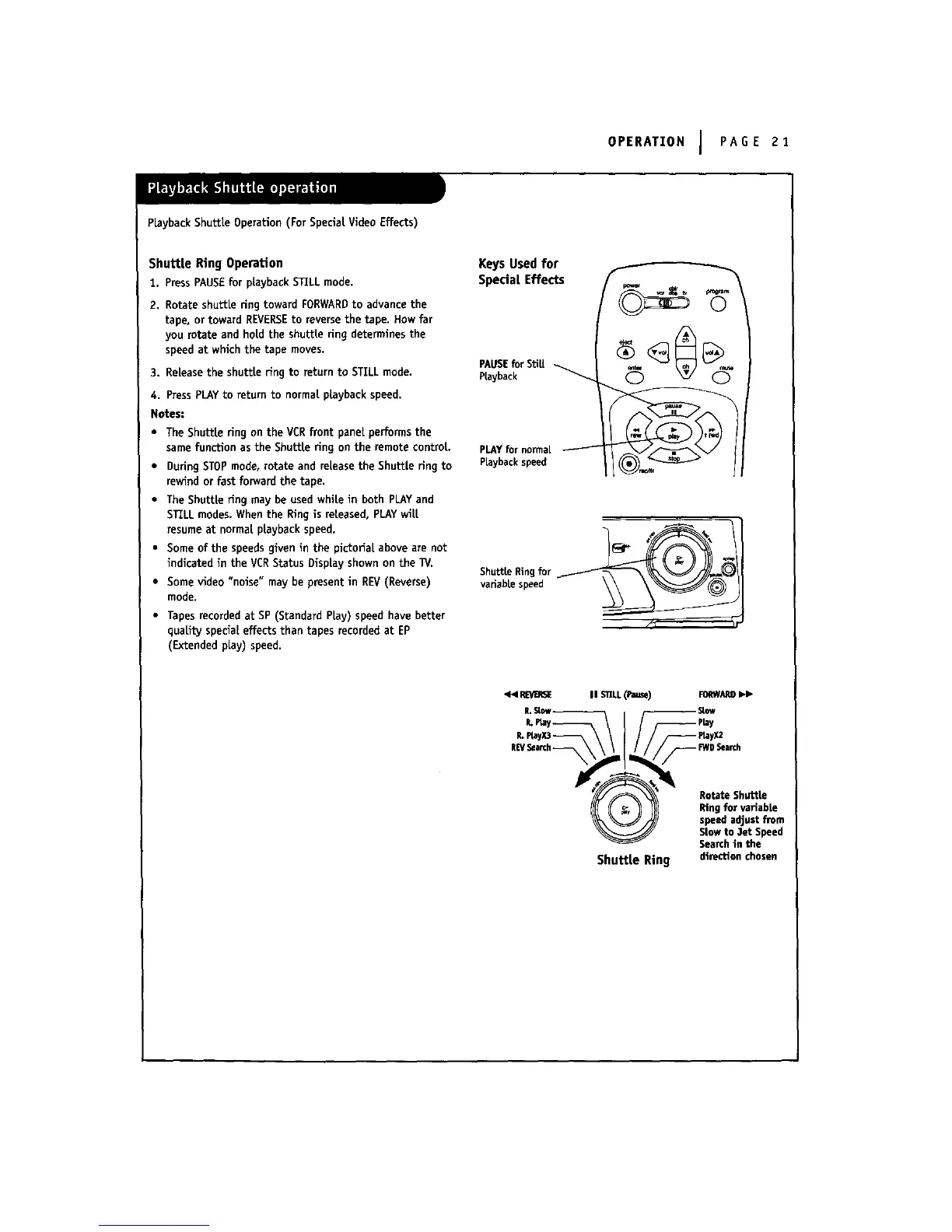
ShuttLe Ring Operation
1. PressPAUSEfor playbackSTLLLmode.
2. Rotate shuttle ring toward FORWARDto advancethe
tape, or toward REVERSEto reversethe tape. How far
you rotate and hold the shuttle ring determines the
speed at which the tape moves.
3. Release the shuttle ring to return to STILL mode.
4. PressPLAy to return to normal playback speed.
Notes:
• The Shuttle ring on the VCRfront panel,performs the
same function as the Shuttle ring on the remote control.
• During STOPmode, rotate and release the Shuttle ring to
rewind or fast forward the tape.
• The Shuttle ffng may be used while in both PLAYand
STLLLmodes. When the Ring is released, PLAYwill
resume at normal playback speed.
• Some of the speedsgiven in the plctoffal above are not
indicated in the VERStatus Display shown on the TV.
• Some video "noise" may be present in REV(Reverse)
mode.
• Tapes recorded at SP (Standard PLay) speed have better
quality special effects than tapes recorded at EP
(Extended pLay) speed.
KeysUsedfor
SpedaiEffects
PAUSE for StiU
Playback
PLAYfor normal
PLaybackspeed
ShuttleRingfor__/_//_.._
variablespeed
•_ m'_SE mlSm.L(_) reRWARO_
L_yx3-_ \ \ ( / / /--P_yx2
REVSearch_ \ \ \ / / / /_FWDSearch
Rotate Shuttle
Y_( _ _ Ringfor variable
_,_ / speedadjust from
_j_ Slowto 3et Speed
Searchin the
Shuttle Ring direction chosen



 To Next Page