OPERATION I PAGE 33
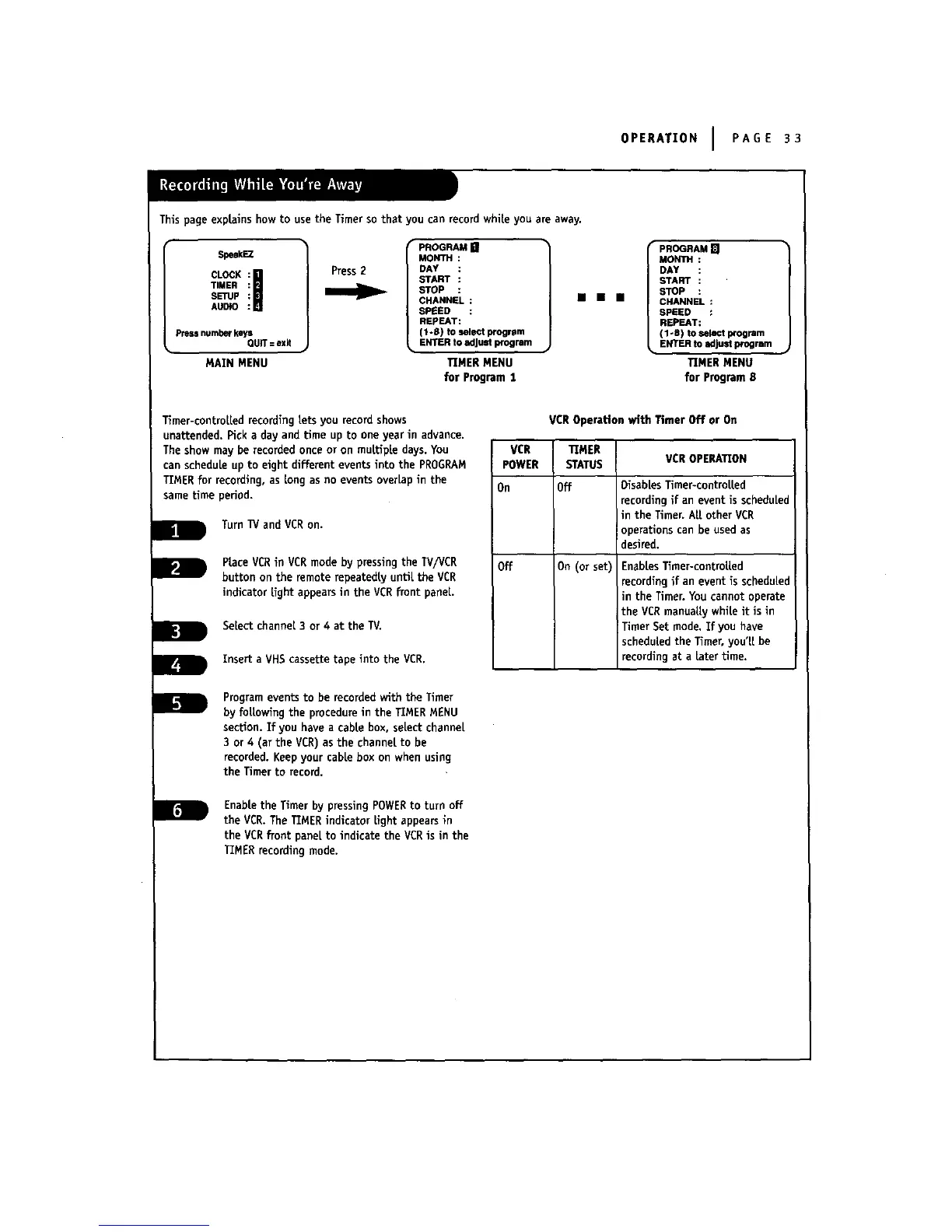
This page explains how to use the Timer so that you can record while you are away.
$peakEZ
CLOCK
TIMER
SETUp
AUDIO
pressnumber keys
QUiT= exit
MAIN MENU
Press 2
PROGRAM []
MONTH
DAY
START
STOP
CHANNEL :
SPEED :
REPEAT:
(1-8) to select program
ENTER to adjust program
TIMER MENU
for Program I
mmmm
PROGRAM []
MONTH :
DAY
START
STOP
CHANNEL :
SPEED :
REPEAT:
(1-8) to select program
ENTER to adjust program
TIMER MENU
for Program 8
Timer-controLLedrecording Lets you record shows
unattended. Pick a day and time up to one year in advance.
The show may be recorded once or on muLtipLe days. You
can schedule up to eight different events into the PROGRAM
TIMER for recording, as Longas no events overLapin the
same time period.
Turn 13/and VCRon.
PLaceVCR inVCR mode by pressingthe TV/VCR
buttonon the remoterepeatedlyunUL theVCR
indicatorLightappearsin the VCR frontpaneL.
SeLectchannel 3 or 4 at the IV.
Inserta VHS cassettetapeintothe VCR.
VCROperationwith TimerOff or On
VCR I TIMER
POWER I STATUS
(
On IOff
off 1On (or set)
VCR OPERATION
DisabLesTimer-controLLed
recording if an event is scheduled
tin the Timer. ALLother VCR
Ioperations can be used as
desired.
EnabLesTimer-controLLed
recording if an event is scheduLed
in the Timer.You cannot operate
the VCRmanuaLLywhile it is in
Timer Set mode. If you have
scheduled the Timer, you'LLbe
recording at a Later time.
Programeventsto be recordedwith theTimer
by fottowlngthe procedureinthe TIMER MENU
section.Ifyou have a cablebox,se[ectchannel
3 or4 (atthe VCR) as the channelto be
recorded.Keep your cabLebox on when using
the Timerto record.
EnabLetheTimerbypressingPOWER toturnoff
theVCR.TheTIMERindicatorLightappearsin
theVCRfrontpaneltoindicatetheVCRisinthe
TIMERrecordingmode.



 To Next Page