PAGE 18 I CONTROLS AND DISPLAYS
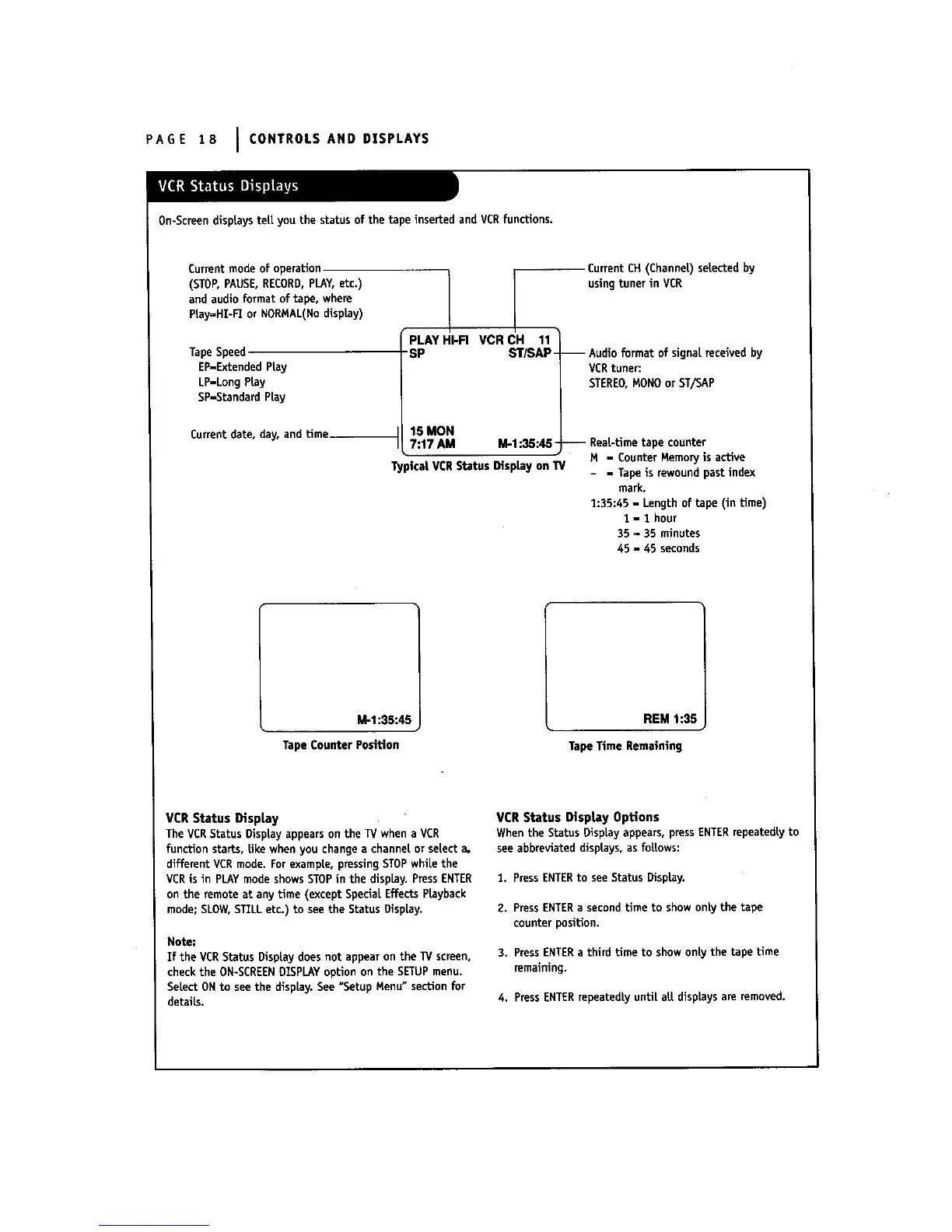
On-Screen displays teLLyou the status of the tape inserted and VCRfunctions.
Current mode of operation
(STOP,PAUSE,RECORD,PLAY,etc.)
and audio format of tape, where
Piay_HI-I_ or NORMAL(Nodisplay)
Tape Speed
EP-Extended PLay
LP-Long Play
SP-Standard Play
Current date, day, and Lime__
PLAY HI-FI VCR CH 11
-SP ST/SAP-
15 MON
7:17 AM M-1:35:45-
TypicalVCRStatus DispLayonTV
CurrentCH(ChanneL)selectedby
usingtunerin VCR
-- Audio format of signal received by
VCRtuner:
STEREO,MONOor ST/SAP
-- ReaL-tlmetape counter
M - CounterMemoryis active
- = Tapeis rewoundpastindex
mark.
1:35:45- Lengthof tape (in time)
1 - 1 hour
35 = 35 minutes
45 - 45 seconds
M-1:35:45
TapeCounter Posffion
REM 1:35
TapeTime Remaining
VCR Status Display
The VCRStatus DispLayappears on the TV when a VCR
function starts, Uke when you change a channet or setect a.
different VCR mode. For examp|e, pressingSTOPwhila the
VCR is in PLAYmode shows STOPin the display. PressENTER
on the remote at any Lime (except SpeciaLEffects Playback
mode; SLOW,STZLLetc.) to see the Status Display,
Note:
If the VCRStatus Display does not appear on the _/screen,
check the ON-SCREEN01SPLAYoption on the SETUPmenu.
SeLectONto see the display. See "Setup Menu" section for
details.
VCR Status DisptayOptions
When the Status Display appears, pressENTERrepeatedty to
see abbreviated disptays, as follows:
1. PressENTERto seeSLaLusDisplay.
2. PressENTERa secondtime to showonly the tape
counter position.
3. PressENTERa third Lime to show onty the tape time
remaining.
4. PressENTERrepeatedly until aLLdisplays are removed.



 To Next Page