Somequickandeasytips to fixing prob[emsyourself.
Before Catting for Service
TROUBLESHOOTING I PAGE 35
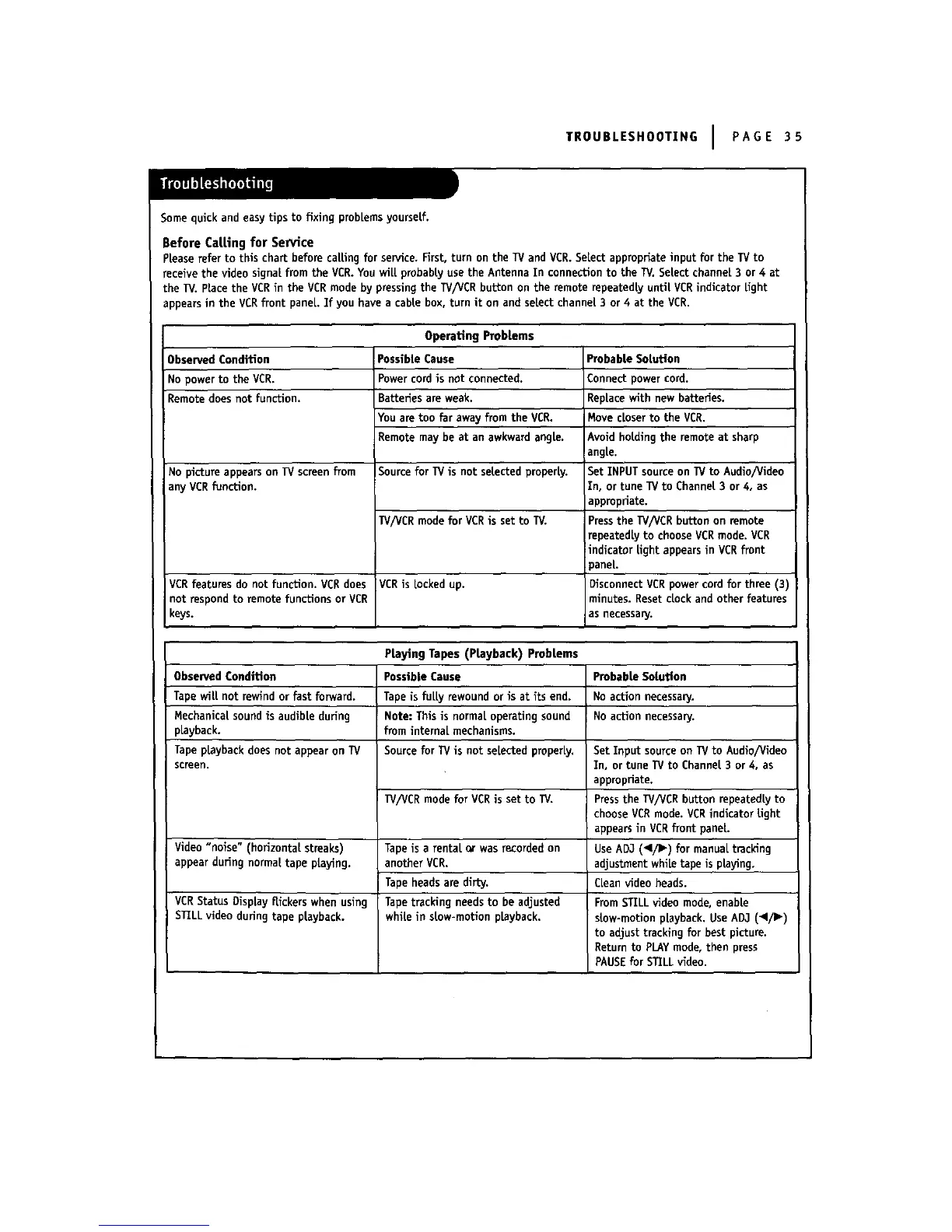
PLeaserefer to this chart before caLLingfor senlice. First, turn on the IV and VCR. Select appropriate input for the TV to
receive the video signal from the VCR. You will probably use the Antenna In connection to the W. Select channel 3 or 4 at
the W. place the VCRin the VCR mode by pressingthe IV/VCR button on the remote repeatedly until VCRindicator Light
appearsin the VCRfront panel. If you have a cable box, turn it on and select channel 3 or 4 at the VCR.
Operating Probtems
Observed Condition Probable Solution
No power to the VCR. Connect power cord.
Remote does not function.
No picture appears on IV screen from
any VCRfunction.
VCRfeatures do not function. VCRdoes
not respond to remote functions or VCR
keys.
PossibLeCause
Powercord is not connected.
Batteries are weak.
Youare too far away from the VCR.
Remote may be at an awkward angle.
Source for TV is not selected properly.
TV/VCRmodefor VCRis setto W.
VCRis locked up.
Replacewithnew batteries.
Movecloserto the VCR.
Avoid holding the remote at sharp
angle.
Set INPUT source on TV to Audio/Video
in, or tune TV to Channel 3 or 4, as
appropriate.
Pressthe TV/VCR button on remote
repeatedly to chooseVCR mode. VCR
indicator light appears in VCRfront
)ane[.
DisconnectVCRpowercord for three(3)
minutes.ResetcLockandotherfeatures
as necessary.
PrayingTapes (Ptayback) Probtems
Observed Condition
Tape wilt not rewind or fast forward.
Mechanical sound is audible during
pLayback.
Tape pLaybackdoes not appear on TV
screen.
Video"noise" (horizontalstreaks)
appearduringnormaltape playing.
VCRStatus Display flickers when using
STILL video during tape playback.
Possible Cause
Tape is fuLLyrewound or is at its end.
! Note: This is normaLoperating sound
from internaL mechanisms.
Source for TVis not selected properly.
IV/VCR mode for VCRis set to TV.
Tape is a rentaL or was recordedon
another VCR.
Tape heads are dirty.
Tape tracking needs to be adjusted
while in stow-motlon playback.
Probable Solution
No action necessary.
No action necessary.
Set Input source on lV to Audio/video
In, or tune IV to Channel 3 or 4, as
appropriate.
Pressthe IV/VCR button repeatedly to
choose VCRmode. VCRindicator light
appearsin VCRfront paneL.
UseADJ (_Ii_) for manuaLtracking
adjustment while tape is playing.
CLeanvideo heads.
From STILL video mode, enable
slow-motion playback. Use AD3 (,/1_)
to adjust tracking for best picture.
Return to PLAYmode, then press
PAUSEfor STILL video.



 To Next Page