OPERATION I PAGE 23
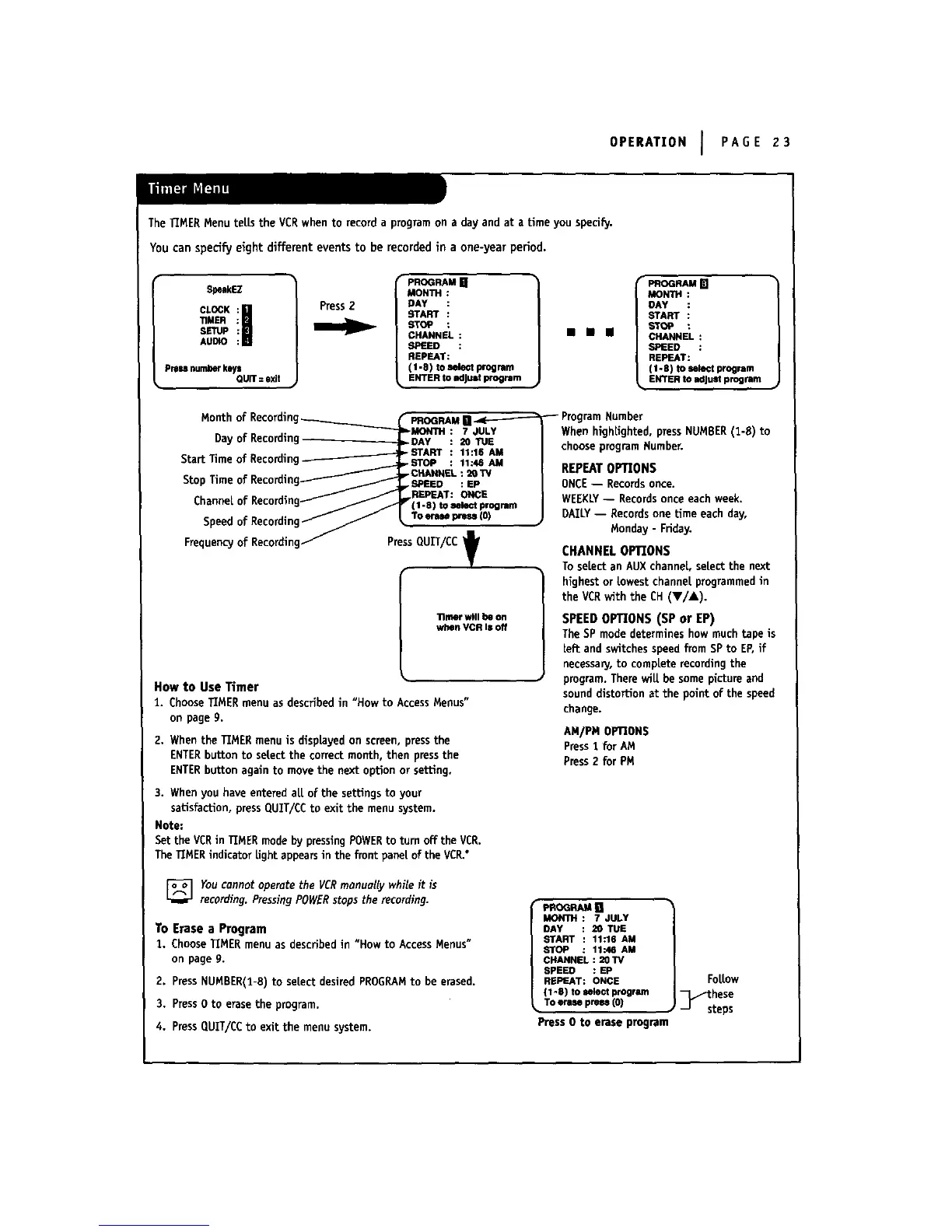
The TIMER Menu teLls the VCR when to record a program on a day and at a time you specify,
You can specify eight different events to be recorded in a one-year period.
SpeakEZ
CL Ki|
TIMER
SETUp
AUDIO
Pressnumberkey=
QUIT: exit
Press2
PROGRAM[]
MONTH
DAY
START
STOP
CHANNEL:
SPIELED :
REPEAT:
(1-8) to emlectprogram
ENTERto adJU=tprogi_Bm
mmm
_OGHAM[]
MONTH
DAY
START
STOP
CHANNEL:
SPEED :
REPEAT:
(1.e) toselectprogram
ENTERto adjustprogram
Month
Dayof Recording
StartTimeof Recording
StopTime
Channelof Recordir
Speedof Recordln_
FrequencyofRecordlnd
D
PressQUIT/CC 't
•lmer will be on
when VCR Isoff
How to Use Timer
1. ChooseTIMERmenuas describedin "How to AccessMenus"
onpageg.
2. Whenthe TIMERmenuis displayedon screen,pressthe
ENTERbuttonto selectthe correct month, then pressthe
ENTERbuttonagainto movethe next optionor setting,
3. WhenyouhaveenteredaLLof the settingsto your
satisfaction,pressCIUIT/CCto exit the menusystem.
Note:
Setthe VERin TIMERmodebypressingPOWERto turnoffthe VCR.
TheTIMERindicatorLightappearsin the front pane[of theVCR.°
When hlghUghted, press NUMBER(1-8) to
choose program Number.
REPEAT OPTIONS
ONCE-- Recordsonce.
WEEKLY-- Recordsonce each week.
DAILY-- Records one Lime each day,
Monday - Friday.
CHANNELOPTIONS
ToseLectan AUXchanneL,selectthe next
highestor LowestchanneLprogrammedin
the VCRwith the CH(V/&).
SPEEDOPTIONS (SP or EP)
TheSPmodedetermineshowmuch tape is
[eft andswitchesspeedfromSPto EF,if
necessanJ,to compLeterecordingthe
program.TherewiLLbesomepictureand
sounddistortionat the point of the speed
change.
AM/PM OPTIONS
Press1 for AM
Press2 for PM
Youcannotoperatethe VCRmanuallywhileit is
recording.PressingPOWERstopstherecording.
To Erase a Program
1. ChooseTIMERmenuasdescribedin "Howto AccessMenus"
onpageg.
2. PressNUMBER(I-8)to seLectdesiredPROGRAMto be erased.
3. Press0 to erasethe program.
4, PressQUIT/CCto exit the menusystem.
pPa_G_AMB
MONTH: 7 JULY
DAY 20 TUE
START 11:16 AM
STOP 11".46AM
CHANNEL: 20TV
SPEED : EP
REPEAT: ONCE
(1 4) to_lect program
TOerm press(0)
Press 0 to erase program
FoLLow
_these
steps



 To Next Page