PAGE 12 I ZNSTALLATTON
Things you may want to do before you operate your VCR.
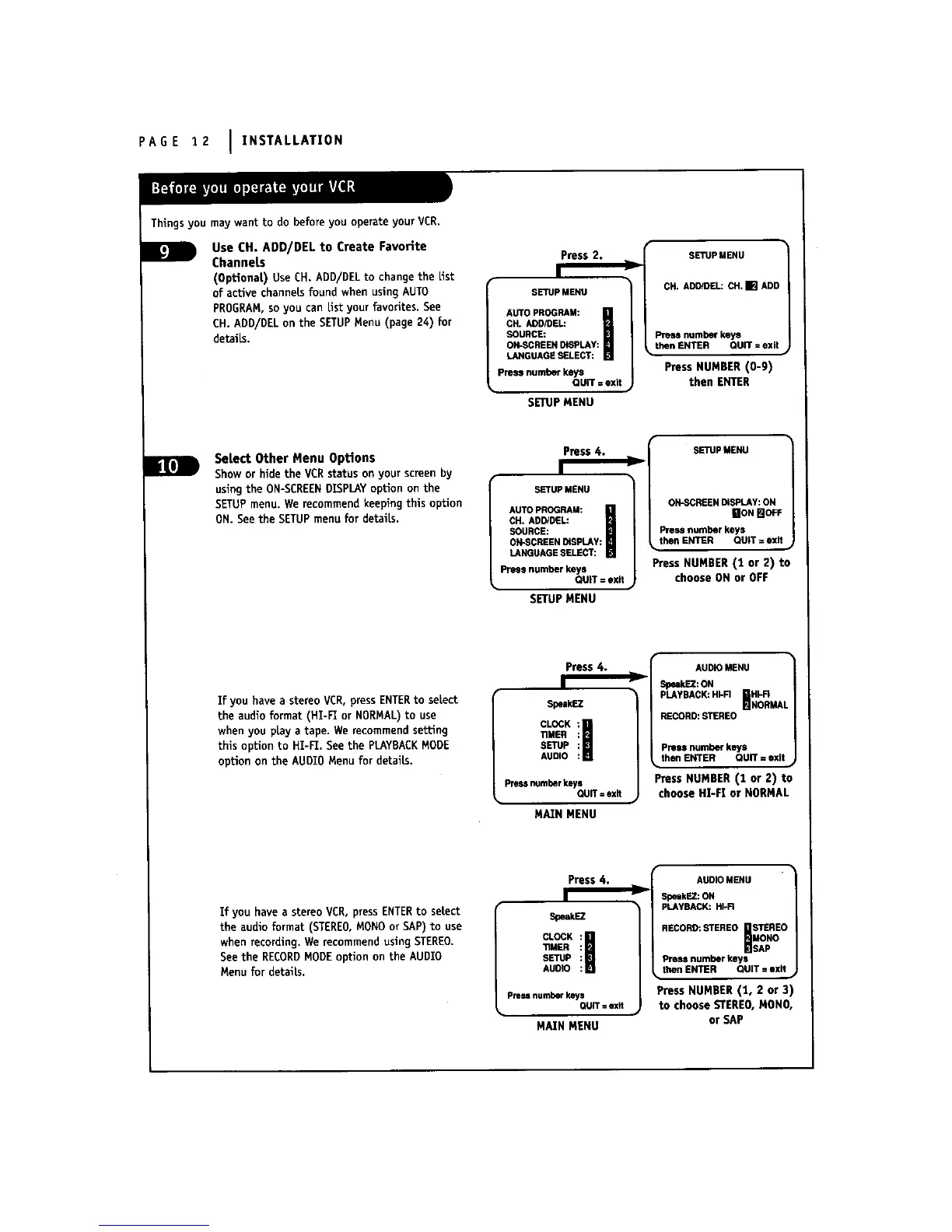
Use CH. ADD/DEL to Create Favorite
Channets
(Optional) Use CH. ADD/DELto change the List
of active channels found when using AUTO
PROGRAM,so you can Listyour favorites. See
CH. ADD/DEL on the SETUPMenu (page 24) for
details.
press 2.
SETUPMENU
AUTO PROGRAM:
CH. ADD/DEL:
SOURCE:
ON-SCREENDISPLAY:
LANGUAGESELECT:
Press number keys
QUiT = exit
SETUPMENU
SETUP MENU
CH.ADD/DEL:OH.[] ADD
Pressnumberkeys
thenENTER QUIT =exit
Press NUMBER (0-9)
then ENTER
B
Select Other Menu OpUons
Show or hide the VCR status on your screen by
using the ON-SCREENDISPLAYoption on the
SETUPmenu, We recommend keeping this opUon
ON. See the SETUPmenu for details.
Press 4.
I
SETUPMENU
AUTOPROGRAM:
CH.ADD/DEL:
SOURCE:
ON-SCREENDISPLAY:
LANGUAGESELECT:
Pressnumberkeys
QUIT=exit
SETUPMENU
SETUPMENU
ON-SCREENDISPLAY:ON
gON BOFF
Pressnumberkeys
thenENTER QUIT= exit
PressNUMBER(1 or 2) to
chooseONor OFF
If you have a stereo VCR, press ENTERto select
the audio format (HI-F1 or NORMAL)to use
when you play a tape. We recommend setting
this option to HI-F1. See the PLAYBACKMODE
option on the AUDIO Menu for details.
Press 4.
SpeakEZ
CLOCK : I
TIMER :
SETUP :
AUDIO :
Pressnumber keys
QUIT : exit
MAIN MENU
AUDIOMENU
D
SpeakEZ:ON
HI'FI
PLAYBACK:HkFI _NORMAI
RECORD:STEREO
Pm_ number keys
• thenENTER QUIT: exit •
Press NUMBER (1 or 2) to
choose HI-FI or NORMAL
If you have a stereo VCR, press ENTERto select
the audio format (STEREO,MONOor SAP) to use
when recording. We recommend using STEREO.
See the RECORDMODEoption on the AUDIO
Menu for details.
Press 4.
SpeakEZ
CLOCK I
TIMER
SETUP
AUDIO
Pressnumberkeys
QUIT=exit
MAIN MENU
AUDIO MENU
r
SpeakEZ:ON
PLAYBACK:HI-FI
RECORD:STEREO_STEREOsApMONO
Prestonumberkeys
• thenENTER QUIT= exit •
Press NUMBER (!, 2 or 3)
to choose STEREO,MONO,
or SAP



 To Next Page