INSTALLATION I PAGE 11
Some things you must do and others you may want to do before you can operate your VCR.
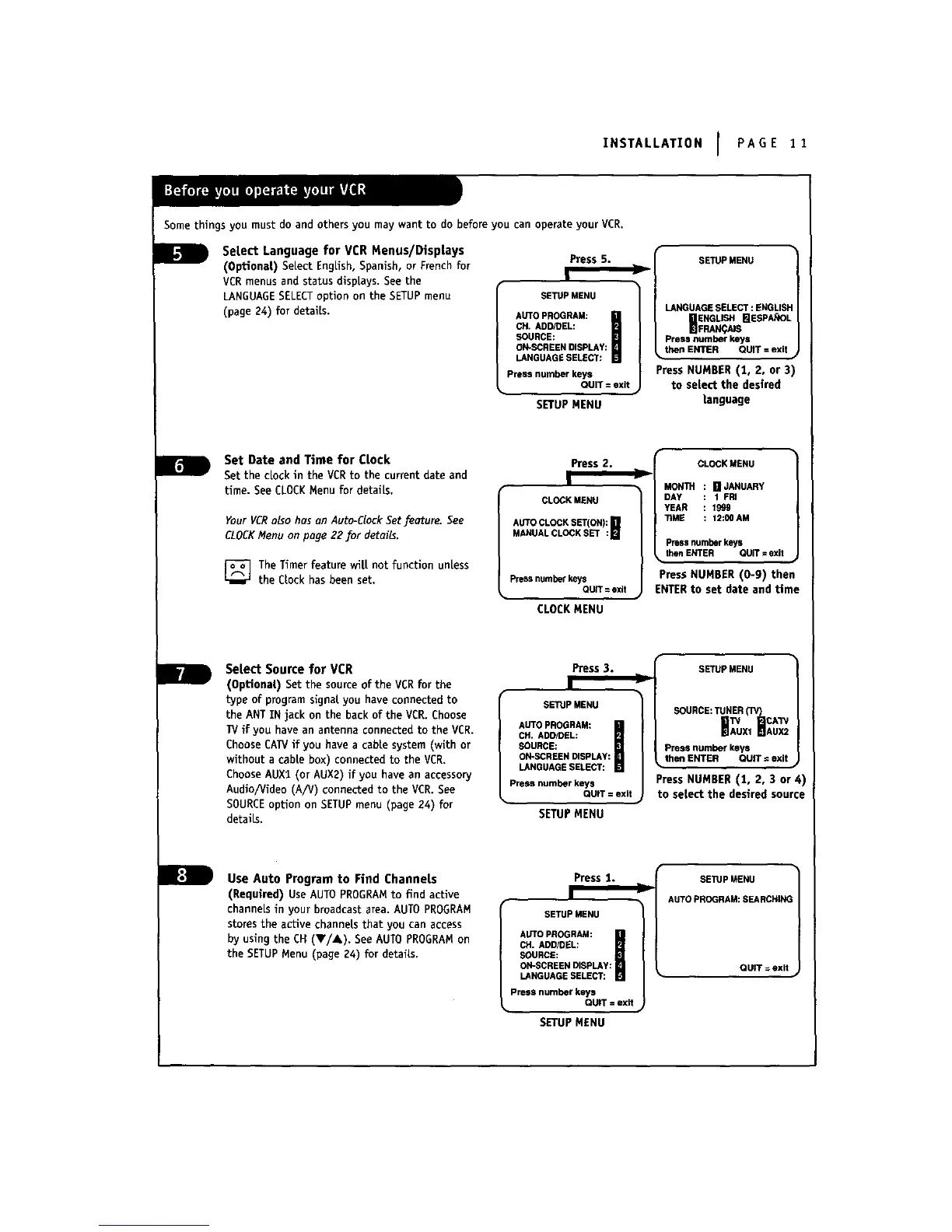
Setect Language for VCR Menus/Displays
(Optional) SeLect EngUsh, Spanish, or French for
VCRmenus and status dispLays.See the
LANGUAGESELECToption on the SETUPmenu
(page 24) for details.
Press 5.
SETUP MENU
AUTOPROGRAM:
CH.ADDfDEL:
SOURCE:
ON-SCREENDISPLAY:
LANGUAGESELECT:
Pressnumberkeys
QUIT=exit
SETUPMENU
SETUPMENU
LANGUAGESELECT:ENGLISI
_ENGUSH _ESPANOL
FRAN_tAIS
Pressnumberkeys
ti,_n EN_R QU_ = exit _
Press NUHBER (1, 2, or 3)
to select the desired
language
Set Date and Time for Clock
Set the clock in the VCRto the current date and
time. See CLOCKMenu for detaiLs.
Your VCRalso has on Auto-Clock Setfeoture. See
CLOCKMenu on poge 22 _or details.
_]The Timer feature wilt not function unless
the CLockhas been set.
Press 2.
!
CLOCKMENU
AUTOCLOCKSET(ON): []
MANUALCLOCKSET :H
Pressnumber keys
QUIT= exit
CLOCKMENU
CLOCKMENU
MONTH [] JANUARY
DAY 1 FRI
YEAR 1999
TiME : 12:00AM
Pressnumberkeys
thenENTER QUIT=exit
Press NUMBER (0-9) then
ENTERto set date and time
Select Source for VCR
(Optionat) Set the source of the VCRfor the
type of program signal you have connected to
the ANT IN jack on the back of the VER. Choose
TVif you have an antenna connected to the VCR.
Choose CAW if you have a cable system (with or
without a cabte box) connected to the VCR,
ChooseAUXl (or AUX2) if you have an accessory
Audio/Video (A/V) connected to the VCR. See
SOURCEoption on SETUPmenu (page 24) for
details,
Press 3.
1
SETUPMENU
AUTOPROGRAM:
CH.ADDIDEL:
SOURCE:
ON%._CREENDISPLAY:
LANGUAGESELECT:
Pressnumberkeys
QUiT=exit
SETUPMENU
SETUPMENU
SOURCE:TUNER(TV}
CAW
HAWUX,BAUX2
Pressnumberkeys
then ENTER QUIT¢exit
Press NUMBER (1, 2, 3 or 4)
to select the desired source
Use Auto Program to Find Channets
(Required) Use AUTO PROGRAMto find active
channels in your broadcast area. AUTO PROGRAM
stores the active channels that you can access
by using the CH (T/_,), See AUTOPROGRAMon
the SETUPMenu (page Z4) for details.
Press 1.
I
SETUPMENU
AUTOPROGRAM:
CH.ADD/GEL:
SOURCE:
ON-SCREENDISPLAY:
LANGUAGESELECT:
Pressnumberkeys
QUIT=exit
SETUPMENU
SETUPMENU
Ji
AUTOPROGRAM:SEARCHIN(
QUIT =exit



 To Next Page