PAGE 10 I INSTALLATION
Things you must do before you can operate your VCR.
B
m
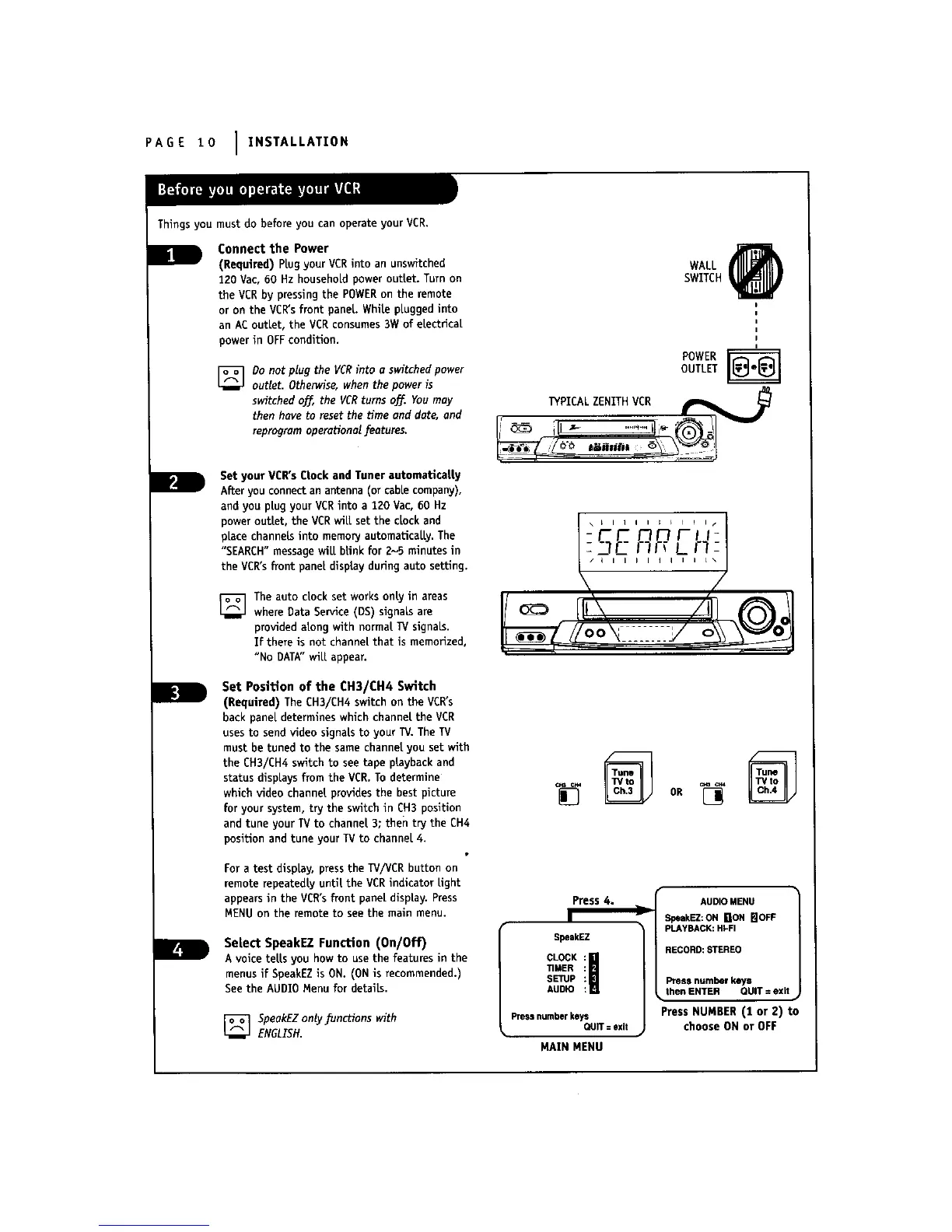
Connect the Power
(Required) PLugyour VCRinto an unswitched
120 Vac, 60 Hz household power outlet. Turn on
the VCRby pressingthe POWERon the remote
or on the VCR'sfront panel. White plugged into
an ACoutlet, the VCRconsumes3W of electrical
power in OFFcondition.
] Do not plug the VCRinto u switched power
outlet. Otherwise, when the power is
switched o_, the VCRturns off.. You may
then have to reset the ttme and date, and
reprogram operational features.
Set your VCR'sClock and Tuner automatlcatty
After you connectan arrtenna (or cable company),
and you plug your VCRinto a 120 Vac, 60 Hz
power outlet, the VCRwill set the clock and
place channels into memory automatically. The
"SEARCH"message will blink for 2-5 minutesin
the VCR'sfront panel display duringauto setting.
] The auto clock set works only in areas
where Data Service (DS) signals are
provided along with normal W signals.
If there is not channel that is memorized,
"No DATA"wilt appear.
Set Position of the CH3/CH4 Switch
(Required) The CH3/CH4 switch on the VCR's
back panel determines which channel the VCR
usesto send video signals to your TV. The TV
must be tuned to the same channel you set with
the EH3/CH4 switch to see tape playback and
status displays from the VER. Todetermine
which video channel providesthe best picture
for your system, try the switch in CH3 position
and tune your TV to channel 3; then try the CH4
position and tune your TV to channel 4.
For a test display, press the TV/VCR button on
remote repeatedly until the VCR indicator light
appearsin the VCR'sfront panel display. Press
MENU on the remote to see the main menu.
Select SpeakEZ Function (On/Off)
A voice tells you how to use the features in the
menusif SpeakEZis ON. (ONis recommended.)
See the AUDI0 Menu for details.
[] SpeakEZonty functions with
ENGLISH.
WALL @
SWITCH
POWER r_
OUTLET
PICALZEN THVC.__________L
,, I
[] OR[]
Press 4.
SpeekEZ
CLOCK I
TIMER
SETUP
AUDIO
Press numberkeys
QUIT= exit
MAIN MENU
AUDIOMENU
SpeakEZ:ONNON I_IOFF
PLAYBACK:HI-FI
RECORD:STEREO
Pressnumberkeys
then ENTER QUIT=exit
Press NUMBER (t or 2) to
choose ON or OFF



 To Next Page