INSTALLATION I PAGE g
Things you must do before you can operate your VCR.
CLOCKMENU
AUTOCLOCKSET(ON):[]
MANUALCLOCKSET :Ill
press numberkeys
QUIT= exit
r
PROGRAM []
MONTH :
DAY
START ::
STOP :
CHANNEL :
SPEED :
REPEAT :
(1-8) to sek_t program
ENTER to adjust program
SETUPMENU
AUTOPROGRAM:
CH. ADD/DEL:
SOURCE:
ON.SCREENDISPLAy:
LAHGUAGESELECT:
Press number keys
QUIT = exit
CLOCK TIMER SETUP
AUDIOMENU
_kEZ:ON ilON _OFF
I_AYBACK: HI-R
RECORD:STEREO
press number keys
• _ then ENTER QUIT = exit
AUD]O
Press NUMBER(1, 2, 3, 4)button
Sp_EZ
CLOCK I
1TMER
SETUP
AUDIO
Pressnumber keys
QUIT = exR
MAIN MENU
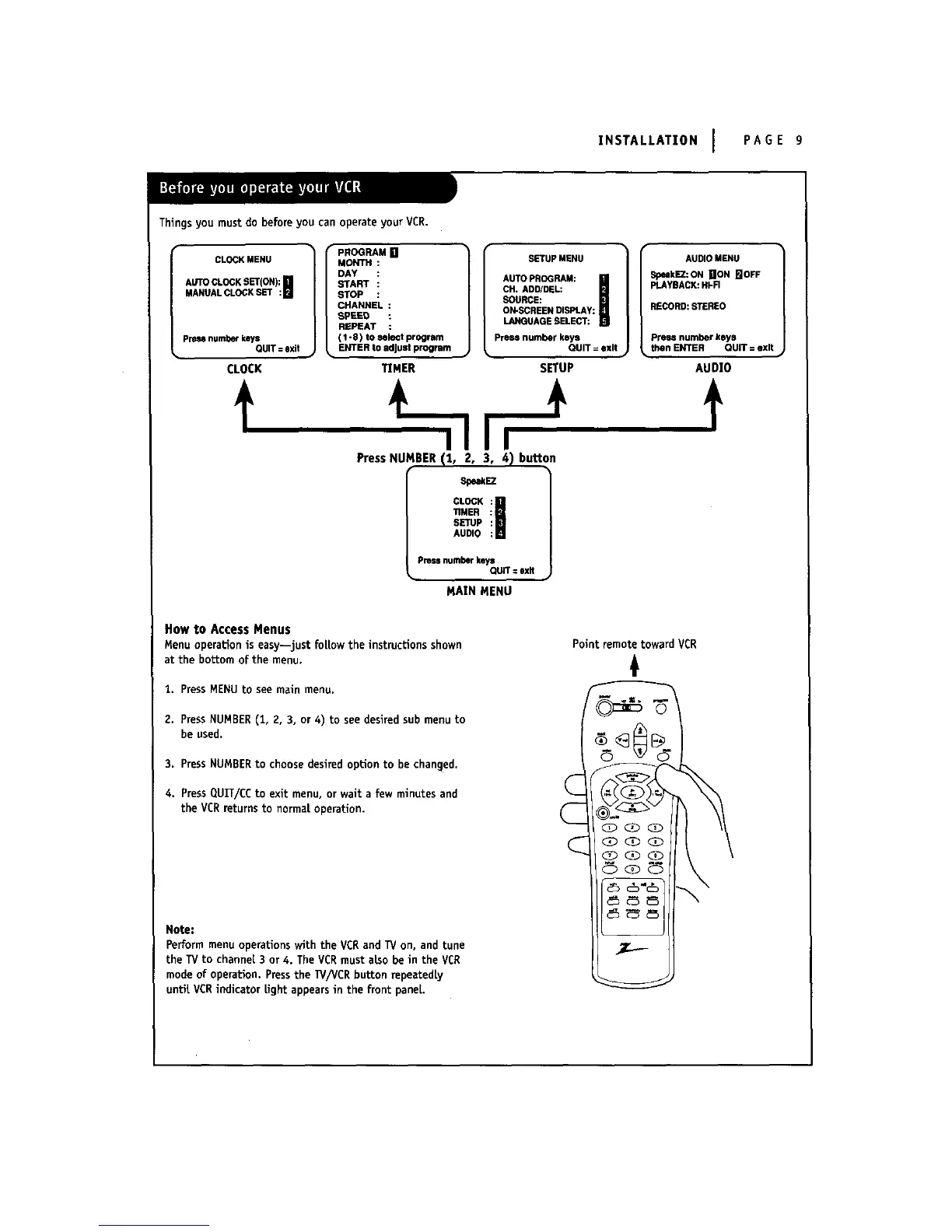
How to Access Menus
Menu operaUon is easy--just fottow the instructions shown
at the bottom of the menu,
1. PressMENU to see main menu,
2. PressNUMBER(1, 2, 3, or 4) to see desired sub menuto
be used.
3. PressNUMBERto choose desired option to be changed,
4. PressQUIT/CC to exit menu, or wait a few minutes and
the VCR returnsto normat operation.
Point remote toward VCR
Note:
Perform menu operations with the VCRand TV on, and tune
the TVto channel 3 or 4. The VCRmust also be in the VCR
mode of operation. Pressthe W/VCR button mpeatedty
untit VCRindicator tight appearsin the front panel



 To Next Page