PAGE 34 I OPERATION
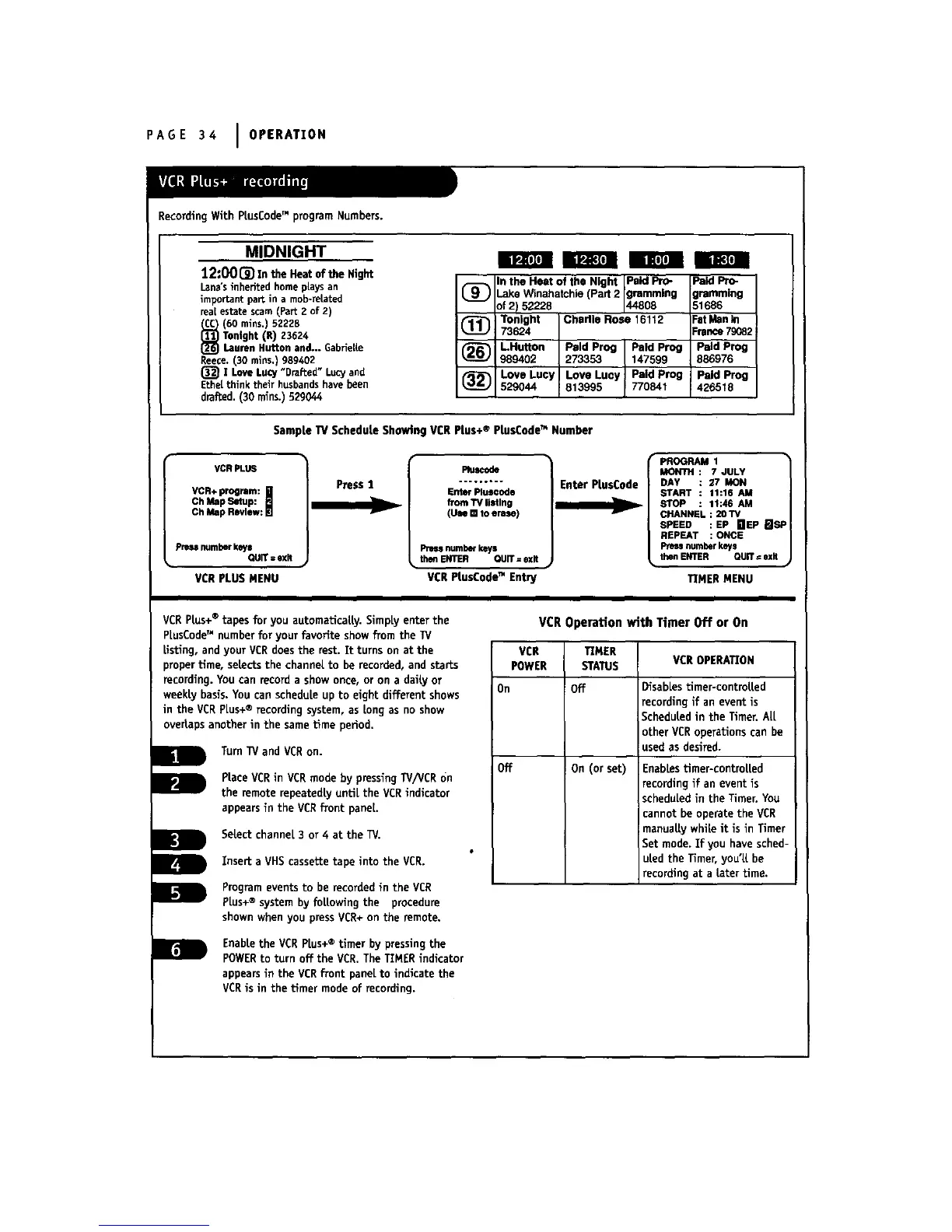
Recording With PiusCode" program Numbers.
MIDNIGHT
12:001_ In the Heat of the Night
Lana's inherited home plays an
important part in a mob-related
real estate seam (Part 2 of 2)
(60 mins,) 52228
Tonight {R) 23624
Lauren Rutton and... GabrieUe
Reece. (30 mins,) 989402
(_ ! Love LUCy "Drafted" LuCy and
Ethe[ think their husbands have been
drafted. (30 rains.) 529044
m m l Im l
_) n the Heat of the Night Paid Pro- Paid Pro-
.ake Winahatchie (Pad 2 grammlng iremmlng
)f 2) 52228 44808 51686
(_ Tonight Chedle Rm e 16112 FatManIn
73624 France79082
(_R"IJ LHutton Paid Prog Paid Prog Paid Prog
989402 273353 147599 886976
(_ Love Lucy Love Lucy ! Paid Prog Paid Prog
i
529044 813995 770841 426518
SampLe TV ScheduLe Showing VCR Plus+ ® PtusCodeTM Number
VCRPLU6
VCR+program:
!
ChMapRlwlew:
ChMapSetup:
pressnumberkeys
QUIT=exit
VCR PLUS MENU
Press I
v
Plu_ode
frontTVliStln9
(Uu [] toeras,e)
Pm_ numberkeys
• theftENTER QUIT=exit
VCR PLusCodeTM Entn
Enter PLusCode
PROGRAM 1 •
MONTH: 7JULY
DAY 27 MON
START 11:16 AM
STOP 11:46 AM
CHANNEL : 20 TV
SPEED : EP HEP mSP
REPEAT : ONCE
numberkeys
then ENTER QUIT= exit
TIMER MENU
VCR PLus+® tapes for you automaticaLLy.SimpLyenter the
PLusCode_Mnumber for your favorite showfrom the TV
Listing, and your VCRdoes the rest. Tt turns on at the
)roper time, selects the channel to be recorded, and starts
recording. You can record a show once, or on a daily or
weekly basis. You can schedule up to eight different shows
in the VCRPLus+® recording system, as Longas no show
overlaps another in the sametime period.
Turn'Wand VCRon.
RaceVCRin VCRmodeby pressing/V/VCRon
the remoterepeatedlyuntiLthe VCRindicator
appearsin the VCRfront paneL.
SeLectchannel 3 or 4 at the W.
Insert a VHS cassette tape into the VCR.
Program events to be recordedin the VCR
PLus+® system by foLLowing the procedure
shown when you press VCR+on the remote.
EnabLethe VCR PLus+® timer by pressing the
POWERto turn off the VCR.The TIMER indicator
appears in the VCRfront paneLto indicate the
VCR is in the timer mode of recording,
VCR Operation with Timer Off or On
VCR TEMER
POWER STATUS VCROPERATION
On Off DisabLestimer-controLLed
recording if an event is
ScheduLedin the Timer. ALL
other VCRoperations can be
used as desired.
Off On (or set)
EnabLestimer-controLLed
recording if an event is
scheduled in the Timer. You
cannot be operate the VCR
manuaLLywhile it is in Timer
Set mode. Efyou have sched-
uled the Timer, you'LLbe
recording at a tater time.
Ir -i



 To Next Page