SIMPLICITY PLUS INSTALLATION MANUAL
Approved Document No: GLT.MAN-107 PAGE 34
Issue 3.16 Author: NRPJ Date: 21/09/2017
15.2 VIEWING DEVICE STATUS
On the Simplicity, all loop devices can be viewed from Configuration Menu 1, or viewed & edited from Configuration
Menu 2.
Enter configuration menu 2 as described above, and select option 5 (Edit Device).
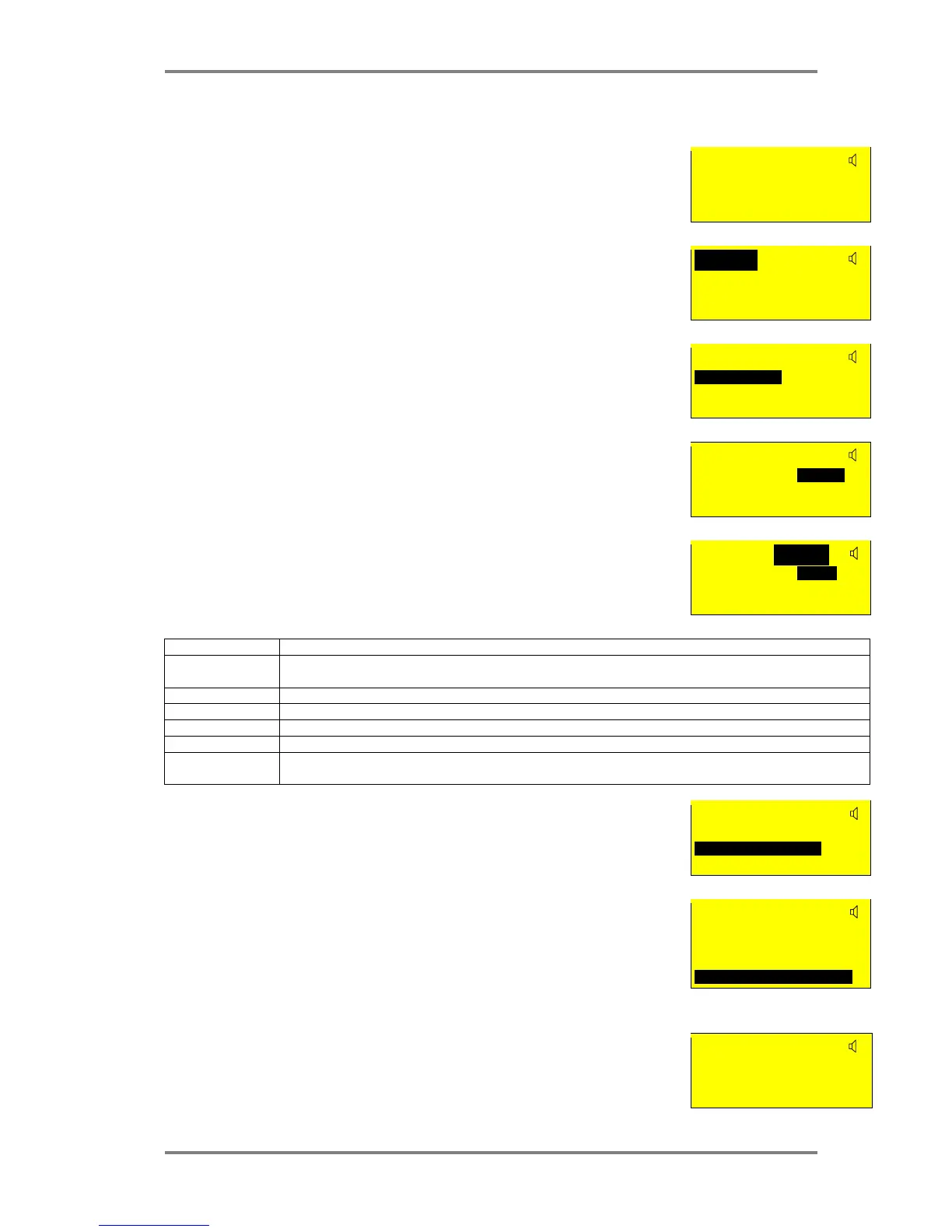
The following screen is shown:
The screen is divided into the following sections:-
Optical
Analog: 25 Normal
Fl 3 Bedroom 303
Zone:01 Ad:016
Configured Device Type
This shows the Device that was at this address during the last loop configuration.
There are 8 possibilities for this:-
Optical, Ion, Heat, Call-Pt, Sounder, I/O Unit, Zone Mon or CO
Optical
Analog: 25 Normal
Fl 3 Bedroom 303
Zone:01 Ad:016
Analogue Value
This shows the analogue value that the device is sending To the panel. For detectors, this value is
usually about 25 for clean air, and 55 during alarm. Non analogue devices such as call points and
I/O units have a normal value of 25, and an alarm value of 55. They will return a value of less
than 8 to report a fault condition.
Optical
Analog: 25 Normal
Fl 3 Bedroom 303
Zone:01 Ad:016
Device Status
This is the current status of the device. It will show one of the following values:-
Normal, Fault, Alarm or Prealarm
Optical
Analog: 25 Normal
Fl 3 Bedroom 303
Zone:01 Ad:016
Fault Description
If the device is in a fault condition, a description of the fault will appear here. It will show one of
the following messages:-
Optical Changed
Analog: 25 Fault
Fl 3 Bedroom 303
Zone:01 Ad:016
FAULT MEANING
Changed The device had been changed with one of a different type since last configuration. The message will flash
between Changed, and the new type of device seen (e.g. Ion).
Missing The device is not communicating (i.e. removed , damaged or Address setting changed)
Side A Only There is a break in the cable, and the device is only seen from Side A
Side B Only There is a break in the cable, and the device is only seen from Side B
2-ADDR Two devices have the same address setting
No message This device is signalling an internal fault by returning a value of less than 8. (e.g. sounder control unit that
has lost its power supply.)
Device Label
This is the 20 character description of the device location entered by the installer. To change this
Press Enter button to activate the cursor.
Optical Changed
Analog: 25 Fault
Fl 3 Bedroom 303
Zone:01 Ad:016
Device Identification
This is the Zone and address of the device. This is how the device will probably be referred to on
the system drawings.
Optical Changed



 To Next Page