ZONEMASTER MAXIPOINT V2 DAMPER CONTROL SYSTEM - Installation Manual
15
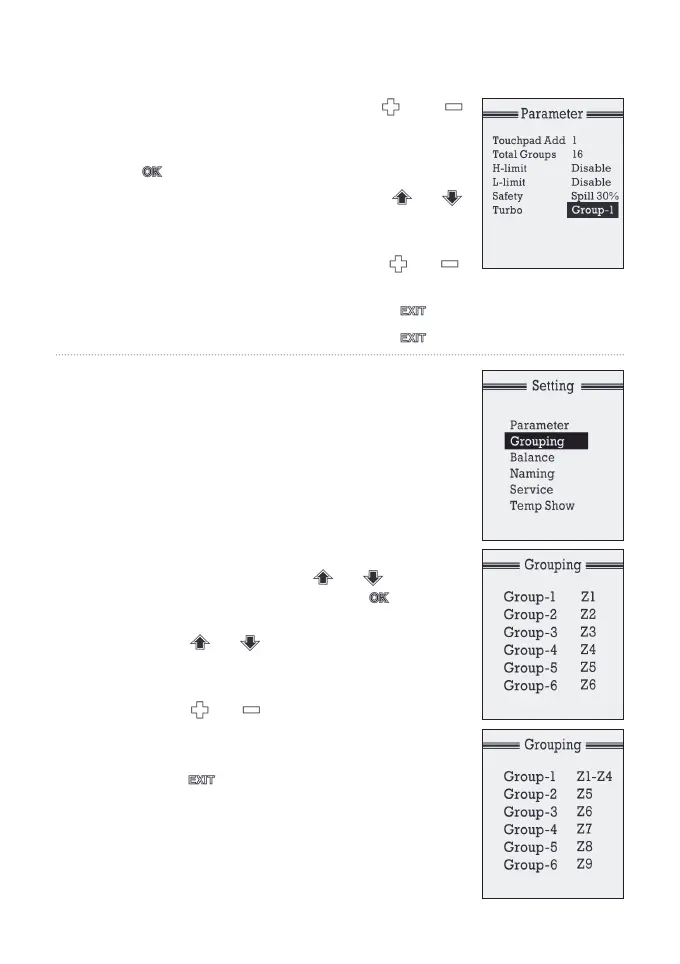
a) Goto‘Setting’menubyholdingand
buttons at the same time for 5 seconds.
b) Select‘Parameters’sub-menubypressing
button.
c) Go to‘TURBO’menubypressingor
button and highlight NONE (Default value
is‘NONE’).
d) Select desired group by pressing or
button
e) Backto‘Setting’menubypressingbutton
f) Back to normal display by pressing button.
7.3 Grouping Zones
For ease of control operation, multiple zones can
be grouped together. The grouped zones are
treated as one group with its own name and
turned on or off together. Individual balanced
damper position is not affected by grouping,
which means zone balancing can be conducted
before or after grouping.
Grouping can be carried out as follows:
a) At setting mode, press or button
toselect‘Grouping’,andpressbutton
to bring up Grouping screen.
b) Press or button to highlight the
group to which the zones are to be added
to or subtracted from.
c) Press or button to add or minus
zones to the group.
d) Repeat Step b) and c) todeneallgroups.
e) Press button once to exit back to
setting menu.
NOTE: The maximum number of zones in a
group is 4. The factory default for grouping
is that each group has one zone.


 To Next Page