ZONEMASTER MAXIPOINT V2 DAMPER CONTROL SYSTEM - Installation Manual
18
7.6 Enabling/Disabling Service Reminder
Thereisabuilt-inservicereminderinthe
MaxiPoint V 2 system for half yearly and two
yearly to automatically display an alert to tell
customers that the air conditioning system is
due for service. Installers can also use this
feature to leave their details such as their
names and contact numbers.
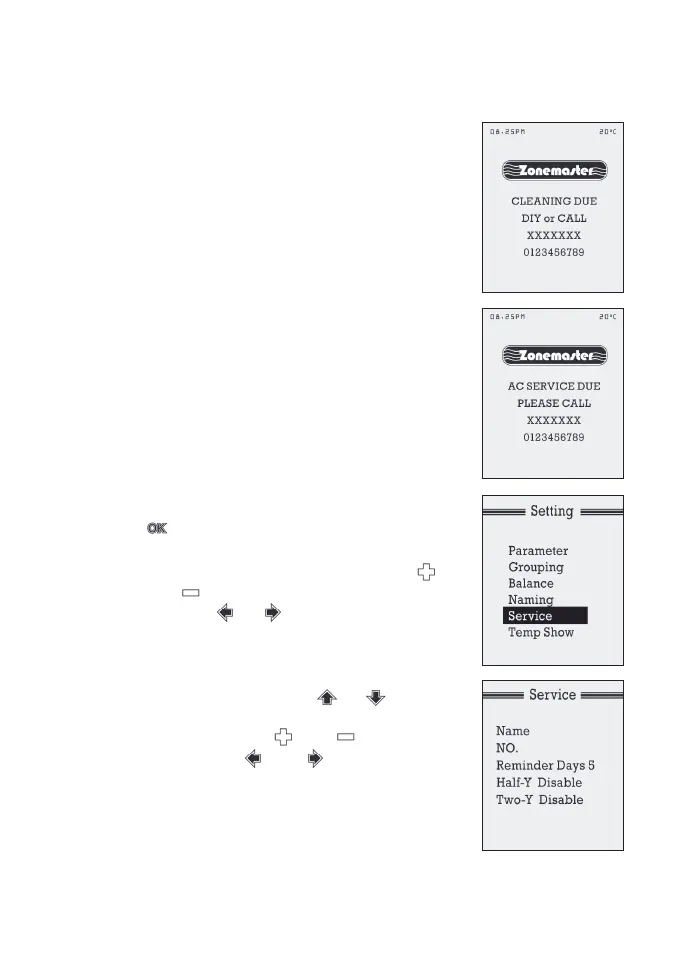
The service reminder (if enabled) will display
‘CLEANINGDUE’or‘ACSERVICEDUE’and
installer’snameandcontactnumberonLCD
screen for 5 consecutive days if it has been
enabled for 6 months (182 days) or 2 years
(728 days) respectively since the air
conditioning system being commissioned
orservicedasshownintherightgure.It
is disabled by default but can be enabled
as follows:
a) In‘Setting’menu,selectServiceby
highlighting it and follow by pressing
to bring up next screen.
b) In‘Service’menu, Name line is highlighted
and installers name can be input by using
or buttons to select letters or
numbers, or buttons to move to
the next letter. The maximum allowable
characters are 10. It can be left blank if the
installer wants to be unnamed.
c) Moveto‘No’lineusingor
buttons and input phone or mobile
number by using or to select
numbers and or buttons to
move to next digit. The maximum
allowable characters are 12.


 To Next Page