ZONEMASTER MAXIPOINT V2 DAMPER CONTROL SYSTEM - Installation Manual
17
7.5 Naming Groups
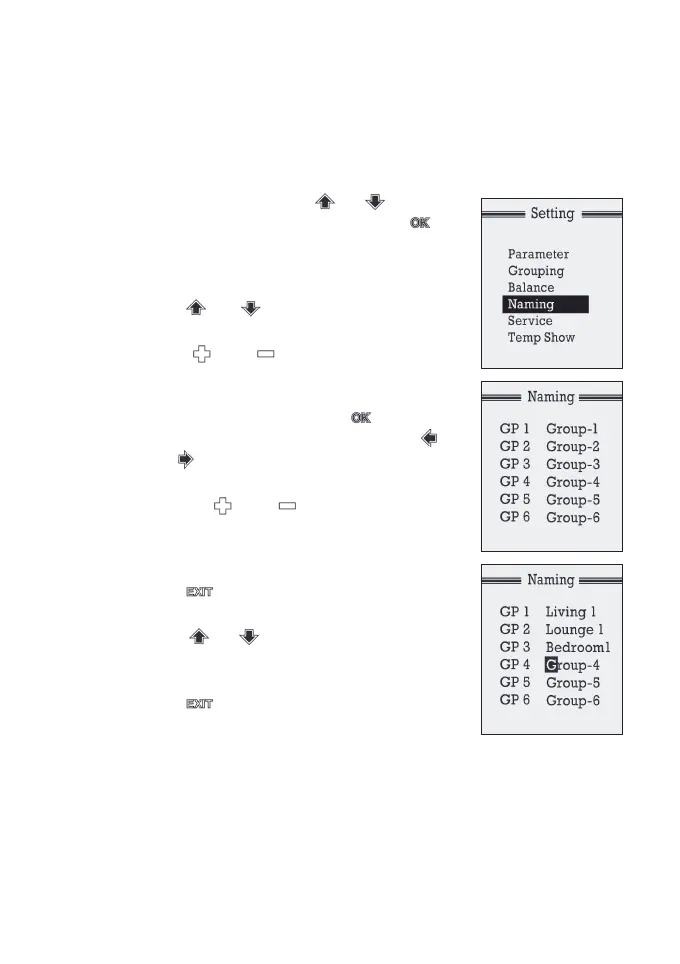
Thenameofagroupissetas‘Group-addr’indefaultsetting.For
example,group1iscalled‘Group-1’onitsfactorydefault.Thenames
can be customised as follows:
a) At setting mode, press or button
toselectthe‘Naming’,andpressthe
button to enter the sub menu of the
namingscreen.(‘GP1’meansgroup1
and‘Group-1’isitscurrentname)
b) Press or button to select the
group to be named.
c) Press or button to select one
of the preset group names for the group.
d) If user wants to make some changes to the
preset name selected, press button
to initialize the change, and then press
and button to select the character to
be changed.
e) Then use or button to change
the character as prefered. There are 26
letters, 10 numbers and a space to choose
from through this process.
f) Press button to exit the change
process.
g) Press or button to select the next
group and follow steps c) to f) to customize
the names for other groups.
h) Press button once to exit back to
Setting menu.


 To Next Page