ZONEMASTER MAXIPOINT V2 DAMPER CONTROL SYSTEM - Installation Manual
16
7.4 Balancing Zones
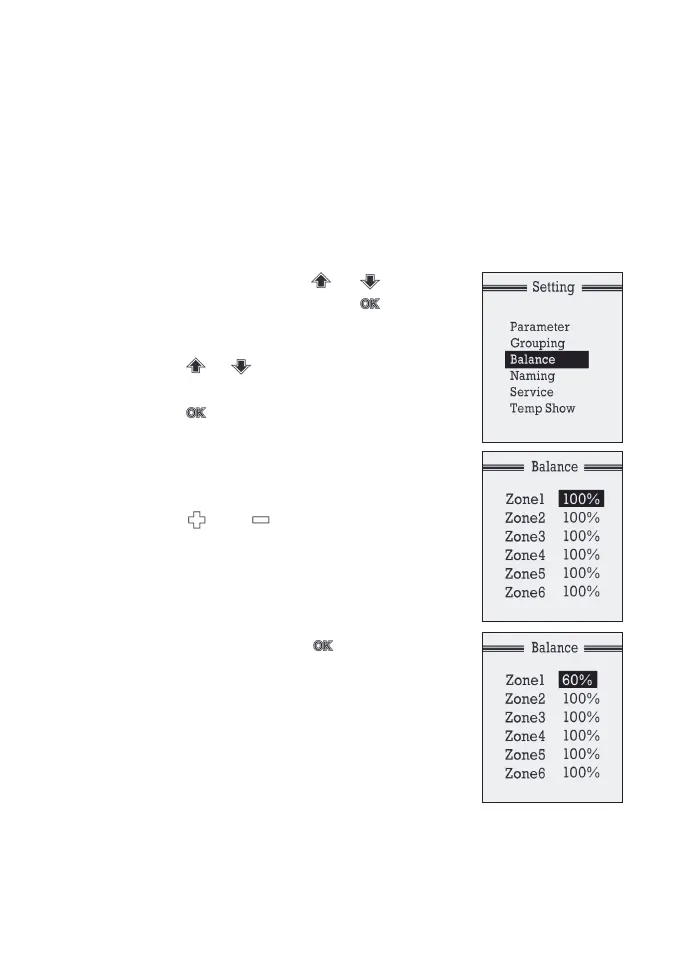
BalancingfeatureofMaxiPointV2offerstheexibilityofbalancing
theamountofairowtoeachzoneelectronically.Itworksinthesame
wayasamanualdamperdoestobalancetheairowforeachzone
without using an extra damper. Once the opening position of the
damper is set, the damper will only open to this position. The default
settingforeachdamperis100%openingposition.Thebalancing
settings can be conducted on the touchpad as follows:
a) At setting mode, press or button
toselect‘Balance’,andpressbutton
to enter the sub menu of the balancing
screen.
b) Press or button to select the zone
to be balanced.
c) Press button when the zone to be
balanced is highlighted to initiate
balancing. Then the numbers in the
highlighted section starts blinking and the
zone damper initiates to closed position.
d) Press or button to increase or
decrease the percentage of opening
positions for the zone.
e) Once the percentage has been set for the
respective zone wait for about 15 seconds
tillwords‘PLEASEWAIT’atthebottom
disappears. Then press button
againtoconrmthechange.
f) Follow step b) to e) to adjust the settings
for the other zones.
NOTE: The balancing menu will display all the 16
zones irrespective of the number of zones actually
present in the system. The balancing percentages of
the inactive zones remain locked. Also, once the zone
is balanced with a percentage opening, it is treated as a complete zone
when calculating spilling setpoint. If lower order zones are balanced
with small opening percentage, it is highly recommended to set a higher
spill set-point to ensure there is enough opening for spilling.


 To Next Page