ZONEMASTER MAXIPOINT V2 DAMPER CONTROL SYSTEM - Installation Manual
19
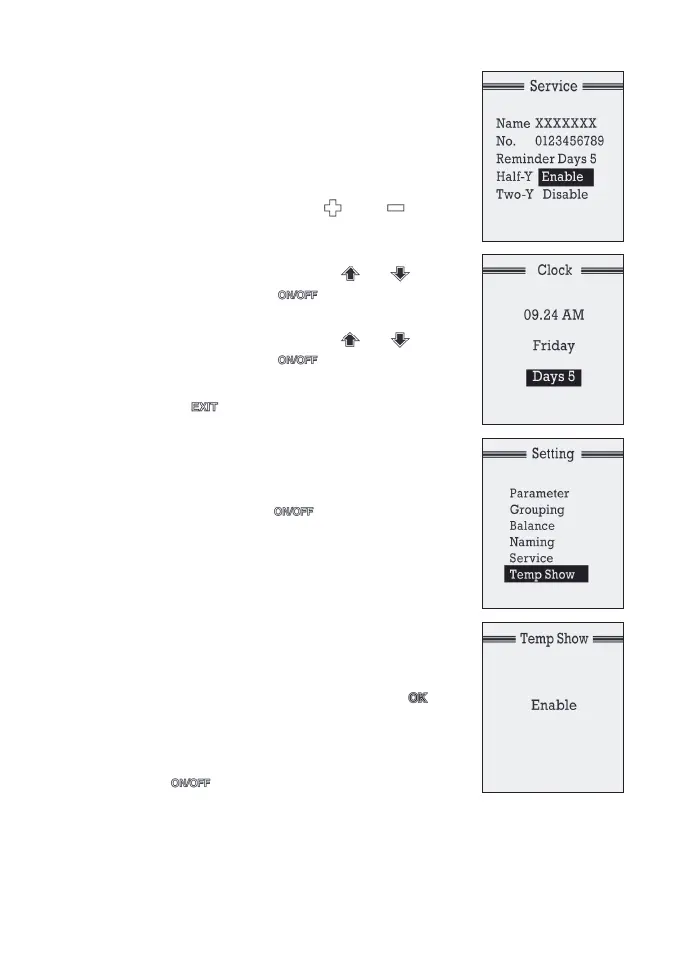
d) Reminder days are the days the service
alert will display on the LCD screen since
the service due date has reached. It is set
as 5 and the displayed alert will disappear
after 5 days. Installer can change it by
highlighting it and using or
buttons to add or subtract days. The range
of reminder days is from 1 to 9.
e) Moveto‘Half-Y’lineusingor
buttons and press button to enable/
disable the half yearly reminder feature.
f) Moveto‘Two-Y’lineusingor
buttons and press button to enable/
disable the two yearly reminder feature.
g) Press button once to exit back to
setting menu.
To clear the displayed alert before the set days
hasreached,goto‘CLOCK’menu(seetheSet
Clock and Day menu on page 20), highlight the
‘Days’line,andpressbuttononce.The
alertwilldisappearafterexiting‘CLOCK’menu.
7.7 Enabling/Disabling Temperature Display
The Temp Show feature allows to either enable/
disable the temperature displayed on the upper
right hand of the LCD screen. It is enabled as
default but can be disabled as follows.
a) In‘Setting’menuselect‘TempShow’by
highlighting it and follow by pressing
button to bring up the next screen
b) Ifthe‘TempShow’featureisenable,the
LCDscreenwilldisplay‘Enabled’.Pressing
the button will disable the function
Record the above parameters such as Grouped Zones & Balancing on the
stickeroftheMainControlModuleandtheSystemConguration,Grouped
Zones along with Named Groups, Balancing and Installer details to table 1, 2, 3
and4respectivelyonpage8and9oftheOperationmanualforfuturereference.


 To Next Page