ZONEMASTER MAXIPOINT V2 DAMPER CONTROL SYSTEM - Installation Manual
21
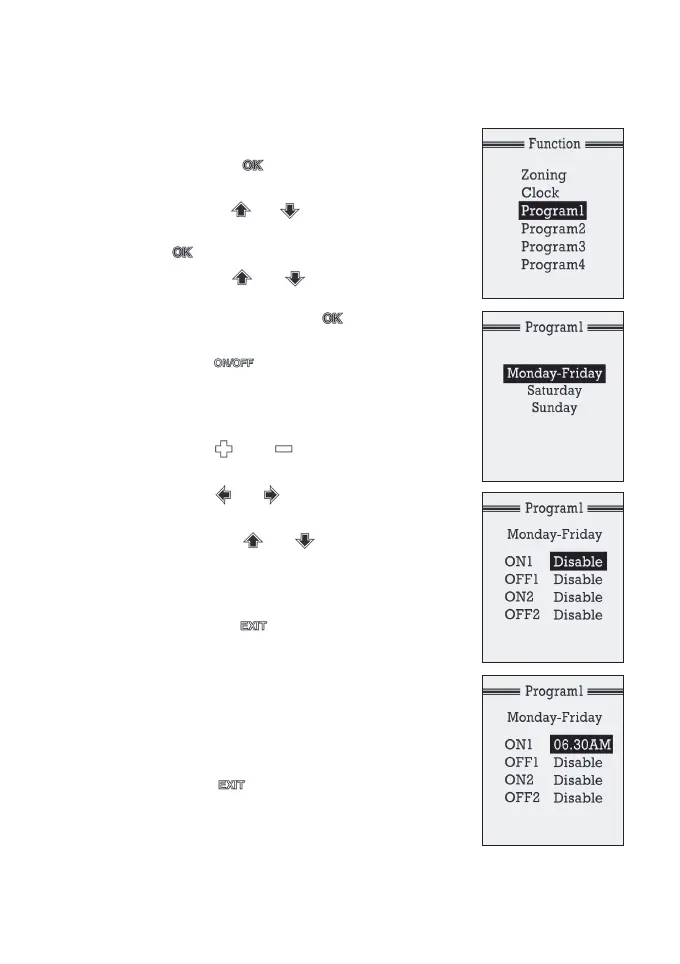
2) Adjust Program Time
a) Press the button once to enter into
the‘Function’Screen.
b) Use the or button to select the
programtobemodied,andthenpress
button to enter into its sub menu.
c) Use the or button to select
Monday-Friday,SaturdayorSunday
program. Then press button to enter
into its sub menu.
d) Press button to enable the setting
for ON/OFF times. The LCD will show the
starttimeoftherstturningoneventof
the program.
e) Press or button to change the
time.
f) Press or to move between hours
and minutes.
g) Press the or button to select
other ON/OFF settings. Follow steps d) to
f) to enable/disable other events or
change the time.
h) Press the button to go back to
program setting menu.
i) Follow steps c) to g) to set the ON/OFF
time or disable the event for other
weekdays in the program.
j) Repeat steps b) to i) to set all the time
for the other programs.
k) Press button to exit the Program
Mode. Alternatively, it will return to the
sleep mode itself in 15 seconds if no key
is being pressed.



 To Next Page