22
4.4.3 Advanced Settings
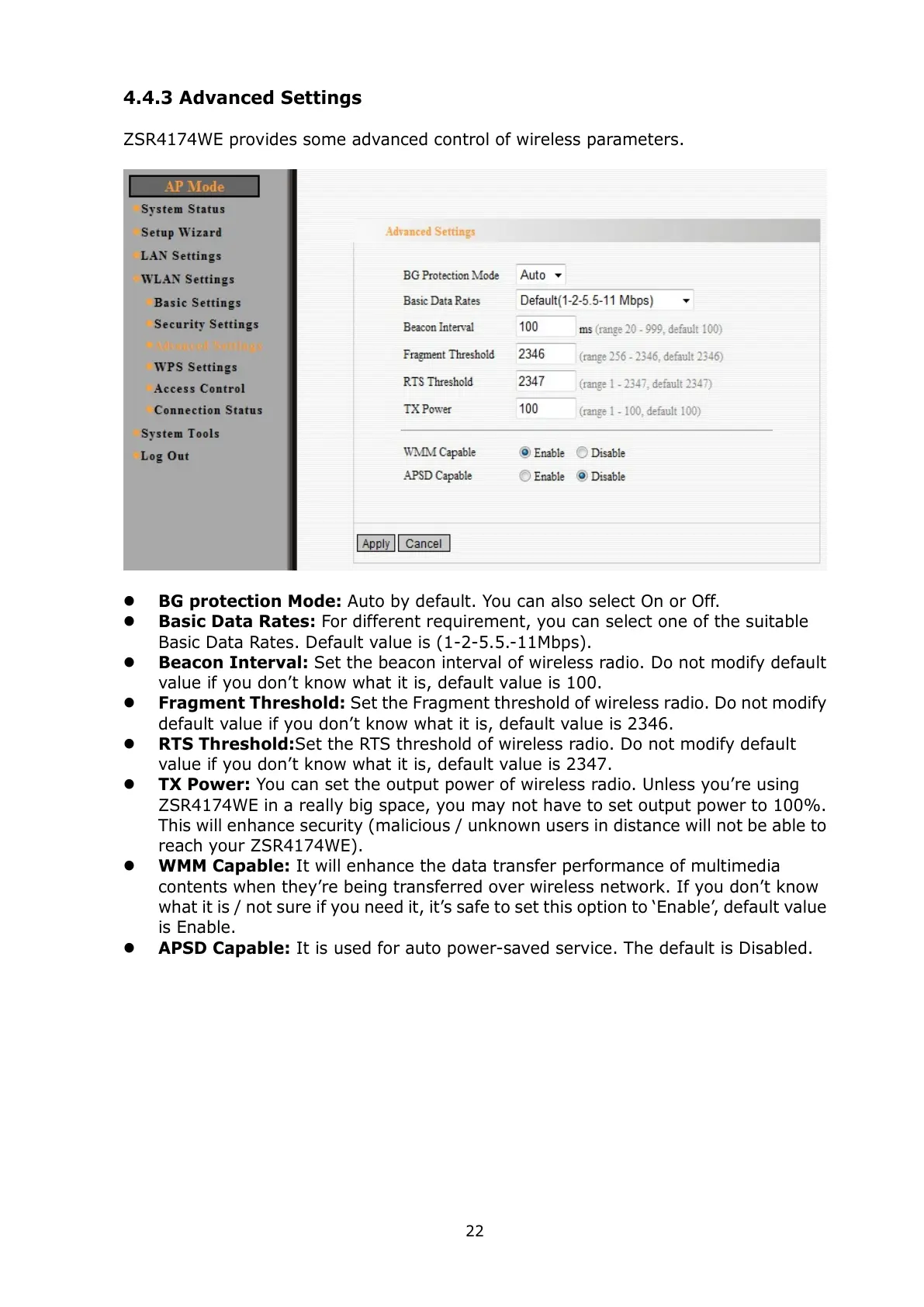
ZSR4174WE provides some advanced control of wireless parameters.
BG protection Mode: Auto by default. You can also select On or Off.
Basic Data Rates: For different requirement, you can select one of the suitable
Basic Data Rates. Default value is (1-2-5.5.-11Mbps).
Beacon Interval: Set the beacon interval of wireless radio. Do not modify default
value if you don’t know what it is, default value is 100.
Fragment Threshold: Set the Fragment threshold of wireless radio. Do not modify
default value if you don’t know what it is, default value is 2346.
RTS Threshold:Set the RTS threshold of wireless radio. Do not modify default
value if you don’t know what it is, default value is 2347.
TX Power: You can set the output power of wireless radio. Unless you’re using
ZSR4174WE in a really big space, you may not have to set output power to 100%.
This will enhance security (malicious / unknown users in distance will not be able to
reach your ZSR4174WE).
WMM Capable: It will enhance the data transfer performance of multimedia
contents when they’re being transferred over wireless network. If you don’t know
what it is / not sure if you need it, it’s safe to set this option to ‘Enable’, default value
is Enable.
APSD Capable: It is used for auto power-saved service. The default is Disabled.



 To Next Page