21
■
Advanced Operation
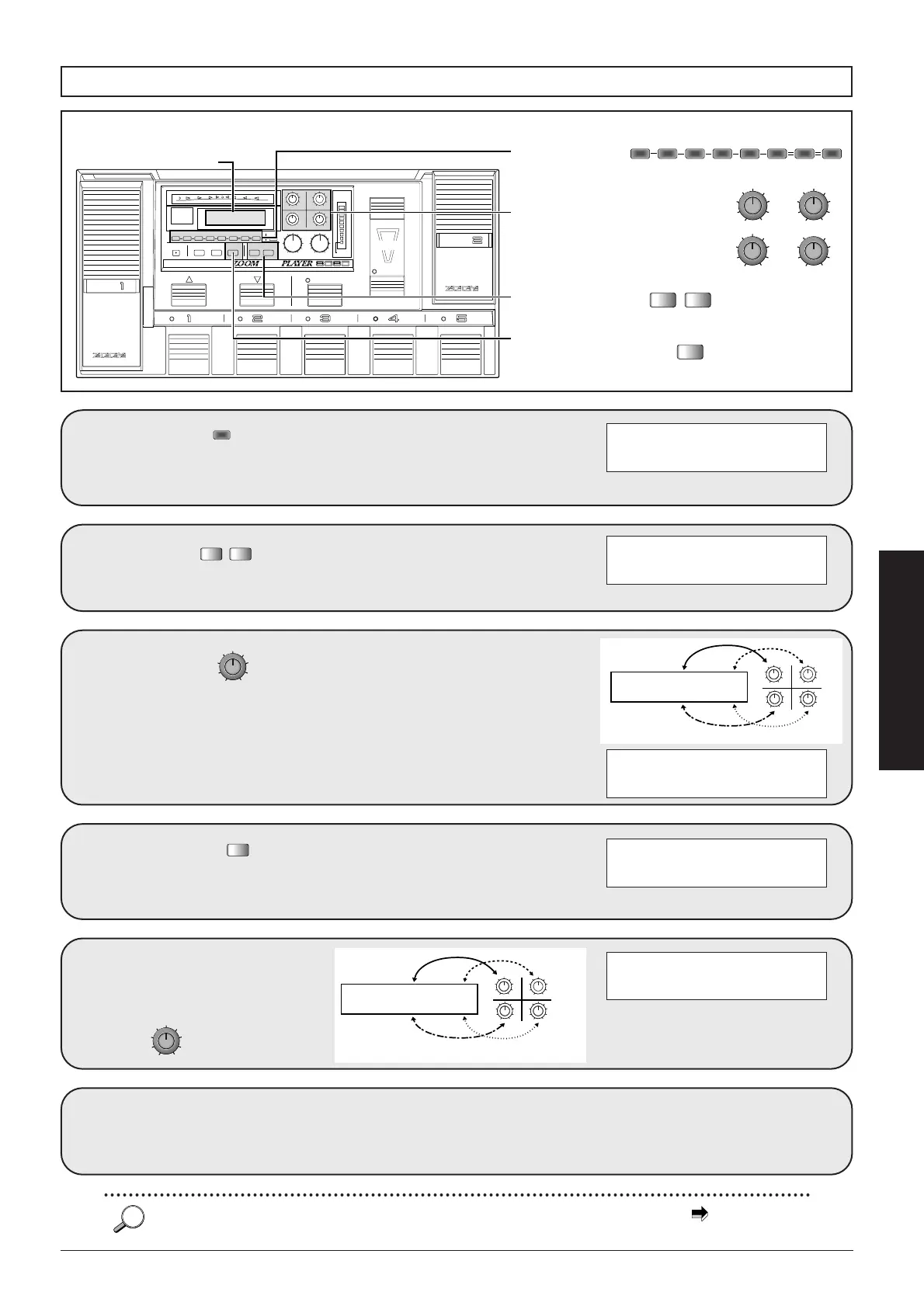
Use the to
select the effect
module to be edited.
1
Use the to
switch the effect type.
When effect modules are switched,
the corresponding parameter on the
display also changes.
2
Use the
1-4 to change the
parameter settings.
The parameters shown on the
display are allocated to the data
entry knobs 1-4, so that turning a
certain knob alters the
corresponding parameter.
3
Use the
to call up page 2 with
more parameters.
4
The parameters on
page 2 again can be
adjusted with the
1-4.
5
PIT PtL=+12 BIL=50
é PtR=+24 BIR=50
PIT FiL=+10 FiR=+10
é RTM=WBl DIR=NML
Other effect modules
can be edited in the
same way.
6
PIT FiL=+10 FiR=+10
é RTM=WBl DIR=INV
PIT PtL=+12 BIL=50
é PtR=+24 BIR=30
PitD PIT=+12 TIM=10
FB= 0 BAL=50
Changing the parameter settings
CONTROL
PEDAL
CONTROL
PEDAL
CONTROL
SWITCH
DECREASE
–(TAP/HOLD)
INCREASE
USER
FUNCTION
BANK
MAX
CONTROL
SWITCH
INDICATOR
1/2
MIN
BLINK
(DLY:TAP)
DLY TOTAL
STORE
(EXECUTE)
PRESENCE OUTPUT
GROUP
COMPARE
FINE TUNE
Super
ADVANCED GUITAR EFFECTS PROCESSOR
COMP EFF1 DIST EQ EFF2 EFF3 REV
EDIT
EXIT
UTILITY
PAGE
TYPE
–+
34
12
MAXMIN
MAXMINMAXMIN
MAXMIN
2
1
3, 5
4
Display
Effect keys
COMP EFF1 DIST EQ EFF2 EFF3 DLY REV
TYPE
–+
TYPE -/+ keys
34
12
MAXMIN
MAXMINMAXMIN
MAXMIN
Data entry knobs 1-4
UTILITY
PAGE
UTILITY/PAGE key
PIT PtL= BIL=
é PtR= BIR=
34
12
MAXMIN
MAXMINMAXMIN
MAXMIN
q
w
e
r
qw
er
Data entry knobs 1-4
PARAMETERS 1-4
PAGE 1
PIT FiL= FiR=
é RTM= DIR=
34
12
MAXMIN
MAXMINMAXMIN
MAXMIN
t
y
u
i
ty
ui
Data entry knobs 1-4
PARAMETERS 5-8
PAGE 2
For details on effect types and parameters, see the section "Effect Types and Parameters" starting on p. 45.



 To Next Page