This module contains equalizer effects and wah/modulation effects with strong characteristics. It can be inserted before or
after the DIST module.
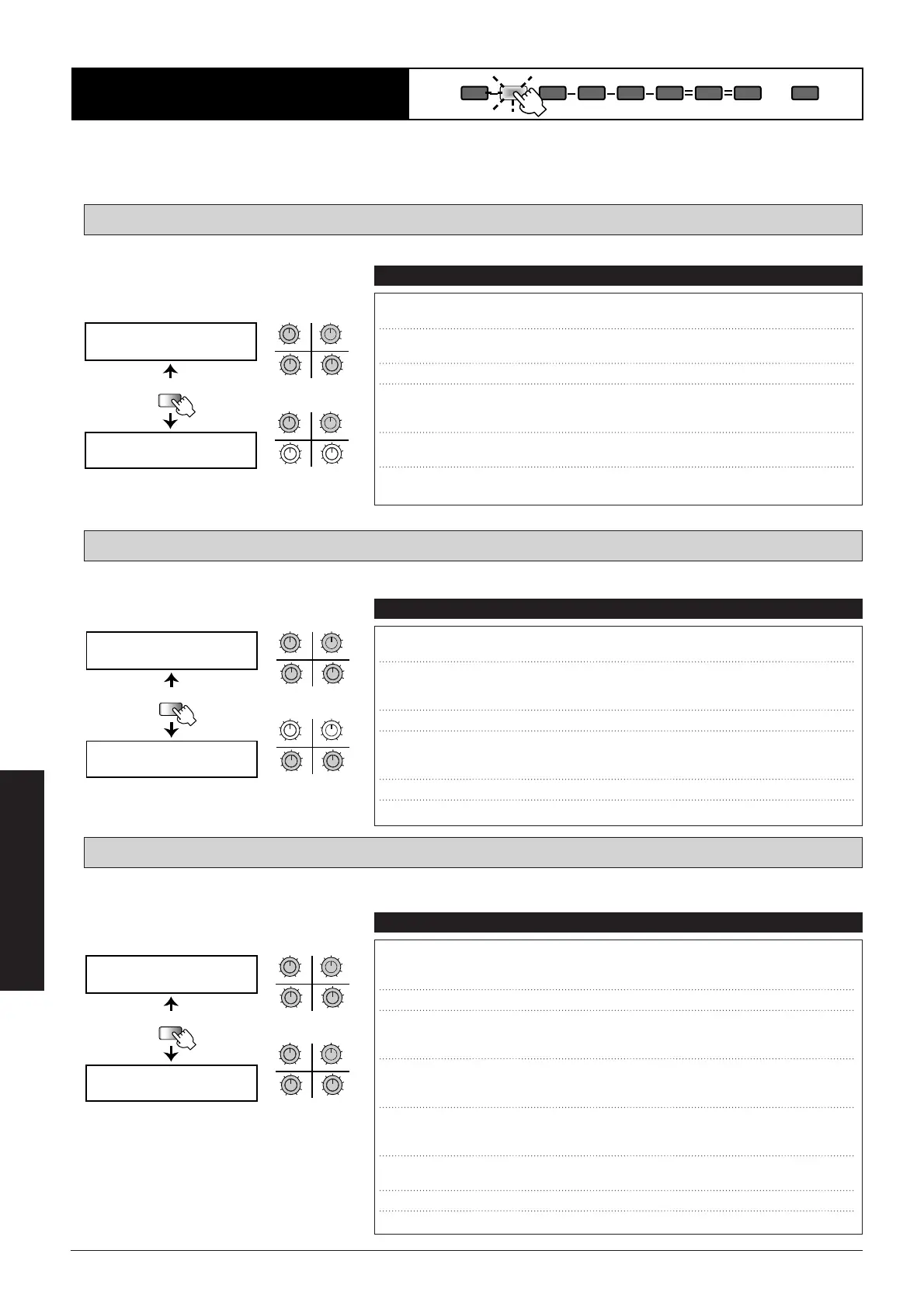
Parametric equalizer with high-range enhancer.
Recreation of an ever-popular vintage-type pedal wah.
Recreates a vintage auto-wah sound cherished by fusion and funk musicians in the seventies and eighties.
VAWA: Vintage Auto-Wah 1
PWAH: Pedal-Wah
PEQ: 1-Band Parametric EQ
■
48
Effect Types and Parameters
COMP EFF1 DIST EQ EFF2 EFF3 DLY REV TOTAL
EFF1 Module
UTILITY
PAGE
PEQ FRQ= G=
Q= POS=
PEQ EhF= SNS=
34
12
MAXMIN
MAXMINMAXMIN
MAXMIN
qw
er
34
12
MAXMIN
MAXMINMAXMIN
MAXMIN
ty
PAGE 1
PAGE 2
qw
er
ty
q FRQ (Frequency) Sets the boost/cut frequency.
63, 160,
400, 1.0, 2.5
w G (Gain) Sets the boost/cut amount. -
18, -16,
...
,
+
5,+6
e Q (Q) Sets the width of the boost/cut frequency range.
78, 2.1
r POS (Insert Position) Sets the module insertion point. "BFR" means
before the DIST module and "AFT" after the
DIST module.
BFR, AFT
t EhF Sets the enhancer frequency.
1
-
4
(Enhance Frequency)
y SNS Sets the enhancer sensitivity.
off, 1
–
10
(Enhance Sensitivity)
Parameters Comment Values
UTILITY
PAGE
PWAH FRQ= DRY=
SEL= POS=
PWAH
RTMå DIR=
34
12
MAXMIN
MAXMINMAXMIN
MAXMIN
qw
er
34
12
MAXMIN
MAXMINMAXMIN
MAXMIN
ty
PAGE 1
PAGE 2
qw
er
ty
q FRQ (Frequency) Sets the center frequency that is active
when the patch is called.
1
–
50
w DRY (Dry Mix) Sets the balance between effect sound and dry
sound (original sound).
When set to 0, no original sound is output.
0
–
10
e SEL (Type Select) Lets you select one of two wah types.
1, 2
r POS (Insert Position) Sets the module insertion point. "BFR" means
before the DIST module and "AFT" after the
DIST module.
BFR, AFT
t
RTM (RTM Destination)
Shows which RTM parameter is being controlled.
FRQ
y
DIR (RTM Direction)
Sets the RTM direction.
NML, INV
Parameters Comment Values
UTILITY
PAGE
VAWA SNS= PK=
DRV= POS=
VAWA SEL= OFS=
RTMå DIR=
34
12
MAXMIN
MAXMINMAXMIN
MAXMIN
qw
er
34
12
MAXMIN
MAXMINMAXMIN
MAXMIN
ui
ty
PAGE 1
PAGE 2
qw
er
ui
ty
q SNS (Sensitivity) Sets the wah effect sensitivity. With higher values,
the wah effect starts already when strings are
picked softly.
1
–
50
w PK (Peak) Higher values give a stronger wah effect.
1
–
10
e DRV (Drive) Sets the wah effect direction. When set to "up",
the center frequency is shifted upwards, and
when set to "dwn" downwards.
dwn, up
r POS (Insert Position) Sets the module insertion point. "BFR" means
before the DIST module and "AFT" after the
DIST module.
BFR, AFT
t SEL (Type Select) Three filter types can be selected for the wah
effect: Low (low-pass filter), Mid (band-pass filter),
Low,
HiP (high-pass filter).
Mid, HiP
y OFS (Offset) Sets the center frequency where the wah effect
becomes active.
Low, Hi
u
RTM (RTM Destination)
Shows which RTM parameter is being controlled.
SNS
i
DIR (RTM Direction)
Sets the RTM direction.
NML, INV
Parameters Comment Values



 To Next Page