10
Names and functions of parts
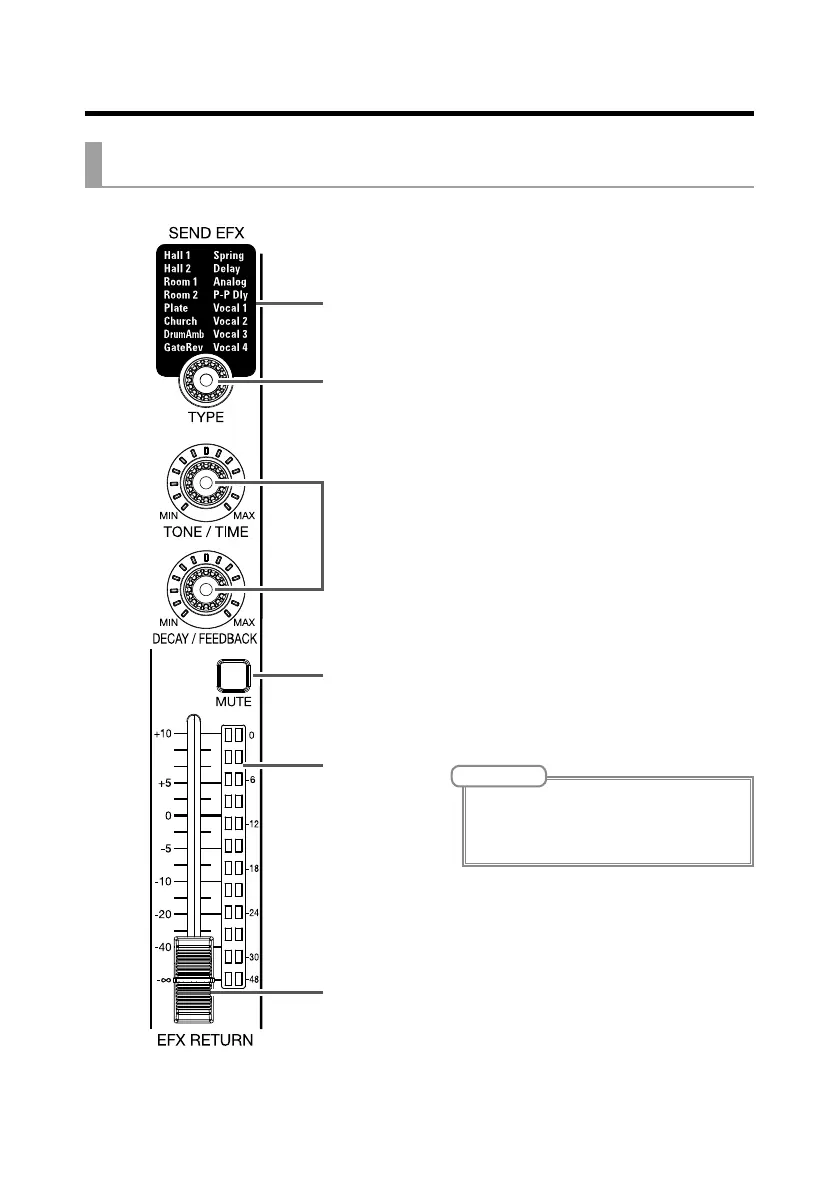
Send effect (SEND EFX) section
1
Effect type list
This is the list of the built-in effects.
The name of the currently selected effect lights.
It blinks when being selected.
If some time passes without a different effect
being selected, the previously selected effect
will remain selected.
2
TYPE knob
Use to select the built-in effect.
Turn this knob to select the effect type, and
press it to conrm.
3
Parameters 1 and 2
Use these to adjust the parameters for the se-
lected effect.
See P. 95 for the parameters of each effect.
4
EFX RETURN MUTE button
This mutes or unmutes the signal sent from the
built-in effect.
To mute the signal, press this button to light it.
5
EFX RETURN level meters
These show the levels of the signals sent from
the built-in effect to the master bus after adjust-
ment by the EFX RETURN fader. Their range is
from −48 dB to 0 dB.
6
EFX RETURN fader
This adjusts the levels of the signals sent from
the built-in effect to the master bus in a range
from −∞ dB to +10 dB.
NOTE
If the actual channel fader position differs from the
channel fader position recalled using the scene
function, for example, the level meters will show
the recalled fader position.



 To Next Page