Using the ARRM Function
ZOOM PFX-9003
38
6.
Press the CURSOR [
R
] key once to call up page 2 of the ARRM
module.
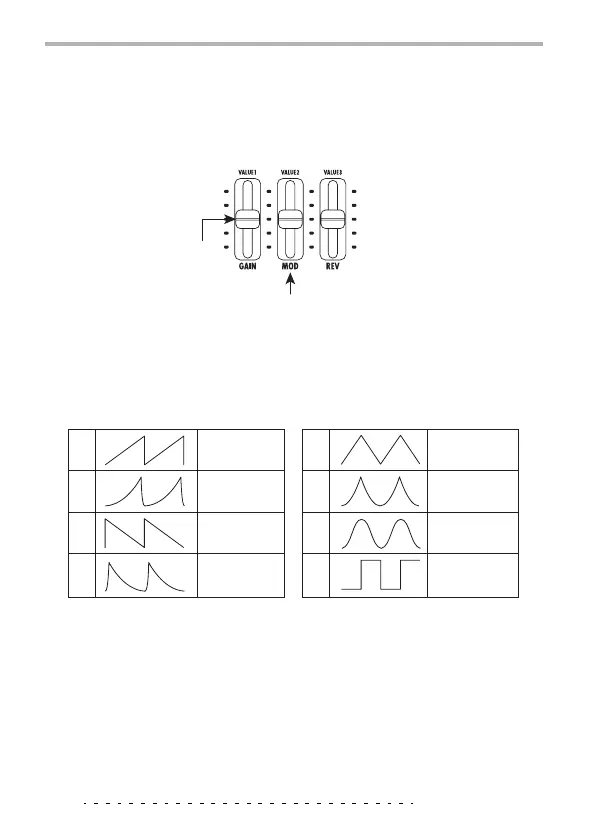
On page 2 of the ARRM module, the following parameters are assigned to
sliders 1 and 2.
7.
Use slider 1 to select the control waveform type. The following
choices are available.
8.
Use slider 2 to set the control waveform cycle.
Based on the rhythm pattern tempo, the control waveform cycle can be
specified in notes and measures. The following choices are available.
05: eighth note b1: 1 measure
1: quarter note b2: 2 measures
2: half note b3: 3 measures
3: dotted half note b4: 4 measures
Slider 1
Slider 2
WAVE parameter
(control waveform type)
SYNC parameter (control waveform cycle)
1
2
3
4
Rising sawtooth
wave
Falling sawtooth
wave
Rising fin wave
Falling fin wave
5
6
7
8
Triangle wave
Sine wave
Second power
triangular wave
Square wave



 To Next Page