8
Loading batteries
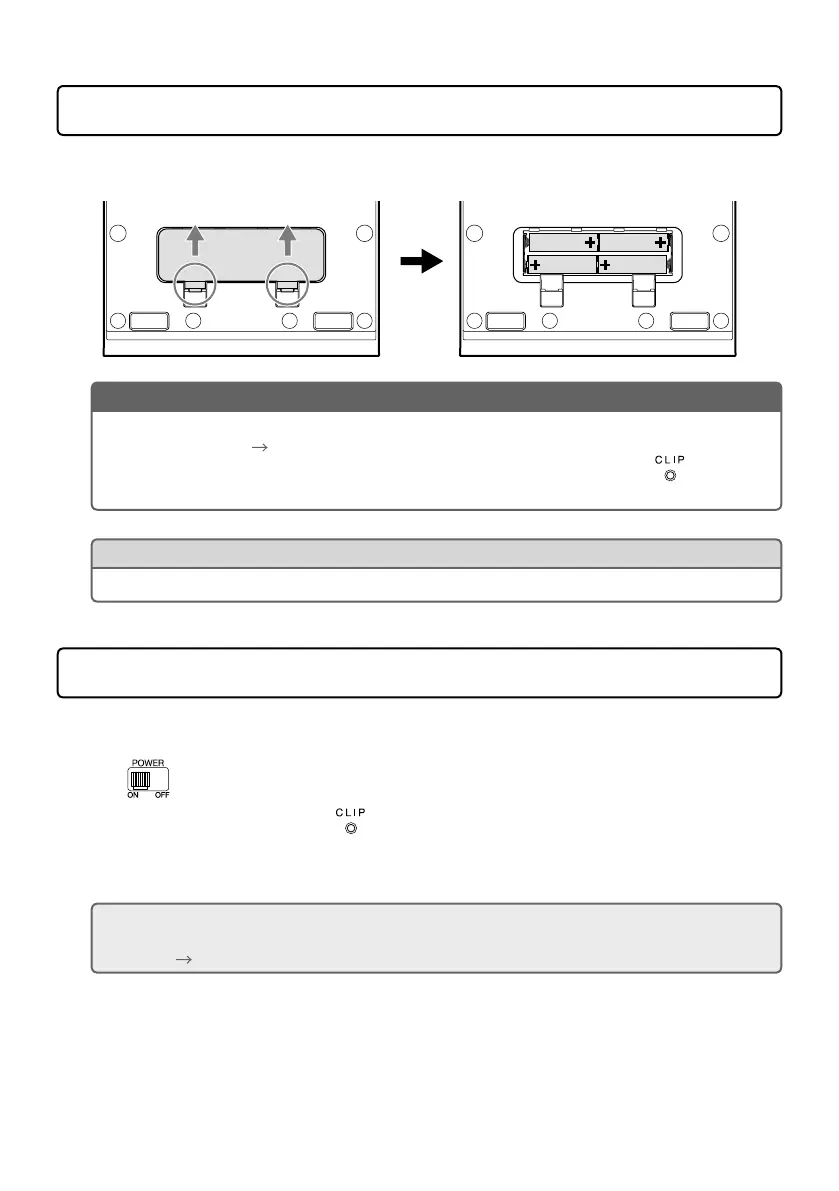
Open the battery compartment cover on the bottom of the product and insert 4 AA batteries.
Press up and open
NOTE
• Setthetypeofbatteryusedcorrectlysothattheamountofremainingbatterychargecanbe
shown accurately. (
“Making unit settings” on page 14)
• Whetherornotthereisinput,whentheremainingbatterychargebecomeslow,
will light red
and then start blinking red. Replace the batteries with new ones.
HINT
Power for operation can also be supplied through the USB port.
Turning the power on
1.
Minimize the volume of output devices.
2.
Set to ON.
This turns the
V3
power on, and lights green.
3.
Raise the volume of output devices.
ECO mode overview
By default, the ECO mode setting is ON, so the power will automatically turn off if no use occurs for
10 hours. (
“Making unit settings” on page 14)



 To Next Page