3 Functions & Operation
3.1 Interface introduction
3.1.1 Main Interface
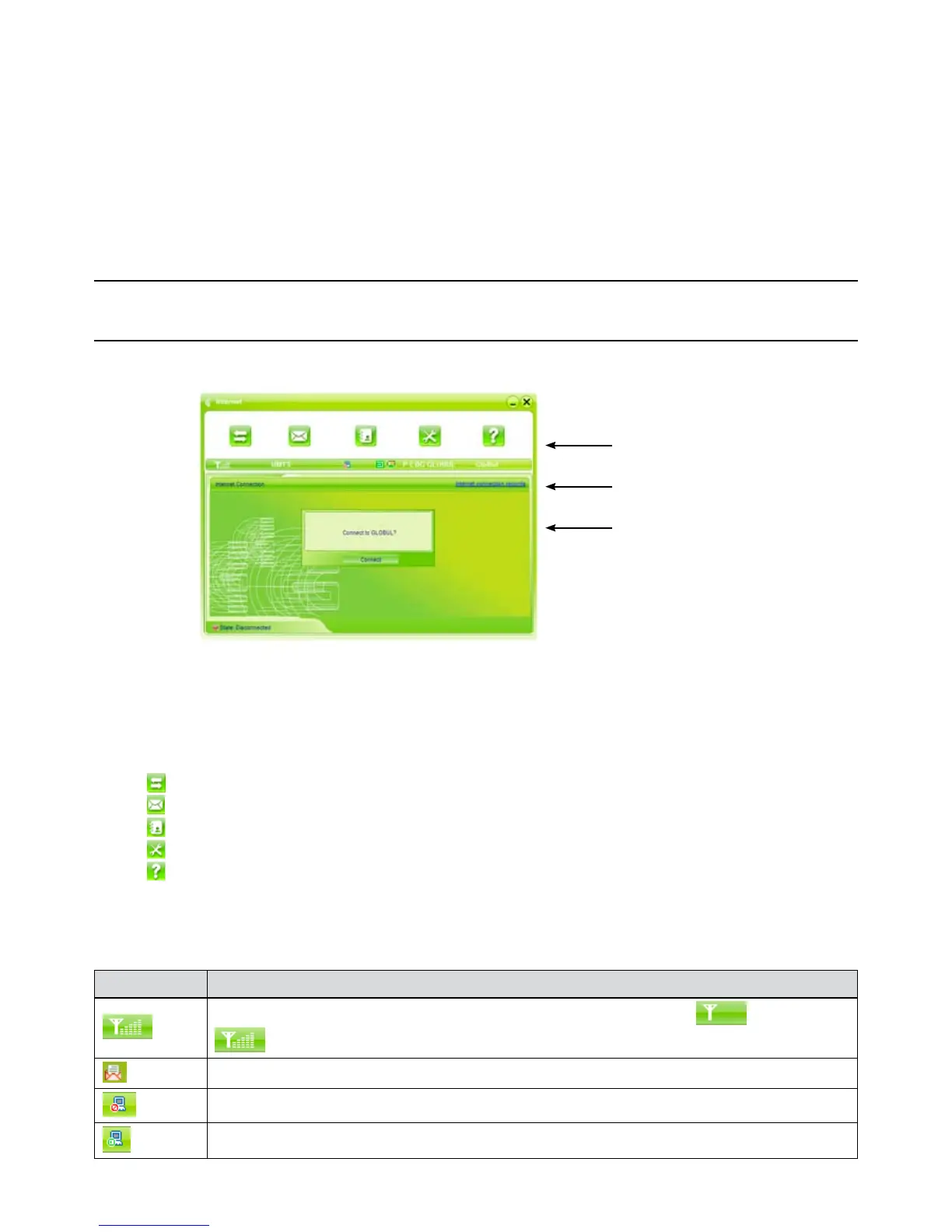
The starting screen of the USB Modem software is shown as the following:
Function button area
System information area
User area
The whole interface is divided into three parts. Related functions can be executed by operation in the
related areas.
1. Function button area:
There will show various function button icons. Select different function button and it will carry out
corresponding operation.
Internet: Connect to the Internet.
SMS: Send SMS or read SMS.
Phonebook: Save and view the different information of the contacts.
Settings: Set normal relative information for the modem.
Help: System information for Help.
2. System information area:
Show the system status and different kinds of tips.
Icon Explanations
The icon indicates the network signal intensity. There are 6 stages from none to the strongest
.
The icon indicates there are new SMS at present.
The icon indicates the current status of Internet connection is not connected.
The icon indicates the current status of Internet connection is already connected.



 To Next Page