Configuration manual for 2N IP intercoms
•
•
•
•
•
Wiegand Module Configuration
The Wiegand module is equipped with the input and outputWiegand interfaces, which are
mutually independent, have separate settings and can receive and send codes at the same time.
The Wiegand input helps you connect such equipment as RFID card readers, biometric readers
and so on. With the Wiegand output, you can connect the intercom to the security system in
your building, for example (to send IDs of the RFID cards tapped on the RFID reader or codes
received on any Wiegand input). The2N
®
Wiegand Isolatoris also equipped with one logical
input and one logical output, which can be controlled viaAutomation.
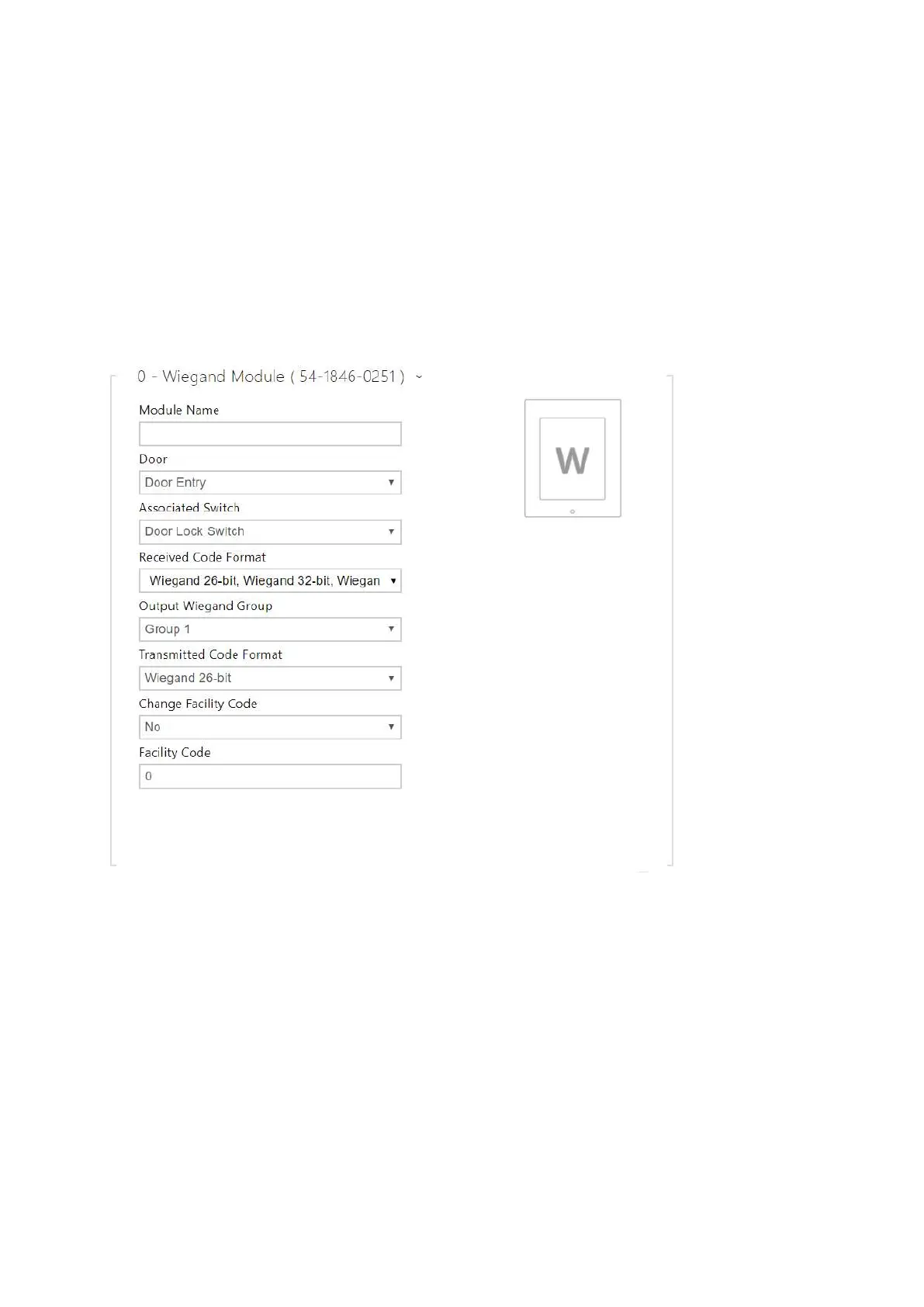
Module Name–set the module name for input/output specification in the SetOutput,
GetInput and InputChanged objects in the2NAutomation.
Door–set the reader direction (Arrival, Departure) for the Attendance system purposes.
Associated Switch– set the switch to be activated after user authentication via this
module. If you set Door Lock Switch, the authentication rules specified in Hardware / Door
will be used.
Received Code Format– set the format for the codes to be received (Wiegand 26, 32, 37
and RAW).
Output Wiegand Group– assign the output Wiegand to a group to which the codes from
the connected card readers or Wiegand inputs can be resent.



 To Next Page