4-10 CHAPTER 4: PERFORMING TROUBLESHOOTING AND DIAGNOSTIC TESTS
Check the length and rating of the UTP cable connection.
Make sure the cable segment is compliant with 10BASE-T or
100BASE-TX recommendations. Maximum length for all types
of cabling for this adapter is 100 meters.
Make sure that you have installed the correct driver for the
network operating system you are running (refer to
Chapter 3, “Installing Network Drivers”).
If any problem persists, refer to Appendix C, “Technical
Support.”
LEDs
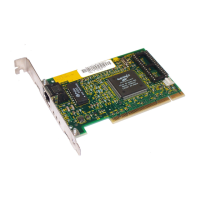
Each Fast EtherLink PCI adapter has three LEDs, as shown in
Figure 2-2. The green 10 Mbps LED (marked 10 LNK) is a
dual-function LED showing link integrity and polarity
reversal. The green 100 Mbps LED (marked 100 LNK) shows
link integrity. The yellow LED (marked ACT) indicates traffic
on the port for either speed. This is summarized in Table 4-2.
The adapter must be physically connected to the network and
network drivers must be loaded for the LEDs to work.
If you experience any problems, first make sure that the
appropriate driver is loaded, that the proper cable is
connected to the adapter port, and that the hub complies
with the adapter specifications (10 Mbps 10BASE-T or
100 Mbps 100BASE-TX). Then recheck the LED.
Table 4-2 Fast EtherLink PCI Adapter LEDs
LED Flashing Steady Off
Green (10 Mbps) Reversed cable
polarity
Good 10BASE-T
connection between
adapter and hub
No connection between
adapter and hub
Green (100 Mbps) Not applicable Good 100BASE-TX
connection between
adapter and hub
No connection between
adapter and hub
Yellow (activity) Network traffic
present
Not applicable No traffic for either speed


 To Next Page