Installation Manual v3.1 | VISIX S-Series Network Camera
12000 Pecos Street, Suite 290, Westminster, CO 80234 | www.3xlogic.com | (877) 3XLOGIC
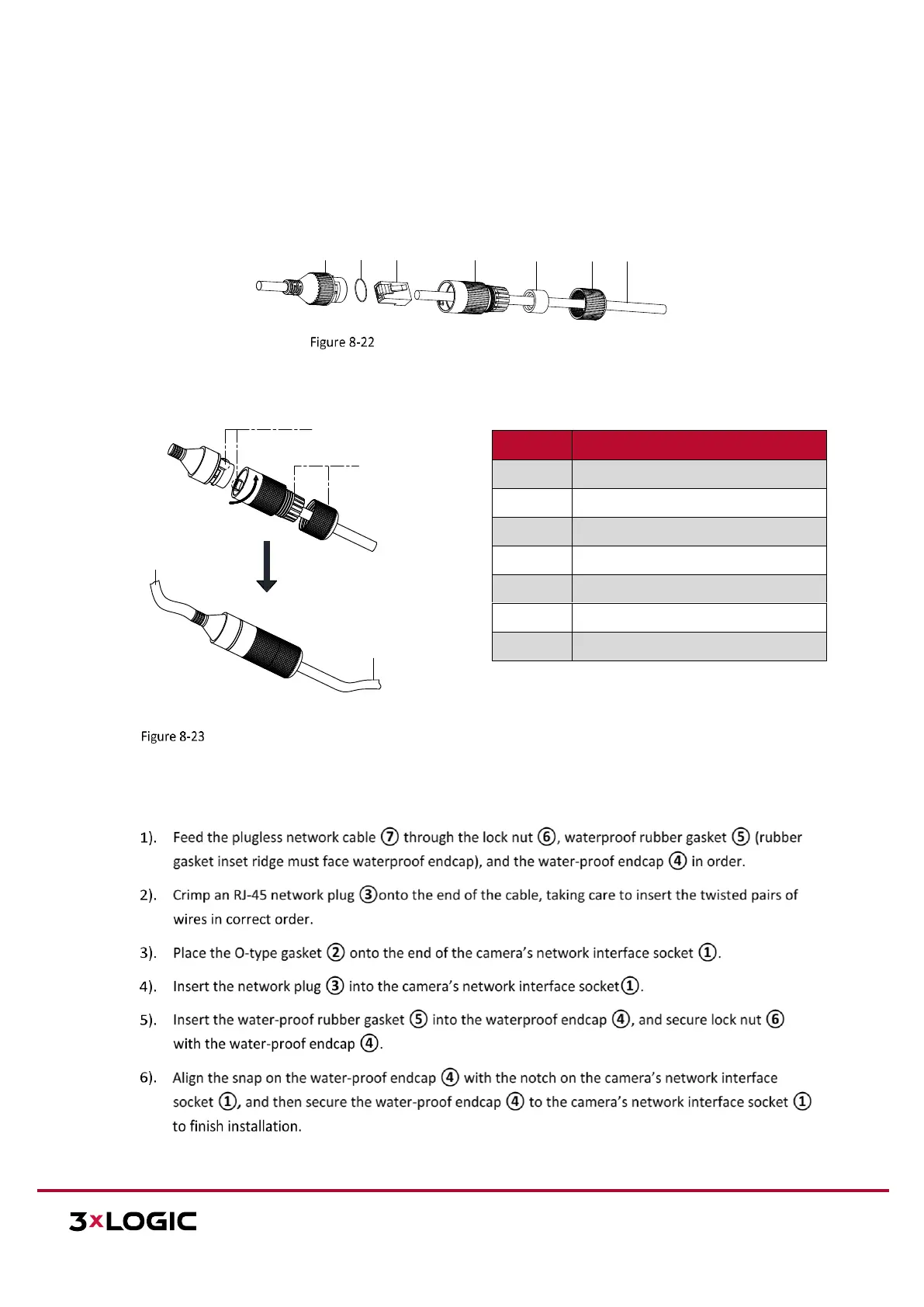
8.2 Waterproof Network Cable Jacket (Optional)
If the camera is installed outdoor, you can adapt the water-proof accessory for the network cable after the
camera is secured on the installation surface.
ACCESSORY COMPONENTS
Waterproof Accessory Components
Camera
Switch/Router
Align the snap and notch.
i. Insert ⑤ into ④.
ii. Secure ⑥ with ④.
Waterproof Accessory Installation
INSTALLATION — WATERPROOF ACCESSORY
Steps:
Camera’s Network Interface Socket
Network Cable from Router/Switch


 To Next Page
 Loading...