ITS2.1 User Manual rev.04/1SEP622750P0001 5
1.6 Standalone ITS
Refer the installation instruction for ITS2.1 Standalone.
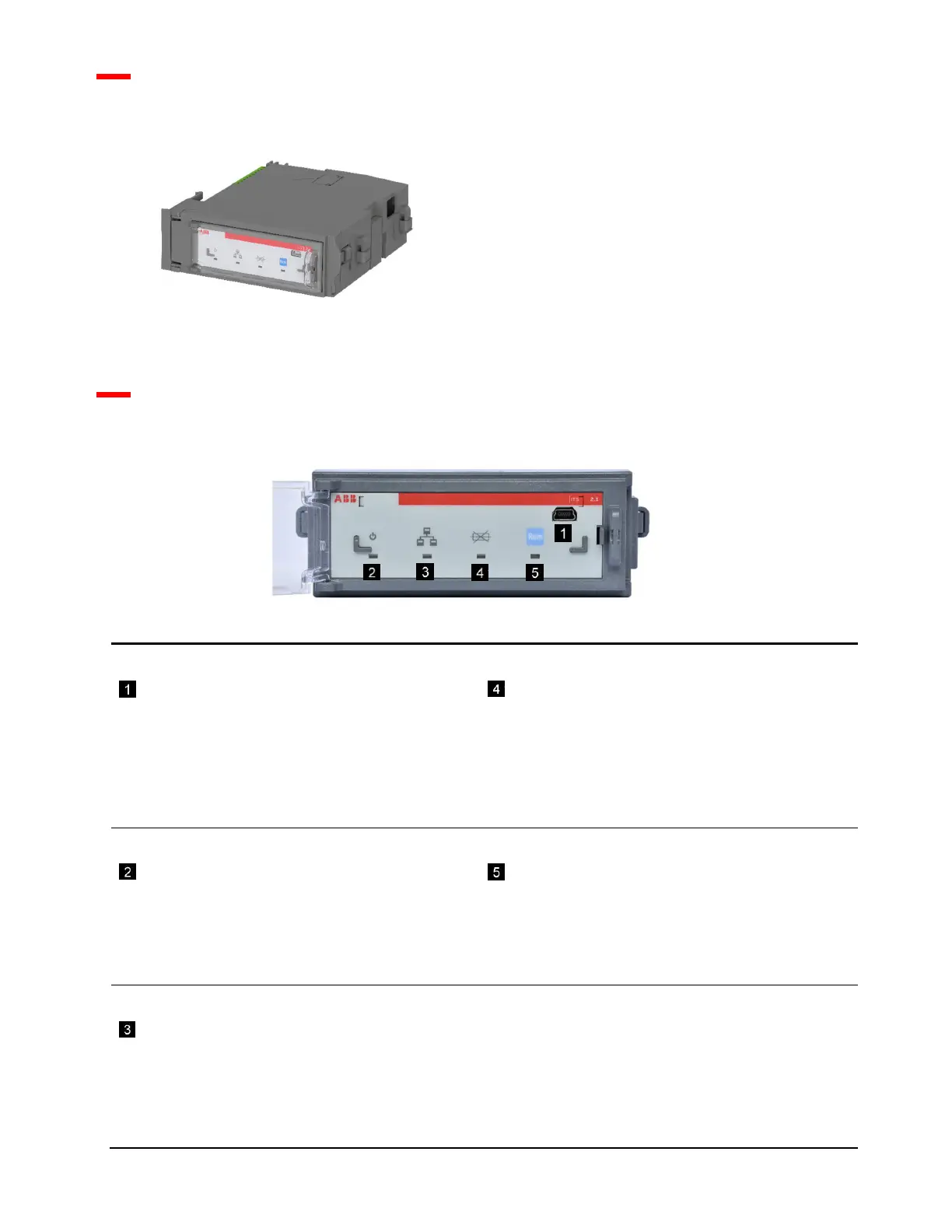
1.7 ITS2.1 Overview
TEST/Prg
The TEST/Prg is for use of configuration tool
Ekip Connect.
Important: This is NOT an ordinary USB connection,
always use the T&P test and program unit when
connecting a laptop to the ITS2.1 unit
Fuse Blown LED
Fuse Blown LED indicates as follows:
- Dark : All fuses are OK
- Lit : One or more fuses are blown
- Flashing :
Nominal line voltage is not set (½ Hz)
Switch opened by motor operation when fuse blown
(2 Hz)
Power LED
The power LED can be configured in two ways:
- Power indication with a steady light
- Alive indication with a flash rate of ½ Hz.
When configuring the light is in WINK LED mode (2Hz).
Local/Remote indicator LED and pushbutton
Local/Remote LED indicates as follows (2):
- Dark : Local mode, commands or setting of
parameters are refused
- Lit : Remote mode, commands or setting of
parameters are accepted
The push button (Rem) selects mode.
Communication LED
The communication LED indicates as follows:
- Dark : No valid message received
- Flashing : Valid message with wrong address
- Lit : Communication OK
If requests from master ends, the LED will go dark after
30 s.


 To Next Page